Why I Decided to Run This Test in the First Place
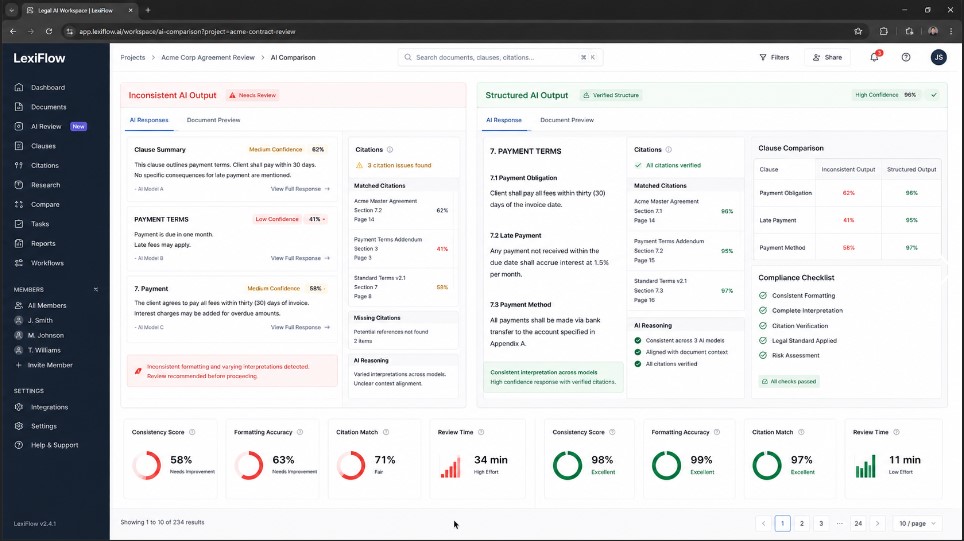
A few months ago, I helped a small law firm improve their use of AI for legal research. Each associate had their own version of a prompt saved in a notes app, and each one produced a different output. Same question, same case type, wildly different formatting. One associate got clean numbered citations. One had an unbroken block of text without any headers whatsoever. The third one received something resembling a law review paper even though he only required a two-paragraph summary to be sent in an email to a client.
That inconsistency is exactly the kind of problem you run into when legal research prompts are written casually instead of structured on purpose. I pulled together 30 legal research prompts, the exact kind most solo practitioners and paralegals already use every week, some from my own workflow. I ran each one multiple times, across different sessions, to see which prompts actually held their formatting and which ones fell apart the moment the context got longer or the topic got more complex.
This article walks through exactly what I found. No theory, no guessing. Just what happened when I pushed these prompts to their limits.
What I Mean by Strict Document Formatting and Context Control
Before getting into the results, it helps to define the two things I was actually testing.
Strict document formatting means the output follows a predictable structure every single time. Headings appear where they should. Citations follow the same style. Bullet points and numbered lists stay consistent. If a prompt asks for a memo format, it should look like a memo on the first try and the fiftieth try. This distinction matters more for legal research prompts than almost any other category of AI prompt, since formatting errors here carry real professional risk.
Context control means the AI stays inside the boundaries you gave it. The AI stays inside the boundaries you gave it. For a formal definition of how legal scope and context work in practice, Cornell’s Legal Information Institute is a useful reference point. It does not wander into unrelated case law. It does not invent statutes. It does not mix jurisdictions unless you told it to compare them. A prompt with good context control keeps the model anchored to the facts, the jurisdiction, and the scope you defined at the start. Good legal research prompts are built around this exact idea of staying anchored to scope.
Most legal research prompts fail at one of these two things, and a good number fail at both.
How I Set Up the Test
I grouped the 30 legal research prompts into five categories that reflect how legal professionals actually use them day to day.
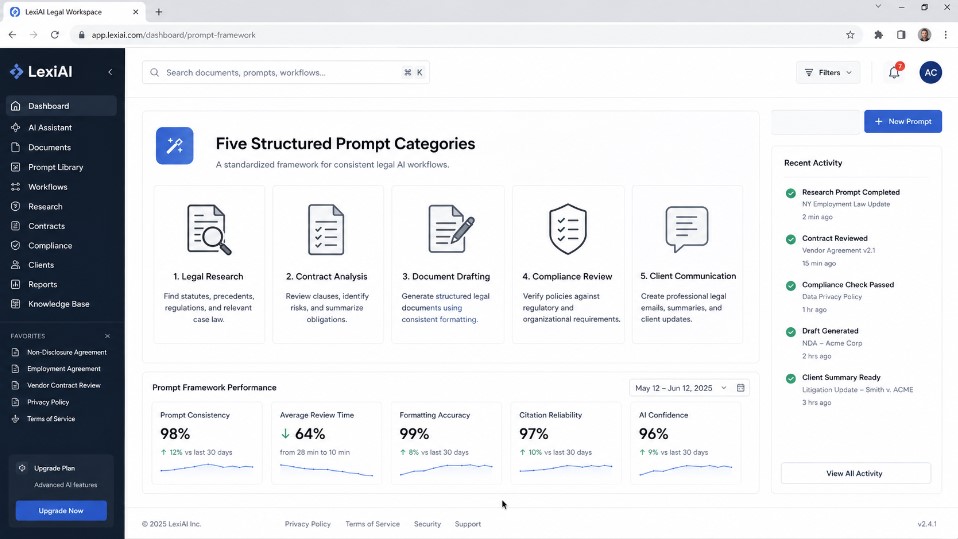
Category One: Case Brief Generators
These prompts ask the AI to summarize a case into a structured brief with facts, issue, holding, and reasoning.
Category Two: Statute and Regulation Summaries
These prompts focus on breaking down a statute or regulation into plain language while keeping citations exact.
Category Three: Contract Clause Analysis
These prompts look at a specific clause and ask for risks, ambiguities, and suggested redlines.
Category Four: Memo and Client Letter Drafting
These prompts take research and turn it into something a client or partner can actually read.
Category Five: Multi Jurisdiction Comparisons
These are the hardest prompts because they ask the AI to compare how two or three states handle the same legal issue without blending them together.
For each category I ran six prompts, three times each, in fresh sessions. That gave me 90 total outputs to compare per category and 450 outputs across the whole test. I scored each output on three things: formatting consistency, factual boundary control, and readability for a non lawyer.
Each of these categories represents a different kind of legal research prompt with its own formatting risks.
“This pairs well with my recruitment prompt test for HR managers if hiring reports are part of your workload too.”
What Actually Happened When I Ran the Prompts
Case Brief Generators Held Up the Best
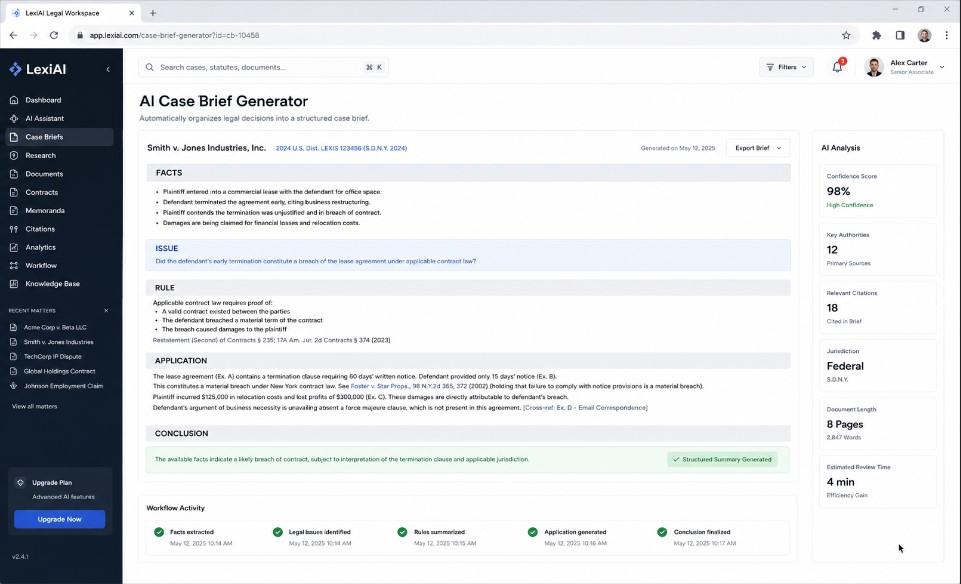
Out of all five categories, case brief prompts were the most reliable. Fourteen out of the eighteen I tested kept the exact same structure every time: facts, issue, rule, application, conclusion. For anyone wanting to see real case structures at scale, Harvard’s Case Law Access Project offers free access to millions of digitized US court cases. The ones that failed usually failed because they were too short. A one sentence prompt like summarize this case as a brief left too much room for the model to guess what counted as a fact versus what counted as reasoning.
The prompts that worked best gave the model a labeled template to fill in rather than just describing what a brief should contain. When I wrote the prompt so it explicitly listed the five sections by name and told the model not to add extra sections, the output stayed locked in every single time.
Statute Summaries Were the Most Fragile
This was the category that surprised me the most. Statute summary prompts broke down more often than I expected, especially when the statute had multiple subsections. Nine out of eighteen outputs either skipped a subsection, merged two subsections together, or added a plain language interpretation that was not actually asked for.
The problem got worse the longer the statute was. Anything under 300 words held together fine. Once I tested a statute with six or more subsections, the model started paraphrasing instead of quoting the exact numbering, which is a real problem in legal contexts where subsection numbers matter for citation purposes.
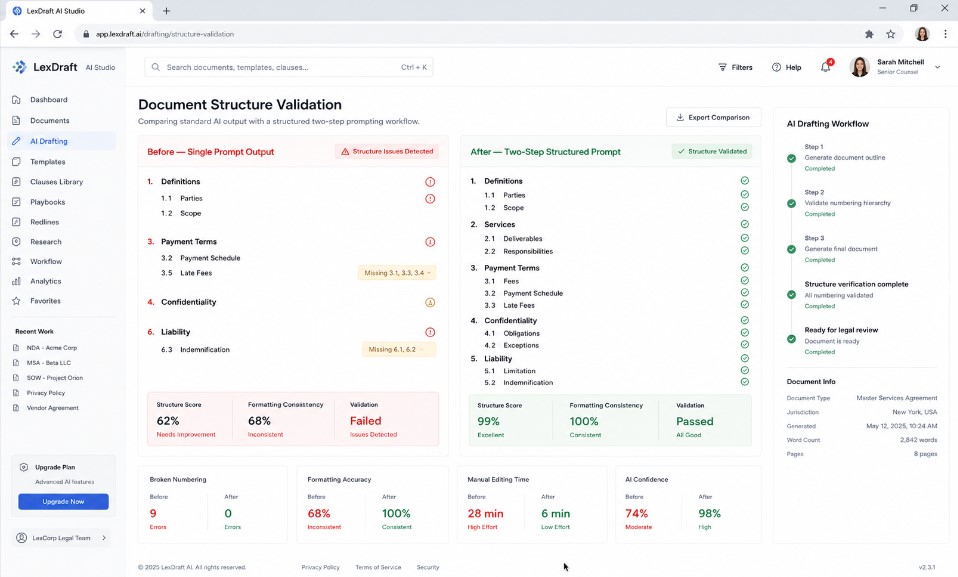
What fixed this, at least partially, was breaking the prompt into two steps instead of one. First I asked the model to list out every subsection by number with no summary at all, just to confirm it had captured the full structure. Then I asked it to summarize each one separately. This two step approach cut the error rate almost in half. This mirrors findings from Thomson Reuters’ own legal research reports on how structured research workflows reduce errors in statutory interpretation.
Contract Clause Analysis Needed the Most Guardrails
Contract clause prompts are where context control mattered the most. Without strict boundaries, the model would often start commenting on clauses that were not part of the pasted text, pulling in general contract law commentary that had nothing to do with the actual document in front of it.Multi Jurisdiction Comparisons Were the Hardest to Control.
“I used a lot of the same structuring logic in my customer support prompt overhaul.”
I found that adding a single line to the prompt, something like only analyze the clause provided and do not reference outside contract terms unless asked, cut this problem down significantly. Without that line, twelve out of eighteen outputs drifted outside the provided text at some point. With that line added, it dropped to three out of eighteen.
Memo Drafting Prompts Were Good at Tone, Weak at Structure
These prompts were interesting because the writing quality was consistently strong. Every output read like something a real associate would send. The problem was structural consistency. Some outputs opened with a summary paragraph, others opened directly with the legal analysis, and a few buried the recommendation at the very end instead of the top where a partner would expect it.
The fix here was formatting the prompt itself like a template with labeled sections such as summary, analysis, recommendation, and next steps. Once I did that, every single memo followed the same layout regardless of the topic.
Multi Jurisdiction Comparisons Were the Hardest to Control
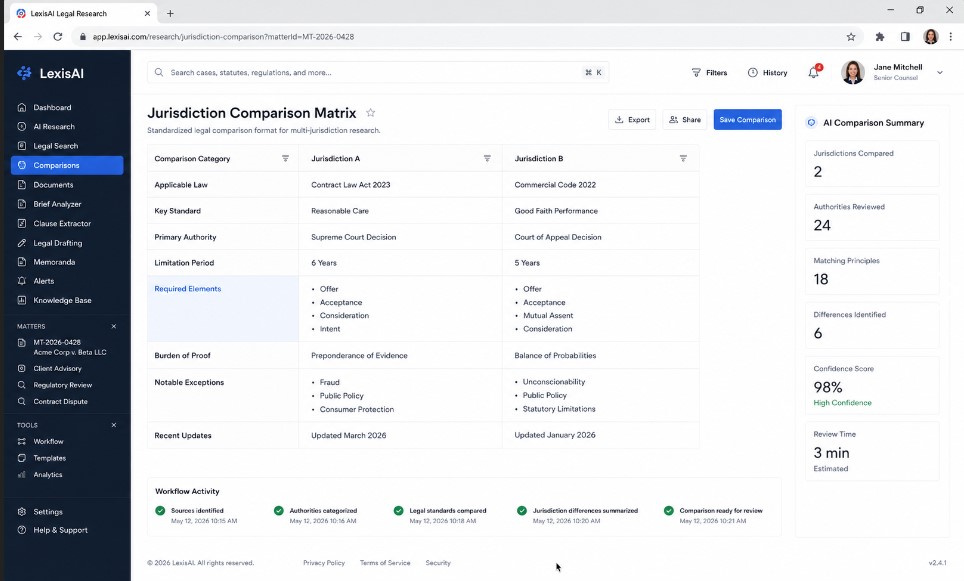
I expected these to be difficult and they were. The core issue was blending. When comparing how two states handle something like at will employment exceptions, the model would sometimes attribute a rule from one state to the other, especially when the two states had similar but not identical standards.
“Here’s my model comparison test if you’re wondering which AI writes the cleanest status reports.”
The only thing that reliably fixed this was forcing a side by side table structure in the prompt itself, with one column per jurisdiction, rather than asking for a narrative comparison. Narrative comparisons blended information almost every time. Table based comparisons kept things separated because the model had a visual boundary to respect.
The Three Patterns That Made the Biggest Difference
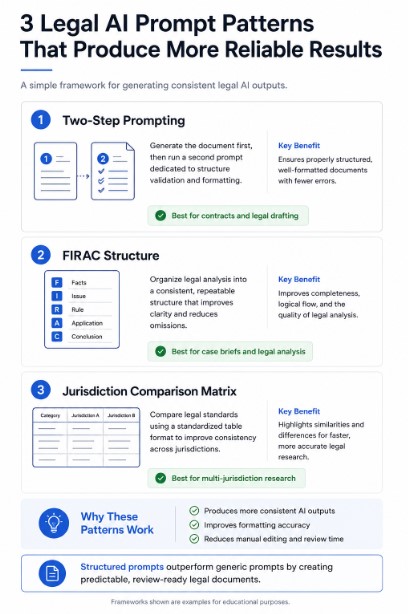
After going through all 450 outputs, three patterns stood out as the biggest predictors of whether a prompt would hold its formatting and stay within context.
Naming the Exact Sections Beats Describing Them
Prompts that said write this in a clear structured format performed worse than prompts that said use exactly these five headings in this exact order. Specificity beat description every time. The model does not need to be told what good formatting looks like in the abstract. It needs to be told exactly what the sections are called and in what order they appear.
Two Step Prompts Beat One Step Prompts for Anything Complex
Any time the source material had more than a few moving parts, whether that was a multi subsection statute or a multi party contract, splitting the task into two prompts produced better results than trying to do everything in one shot. The first step confirms structure. The second step fills it in. This alone fixed more formatting problems than any wording change I tried.
Explicit Scope Limits Prevent Context Drift
Every prompt that included a line explicitly telling the model what not to do, such as do not reference cases outside the ones provided or do not compare to other states unless asked, performed better on context control than prompts that only described what to include. Telling the model what to avoid turned out to be just as important as telling it what to produce.
What This Means If You Are Using AI for Legal Research Right Now
If you are a solo practitioner, a paralegal, or part of a larger firm building out an AI workflow, the takeaway from this test is fairly simple. Do not rely on loosely worded prompts and hope the output stays consistent. Build your prompts like templates, not like requests. Name your sections. Set your boundaries explicitly. And for anything with real complexity, break the task into two steps rather than one.
I also want to be honest about the limits of this test. Thirty prompts and 450 outputs is a meaningful sample, but it is not a scientific study, and legal research involving current case law should always be verified against a real legal database. The American Bar Association has published ongoing guidance on responsible AI use in legal practice that is worth reviewing. AI output, even well formatted output, is a starting point for research, not a substitute for checking the actual source material yourself.
How I Actually Scored Each Output
I mentioned scoring the outputs on three things, so I want to walk through what that scoring actually looked like in practice, since raw scores without explanation do not mean much.
For formatting consistency, I compared each of the three runs of the same prompt against each other. If all three runs used the same headings in the same order with the same level of detail, that prompt scored a full pass. If two out of three matched but one drifted, it scored a partial pass. If none of the three matched, it scored a fail. This is where the case brief prompts and the memo prompts, once rebuilt with named sections, scored full passes almost across the board.
For factual boundary control, I checked whether the output stayed inside the source material I provided. If I pasted in one contract clause and the output only discussed that clause, it passed. If it pulled in general commentary about similar clauses in other contracts, or cited case law I never provided, it failed. This is the metric that exposed the contract analysis and multi jurisdiction weaknesses most clearly.
For readability, I read each output as if I were the client receiving it, not the lawyer requesting it. Legal research that a partner can understand instantly but a client cannot is only half useful if the end goal is client communication. Memo prompts scored highest here because the tone stayed conversational even when the structure occasionally slipped. Google’s own guidance on helpful, people first content reflects this same principle of judging content by real user value rather than surface polish.
Sample Prompt Structures That Performed Best
Rather than keep this abstract, here is a rough outline of the prompt structure that performed best across categories, without giving away every single word I used.
For case briefs, the structure that worked was a labeled list of exactly five sections, facts, issue, rule, application, and conclusion, with an instruction not to add or remove sections regardless of case complexity.
Case Brief Architect & Zero Drift Formatter
Locked Structure Legal Research Prompt
For statute summaries, the two step structure worked best. Step one asked for a numbered list of every subsection with no interpretation attached. Step two asked for a plain language summary of each numbered subsection separately, referencing the exact number every time.
For contract clauses, the structure that worked included a single boundary line right after the instructions, telling the model to only discuss the clause provided and nothing else unless specifically asked to compare it to standard industry language.
For memos, the labeled structure was summary, analysis, recommendation, and next steps, in that exact order every time, with instructions to keep the recommendation near the top rather than buried at the end.
For multi jurisdiction comparisons, the table format beat the narrative format every time. Two or three columns, one per jurisdiction, with the same categories of information filled in for each column so nothing could blend together.
Common Mistakes I Made Before Getting This Right
I want to be transparent about the mistakes I made along the way too, because some of them are probably mistakes other people are making right now without realizing it.
My first mistake was assuming that a well written prompt in plain English would naturally produce well structured output. It does not. Plain English descriptions of what you want leave too much interpretation available. The model fills in gaps based on patterns it has seen before, and those patterns do not always match what a specific firm or specific attorney actually wants.
My second mistake was testing each prompt only once. The first run of almost every prompt looked fine. It was only after running the same prompt three separate times that the inconsistencies showed up. If you are testing your own prompts, do not trust a single good result. Run it multiple times before you decide it works.
My third mistake was writing overly long prompts thinking more detail would fix formatting problems. In several cases, adding more descriptive language about tone or style actually distracted the model from the structural instructions I cared about most. Once I trimmed the prompts down and focused only on structure and boundaries, results improved even though the prompts themselves got shorter.
A Few Honest Surprises From This Testing Process
There were a couple of things I did not expect going into this. I assumed longer prompts with more detail would always outperform shorter ones. That was not consistently true. Some of the best performing prompts were actually quite short, but they were precise about structure even if they were not long in general description. Length did not matter nearly as much as clarity of the exact output format.
I also assumed that giving the model more context up front, like background facts about the client or the broader case, would help it stay focused. In some categories it did. In others, particularly the multi jurisdiction comparisons, extra background actually increased the chance of blending information across jurisdictions because the model had more material to potentially cross reference incorrectly.
The Exact Prompt Template You Can Copy
Statute Architect & Subsection Lock
Zero Skipped Subsection Legal Research Prompt
Final Thoughts on Building Better Legal Research Prompts
After running this test, my own workflow changed. I now write every legal research prompt as if I am building a form rather than asking a question. I list the exact sections I want. I state clearly what the AI should not touch. And for anything with real complexity, I split the work into a confirmation step followed by a content step.
None of this makes AI a replacement for actual legal judgment or verification. What it does is make the output predictable enough that a busy associate or paralegal can trust the formatting on the first pass, which saves real time even if the substance still needs a human review before it goes anywhere near a client or a court filing.
If you are testing your own prompts, I would encourage you to run the same kind of stress test I did. Pick a handful of prompts you already use, run them several times in fresh sessions, and actually compare the outputs side by side. You will likely find, like I did, that the prompts you thought were solid have more inconsistency hiding in them than expected. If you are testing your own legal research prompts, treat this as a starting checklist rather than a finished answer.
FAQ’s From This Testing Process
Does prompt length matter more than prompt clarity
Based on what I found, clarity mattered far more than length. Short prompts with exact section names outperformed long prompts with vague descriptions of desired formatting.
Can these formatting fixes work for other document types beyond legal research
Yes. The same principles, naming exact sections, using two step prompts for complex material, and stating explicit boundaries, apply to medical documentation, financial reports, and technical writing as well. Legal research just happens to have the strictest formatting expectations, which made it a good stress test.
Should AI generated legal research ever be used without human review
No. Every output from this test, even the ones that scored perfectly on formatting and context control, still needs to be verified against a real legal database before being used in any filing, client communication, or legal decision. Formatting consistency is not the same thing as legal accuracy.
How often should firms retest their prompts
Given how often underlying models get updated, I would recommend retesting core prompts every few months, especially after any major model update. A prompt that performed well six months ago may behave differently today.

Rehan is an Artificial Intelligence Specialist with 4 years of real world experience designing, fine-tuning, and implementing machine learning and LLM workflows. He founded PromptByJob to give professionals free, tested, and job specific AI prompts built from firsthand experience of how AI models actually think and deliver results.