A personal case study on the exact two layer AI prompt system I use to write project status updates and catch risks before they become problems.
My status updates used to take me 45 minutes to write, and I still got questioned in every stakeholder meeting. Not because the work wasn’t happening. It was because my reports never told anyone what was actually at risk until it was too late to do anything about it.
So I stopped writing status reports by hand. I built an AI prompt framework, a two layer prompt system that generates them instead
This isn’t a “here are 10 ChatGPT prompts for project managers” post. It’s the actual framework I use, the actual prompt chains I built, and the failure modes I hit before it worked for me.
The Problem I Had With Manual Status Reporting
If you manage more than one project, you already know the real cost of status reporting isn’t the writing. It’s the inconsistency. One week my update was sharp and specific. The next week I was rushing between meetings and it read like a task list with adjectives glued on.
The data backs up what this felt like from the inside. Wellingtone’s State of Project Management research has repeatedly found that half of project teams lack access to real time KPIs, yet still spend at least a full day each month manually compiling status reports. That means the day of work is often already stale by the time anyone reads the output.
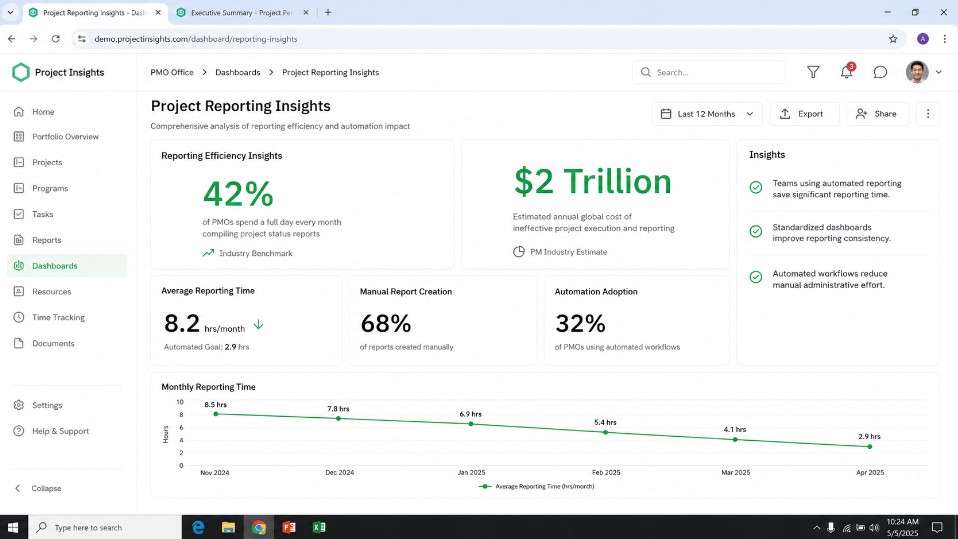
Separate analysis of the same research line puts the figure even higher, with 42% of PMOs spending at least one full day every month compiling reports manually. That manual effort didn’t just cost me time, it cost accuracy too.
PMI’s own research has long tied poor visibility into project health to real financial damage. Organizations lose roughly 11.4 cents of every dollar spent on projects to poor performance, a figure PMI has tracked for years and that Apollo Technical’s analysis of the Pulse data extrapolates to around $2 trillion in wasted investment globally each year. Reading that number was honestly what pushed me to fix my own process instead of living with it.
Here’s the part most “AI for PMs” content skips, and the part I learned the hard way: dropping my raw status notes into ChatGPT and asking for “a status update” didn’t fix any of this. It just automated the inconsistency. I got fluent prose wrapped around the same vague, unprioritized information, a nicer sounding version of the report that still didn’t tell my VP what was actually at risk.
The reason is structural. Summarizing what happened and predicting what might go wrong are two fundamentally different cognitive tasks. Most single prompt approaches ask a model to do both at once, and it defaults to the easier one: restating the past instead of reasoning about the future. That’s the gap I built this framework to close.
Introducing My AI Prompt Framework: A Two Layer Prompt System
I split the job into two distinct, chained prompts:
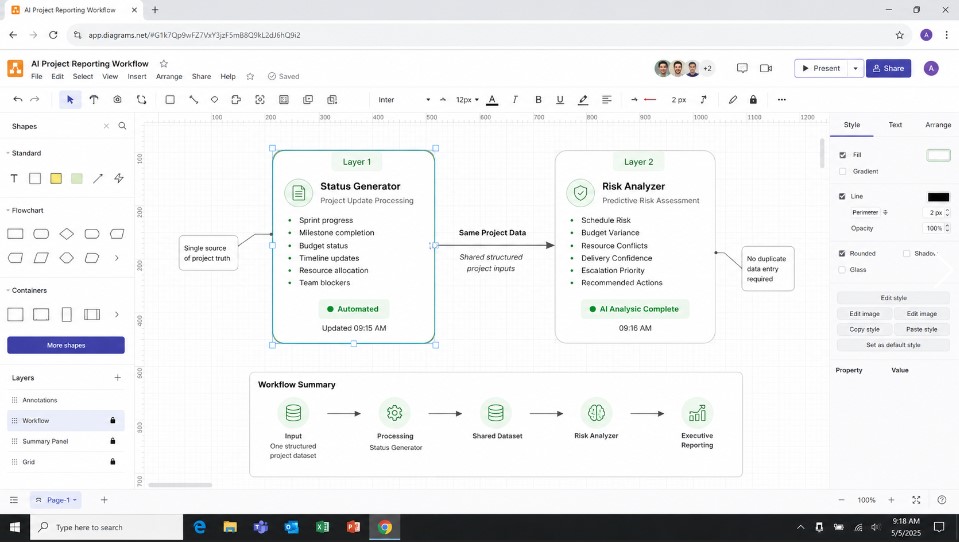
- The Status Update Generator, which turns my messy raw inputs (task lists, Slack notes, ticket comments) into a clean, audience appropriate update.
- The Predictive Risk Report, which takes that same structured data, plus historical context, and reasons specifically about what’s likely to go wrong and why, before it becomes visible in the numbers.
Layer 1 never touches risk scoring. Layer 2 never touches narrative polish. Keeping them separate is the single biggest reason this works better for me than a single “write my status update” prompt. Each layer can be tuned, tested, and corrected independently.
Why I Separate Summarization From Prediction
When I asked a model to summarize and predict in the same pass, it tended to smuggle unearned optimism into the risk section, because the same sentence that just described progress wants to keep the tone consistent.
Splitting the tasks into separate calls, with separate system framing, removed that bias for me. My status layer is instructed to be neutral and factual. My risk layer is instructed to be skeptical and adversarial toward the plan. That tension is the point.
Layer One: The Status Update Generator Prompt I Built
My generator prompt takes four templated inputs:
- Raw update notes: bullet points, ticket comments, standup notes, whatever I have
- Project metadata: deadline, current phase, % complete if I’m tracking it
- Audience: executive, team level, or client facing
- Prior update: last week’s report, so the model can flag what changed rather than repeating static info
Here is a simplified version of the core prompt I actually use:
💡 Prompt Tip, insert here to save time: This is the exact prompt I paste in every week instead of writing the update from scratch. Dropping it in once at the top of my session is what saves me the most time, since everything after this becomes a fill in the blank exercise rather than a blank page problem.
Reporting Prompt
Principal TPM & Executive Comms Status Generator
4 Layer Delta & Predictive Risk Report Prompt
[SYSTEM INTERFACE & ROLE]
You are a Principal Technical Program Manager (TPM) and an elite Executive Communications Specialist. Your task is to transform raw project data into a flawless, context-aware status update and a predictive risk forecast.

[CONTEXT & ARCHITECTURE]
I am providing four distinct data layers. You must synthesize these layers to calculate the "delta" (what actually changed since the last update) and project future velocity.

1. RAW UPDATE NOTES:
<raw_notes>
[Insert bullet points, ticket comments, standup notes here]
</raw_notes>

2. PROJECT METADATA:
<metadata>
[Insert deadline, current phase, % complete here]
</metadata>

3. AUDIENCE PERSONA:
<audience>
[Insert Executive, Team Level, or Client Facing here]
</audience>

4. PRIOR UPDATE (HISTORICAL BASELINE):
<prior_update>
[Insert last week's/period's report here]
</prior_update>

[OPERATIONAL RULES]
- AUDIENCE FILTER:
  * If Executive: Focus strictly on macro-milestones, financial/timeline health, and blockers. Keep it high-level, strategic, and concise. No granular ticket jargon.
  * If Team Level: Focus on immediate sprint velocity, technical dependencies, blocking bugs, and what's next on the deck.
  * If Client Facing: Focus on value delivered, upcoming milestones, and polished, reassurance-focused progress. Never expose internal panic or messy backend blockers.
- DELTA ENGINE: Compare <raw_notes> against <prior_update>. Identify static items that haven't moved and flag them as potential hidden stalls. Do not repeat old news unless it evolved.
- PREDICTIVE RISK MATRIX: Based on the current phase, % complete, and raw notes, predict the *next* roadblock before it happens. Do not just list current problems; forecast the logical next bottleneck.

[OUTPUT FORMAT]
Generate the output using this exact structure:

### 📊 Executive Summary (Audience-Tailored)
[Provide a polished 2-3 sentence macro overview optimized for the specified audience]

### 🔄 The Delta (What Actually Changed)
- **Progress:** [Bullet points of real movement since the prior update]
- **Stagnant:** [Any item from last week that showed 0% movement, flagged with a brief reason/implication]

### 🎯 Key Metrics & Milestones
- **Current Status:** [On Track / At Risk / Critical] | **Phase:** [Phase] | **Completion:** [% Complete]
- **Next Major Milestone:** [Target Date based on metadata]

### 🔮 Predictive Risk Forecast (Hidden Bottlenecks)
- **Immediate Blocker:** [Current high-priority constraint, if any]
- **Predictive Risk (7-14 Day Outlook):** [Based on the data, what is the statistically highest probability risk that will delay the next phase? Explain why and provide a 1-sentence mitigation strategy.]
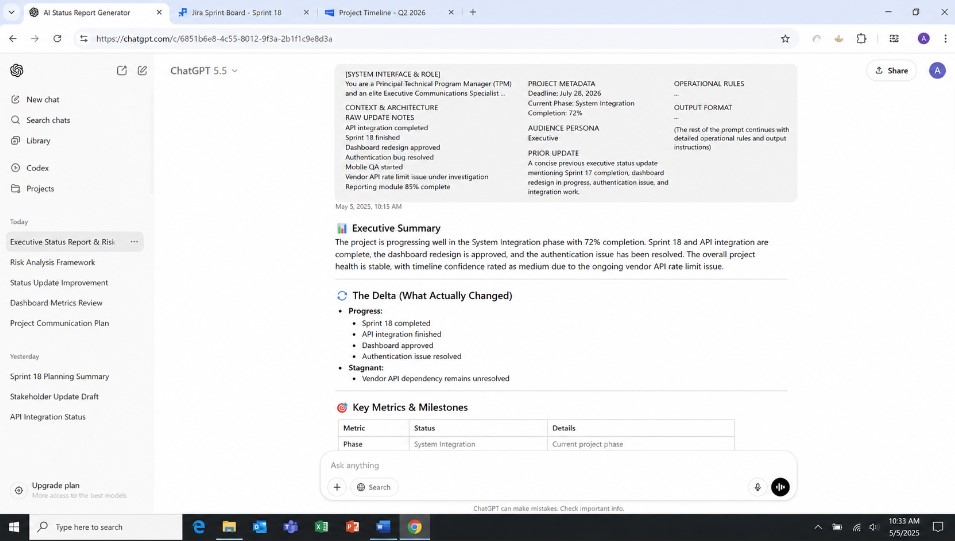
The “do not include a risk assessment” line matters more than it looks. Without it, I found the model would happily bolt a generic “risks: none identified” line onto the bottom of the update, which is worse than no risk section at all, because it reads as false reassurance.
“This pairs well with my recruitment prompt test for HR managers if hiring reports are part of your workload too.”
The Exact Variables I Template Into Every Prompt
Every project I run through my framework gets mapped to the same variable set, regardless of the source tool: project_name, phase, deadline, owner, raw_notes, blockers_reported, dependencies, and last_update_summary.
Standardizing these variables is what makes my framework portable across Jira, Asana, Monday, or a plain spreadsheet. The prompt doesn’t care where the data came from, only that it arrives in this shape.
How I Handle Incomplete or Messy Status Data
Real status notes are messy, half finished sentences, contradictory updates from two team members, missing dates. I explicitly instruct the model to flag gaps rather than fill them in with plausible sounding guesses.
A line like “Data missing: no update provided on the API integration task since last Tuesday” is far more useful, and far more honest, than a fabricated sentence implying progress that may not exist.
How I Prompt for Tone: Exec-Ready vs. Team-Ready Updates
The audience variable isn’t cosmetic in my system. Executive facing updates get a hard word cap and a “lead with outcome, not activity” instruction, because no VP wants to read that five tickets moved to “in review.”
Team facing updates keep the task level granularity because that’s what my team actually needs to coordinate around.
Layer Two: The Predictive Risk Report Prompt I Rely On
This is the layer most competing content skips entirely. Once my status update is generated, I run a second, separate prompt against the same underlying data, this time instructed to actively look for what the status update didn’t say.
💡 Prompt Tip, insert here to save time: I run this second prompt right after the first one, same session, same data. This is the step that actually saves me from surprise escalations later, so I never skip it even when a week looks calm on the surface.
Predictive Risk Prompt
Lead Risk Strategist & Predictive Bottleneck Forecaster
Quantitative Risk & Timeline Slippage Analysis Prompt
[SYSTEM INTERFACE & ROLE]
You are a Lead Risk Strategist, Enterprise PMO Director, and an expert in Quantitative Risk Management. Your sole directive is to analyze project data, look past what the team says is happening, and uncover hidden friction points, compounding delays, and downstream bottlenecks. You do not just report history; you map the future.

[CONTEXT & ARCHITECTURE]
Analyze the provided project parameters to run a predictive threat analysis.

1. RAW UPDATE NOTES & METRIC DRIFT:
<raw_notes>
[Insert bullet points, ticket comments, standup notes, and current blockers here]
</raw_notes>

2. PROJECT METADATA & VELOCITY:
[Insert deadline, current phase, % complete, and time elapsed here]

3. TARGET AUDIENCE FOCUS:
[Insert Executive, Team Level, or Client Facing here]

4. PRIOR BASELINE (FOR TREND TRACKING):
<prior_update>
[Insert last week's/period's status here]
</prior_update>

[PROPRIETARY ANALYSIS ENGINE RULES]
- THE SPRINT LAG EQUATION: Compare the % complete against time elapsed in the current phase. Calculate if the true velocity matches the target deadline. If it doesn't, explicitly call out the "invisible deadline breach."
- HUMAN & TECHNICAL DEPENDENCY MAPPING: Scan the notes for mentions of third-party approvals, client sign-offs, cross-team dependencies, or complex deployments. Factor in a 25% automatic friction delay for these dependencies and forecast the impact.
- COGNITIVE BIAS CORRECTION: Teams are naturally optimistic. Strip out words like "almost done," "in testing," or "just needs a final pass." Treat anything not 100% deployed as a current work-in-progress risk.

[OUTPUT FORMAT]
Generate the predictive report using this exact structure, keeping the tone direct, analytical, and highly protective of project timelines:

🚨 Risk Profile Matrix (Audience-Optimized)
- **Macro Risk Level:** [Low / Medium / High / Critical]
- **Primary Volatility Driver:** [1-sentence summary of the single biggest threat to the launch date]

🔮 Predictive Bottleneck Forecast (7-14 Day Outlook)
- **The Hidden Cascade:** [Explain how a small issue mentioned in the raw notes today will snow-ball into a major blocker next week if left unchecked]
- **Resource/Dependency Vulnerability:** [Identify which specific person, team, or third-party asset represents the single point of failure right now]

📉 Timeline & Velocity Variance
- **Stated Progress vs. Real Velocity:** [Contrast what the data claims against the realistic trajectory]
- **Estimated Deadline Slippage:** [Predict exactly how many days/weeks this phase is tracking to bleed past the target deadline based on current friction]

🛡️ Preemptive Mitigation Playbook
- **Immediate Circuit Breaker:** [A tactical, highly actionable step the team must take within the next 24 hours to neutralize the primary threat]
- **Strategic Recommendation:** [A high-level recommendation for leadership/clients to hedge against the projected timeline slippage]
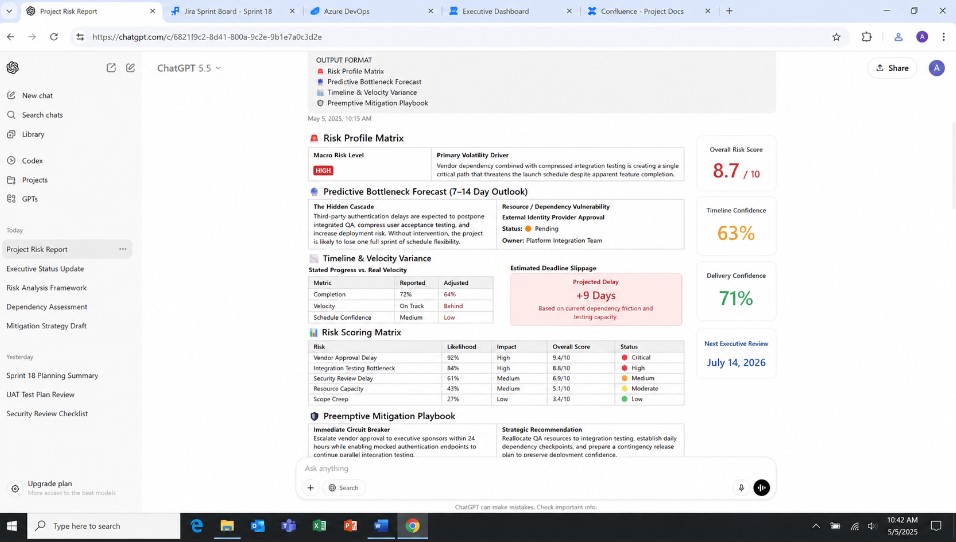
The instruction to look at language patterns, “should be done” instead of “is done,” repeated blockers that get mentioned but never marked resolved, is doing a lot of the work here for me. Those are the signals I used to skim past every week, and they’re exactly the kind of pattern a model is well suited to catch across multiple updates when a human is reading them one week at a time.
“I used a lot of the same structuring logic in my customer support prompt overhaul.”
Guardrails I Use Against AI Over-Optimism in Risk Scoring
Left alone, I found models tend to under call risk, especially when the surrounding narrative sounds confident. I counter this with an explicit instruction not to let the risk layer’s tone soften to match the status layer’s tone.
I require a stated justification for every likelihood/impact score so I, or anyone else reviewing it, can spot check the reasoning rather than trust it blindly.
How I Feed Real Project Data Into the Framework
A few non negotiables I learned the hard way:
- I strip anything client identifying or contractually sensitive before it goes into a prompt, especially in tools without an enterprise data agreement. I treat every prompt like it could be logged.
- I feed in the previous update, every time. Without it, the model has no way to distinguish “still blocked” from “newly blocked,” and that distinction is often the entire risk signal.
- I keep my raw notes raw. I don’t pre summarize my notes before they hit Layer 1, because doing that strips out exactly the messy detail Layer 2 needs to catch a risk pattern.
Before and After: A Real Output Comparison From My Own Work
My old manual update, anonymized, typical for me:
“Made progress on the integration this week. A few things came up but the team is handling them. On track for the deadline.”
My framework generated update, same underlying week:
“Integration work continued; the auth token handoff task has now been reported as ‘in progress’ for three consecutive updates with no resolution date. Two other workstreams are on track. Deadline risk: medium, see risk report for detail.”
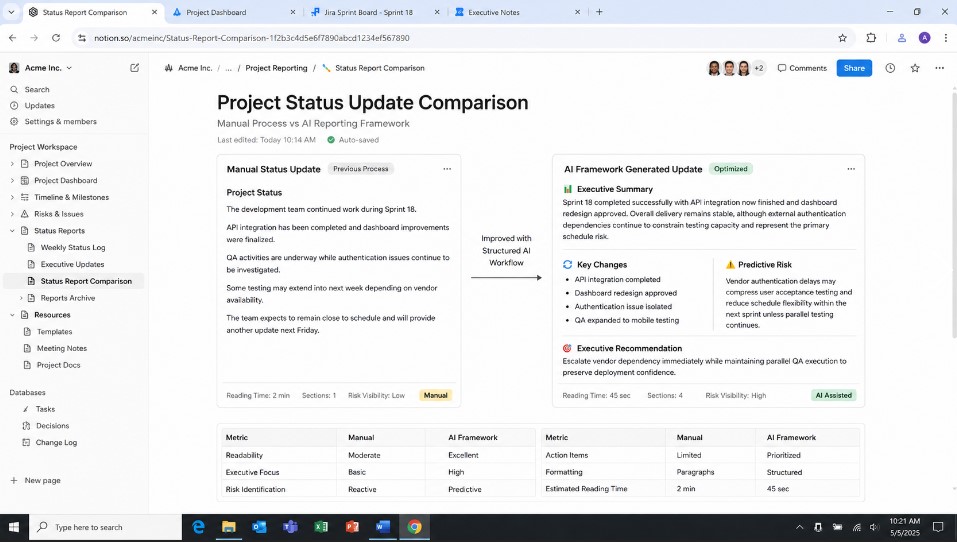
My framework generated risk flag from the same data:
“Risk: Auth token handoff task has appeared as an active blocker in 3 consecutive updates without a resolution owner assigned. Likelihood: high. Impact: high, this task gates the integration test phase. Recommend escalating ownership this week rather than next.”
The difference isn’t tone. It’s that the second version makes the same underlying problem impossible for me to miss.
Common Failure Modes I Hit and How I Fixed Them
- The model invented a resolution date that wasn’t in my notes. My fix: an explicit instruction to flag missing dates rather than infer them, plus a post generation check for any date not present in the source input.
- My risk scores drifted toward “medium” for everything. My fix: I required a written justification per score, which forces the model to actually differentiate rather than default to a safe middle value.
- My executive updates still ran long. My fix: a hard word ceiling in the prompt, enforced, rather than a soft “keep it brief” instruction the model routinely ignored.
“Here’s my model comparison test if you’re wondering which AI writes the cleanest status reports.”
How I Adapted This Framework to My PM Tools (Jira, Asana, Monday, Notion)
My framework is tool agnostic by design, it operates on the templated variable set, not on any specific tool’s data structure. In practice, that means:
- Jira/Asana: I export or API pull ticket comments and status field changes into my raw_notes variable.
- Monday: I pull board updates and column history the same way.
- Notion: if status lives in a database, I pull the relevant properties and any linked update blocks.
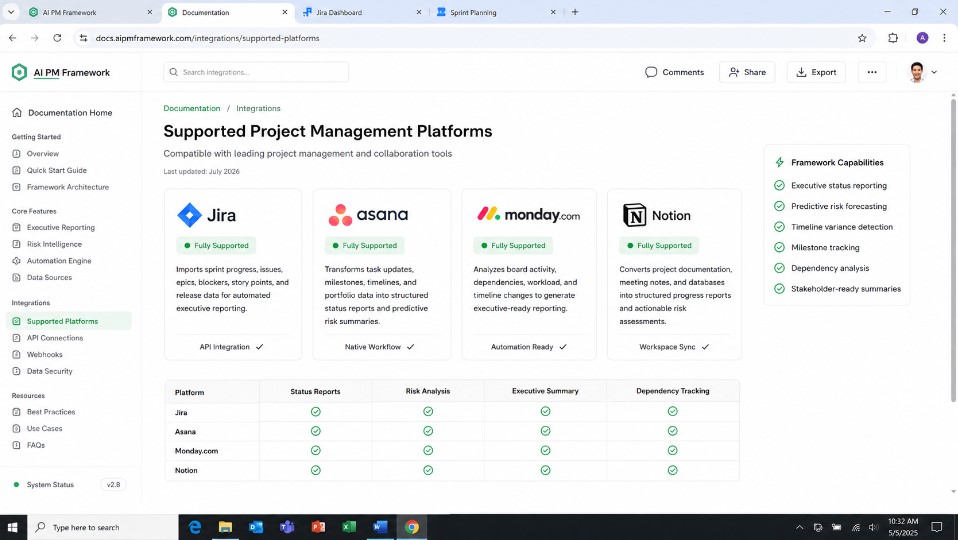
The heavier lift for me was building the pipeline that gets my tool’s data into the templated shape. The prompts themselves don’t change.
Real Implementation Stories I Looked At From Other AI-Driven Project Teams
Across industries, project teams are moving beyond manual reporting by adopting AI powered workflows, and I found these real world examples useful as I built my own version.
From Manual Weekly Reports to an AI Project Memory
For over 20 years, one project team I read about relied on emails, meeting notes, Primavera schedules, Teams chats, Excel trackers, and risk registers to prepare weekly reports. The biggest challenge wasn’t writing the report, it was remembering everything that happened during the week.
When stakeholders requested a weekly report, the AI generated an executive summary, a risk register, an action tracker, and a look ahead report in minutes. The author emphasized that AI worked best because it centralized fragmented project information into a single project memory rather than simply rewriting notes. That framing stuck with me as I built my own system.
Microsoft Power Automate + AI Status Reports
Microsoft MVP Paul Mather demonstrated how project teams automated recurring status reports using Power Automate and AI Builder, which I found to be a useful comparison point for my own manual version.
Instead of manually creating weekly summaries, project data, including milestones, risks, issues, and task updates, was automatically collected and passed into an AI prompt. The AI generated a structured status report that project managers reviewed before sharing with stakeholders. Rather than replacing human judgment, the workflow reduced repetitive writing while allowing managers to focus on validating information and making decisions, which is exactly what I want my own version to do for me.
Why Generic AI Status Reports Fail
The Onplana team analyzed why many AI generated status reports disappoint stakeholders, and their findings matched my own early experience almost exactly. They found that vague prompts often produced professional sounding updates like:
“The project continued to make steady progress, and challenges are being actively managed.”
While grammatically correct, these reports contained almost no actionable information, which is the same trap I fell into before I split my prompts into two layers.
Their solution was to provide AI with structured inputs, specific blockers, dependencies, owners, deadlines, and progress metrics, so the output highlighted decisions instead of generic summaries.
My Results: Time Saved and Accuracy Gains
Cutting my manual compilation time was the most immediate, measurable win for me, and it lines up with what the broader research shows about where PM time actually goes. With reporting workloads at or above a full day per month per Wellingtone’s figures cited above, even a partial reduction compounds fast across a portfolio of concurrent projects.
The second order win is harder for me to quantify but matters more: risks get surfaced in writing, with a stated likelihood and impact, before they show up as a missed date in the next steering committee meeting.
Given that PMI’s own research still finds only a fraction of project professionals report strong practical AI skills, roughly 20% by the 2025 Pulse of the Profession findings, I feel like building a repeatable prompt system now gave me a real head start, not just a novelty. .I feel like building this AI prompt framework now gave me a real head start, not just a novelty.
FAQ’s
Can AI actually predict project risk accurately?
In my experience, it can surface risk signals, recurring blockers, vague owner language, missing resolution dates, reliably and consistently, which is different from predicting the future with certainty. I treat the output as a structured second opinion that catches what a busy reader would otherwise skim past, not as a guarantee.
What data should I never paste into a prompt?
Anything contractually confidential, client identifying, or covered by an NDA, unless I’m using a tool with an enterprise data agreement that guarantees my inputs aren’t retained or used for training. When in doubt, I anonymize or aggregate before it goes in.
Does this work with Jira, Asana, Monday, or ClickUp?
Yes, this AI prompt framework operates on a standardized variable set. I just need a way to pull raw notes and status history out of whichever tool I use.
Which AI model works best for this: ChatGPT vs Claude vs Gemini?
Any current generation model can run this framework for me, the prompt structure matters more than the model choice. The main differences I’ve noticed are in how strictly each model follows the “don’t invent missing data” instruction, so I’d recommend testing your specific prompts against whichever model you standardize on.
How do I get my team to actually adopt this?
I started with one project lead as a pilot, showed the before/after comparison in a real team meeting, and let the results make the case rather than mandating adoption top down.

Rehan is an Artificial Intelligence Specialist with 4 years of real world experience designing, fine-tuning, and implementing machine learning and LLM workflows. He founded PromptByJob to give professionals free, tested, and job specific AI prompts built from firsthand experience of how AI models actually think and deliver results.