I spent a weekend testing ChatGPT prompts for API documentation because our team needed to document a payments API before a partner integration deadline, and our technical writer was out for two weeks. What started as a quick experiment turned into a full weekend of testing, rewriting, and arguing with two senior backend engineers about what counts as “good enough” for a developer to read once and never open a support ticket.
I ran 40 different prompts against the same API. I fed the results to our internal dev review process, the same one we use for any documentation before it ships. Only 6 prompts produced output that passed without heavy editing. This article breaks down exactly which ones worked, which ones failed, and the pattern behind why.
If you are a software engineer, a technical writer, or a solo founder trying to ship API docs without hiring a full documentation team, this is the real data, not a theory.
Why I Tested 40 ChatGPT Prompts for API Documentation
Most articles about AI prompts for developers show you one polished example and call it a day. That is not how real engineering work goes. A single prompt rarely produces documentation that survives contact with an actual reviewer, because API documentation is not one task. It is at least five separate tasks wearing the same trench coat: endpoint description, request and response schema explanation, authentication flow, error handling reference, and working code samples.
I was interested in knowing which of the prompt types performed sufficiently well for bypassing full rewriting, as well as the ones that looked okay initially, but fell apart as soon as a developer attempted to call the endpoint.
How I Set Up the Test
To keep this fair and repeatable, I used the same source material for every prompt.
The API We Documented
For this example, I have used a mid level internal REST API having 14 endpoints which take care of user accounts, subscriptions, and webhook activities. It uses standard bearer token authentication and returns JSON. It also has several endpoints with pagination and rate limiting capabilities, which is the exact complexity that creates problems for generic AI output.
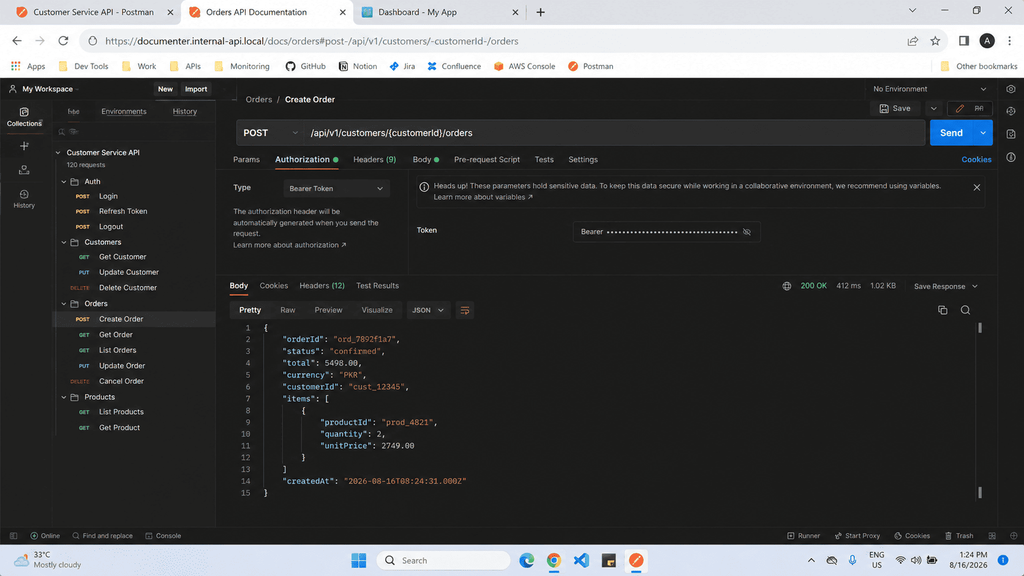
I provided the identical input to ChatGPT in every experiment: the URL, the HTTP verb, the request parameters, an example response payload, and any error codes associated with that endpoint. All the prompts received similar background information.
The Dev Review Criteria
Our internal review checklist has five requirements, and documentation has to pass all five to ship without edits.
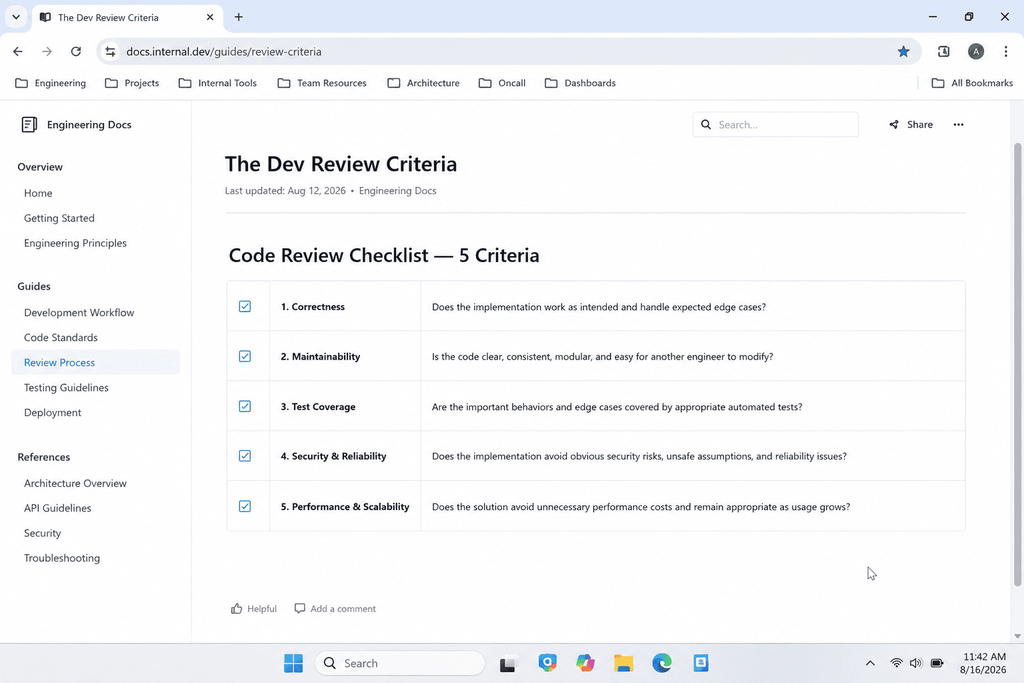
- The endpoint description explains what the endpoint does and why a developer would call it, not just what parameters it accepts
- Every parameter includes its type, whether it is required, and a realistic example value
- The response section shows a full example payload that matches our actual schema
- Error handling lists the specific status codes this endpoint can return, not a generic list copied from every other endpoint
- The code sample actually runs when copied and pasted, with no placeholder syntax errors
Two backend engineers and I reviewed every output blind, meaning we did not know which prompt generated which result until after scoring.
The Prompt Categories I Tested
I grouped the 40 prompts into five categories based on the actual documentation tasks engineers care about, then tested eight variations per category.
Category One: Plain Endpoint Descriptions
These prompts asked ChatGPT to explain what an endpoint does in plain language for a developer audience. Most versions of this prompt produced text that was accurate but generic, the kind of description you could paste into any API’s docs and it would still technically be true. Only the prompts that explicitly asked for a real world use case scenario produced descriptions specific enough to be useful.
Category Two: Request and Response Schema Explanations
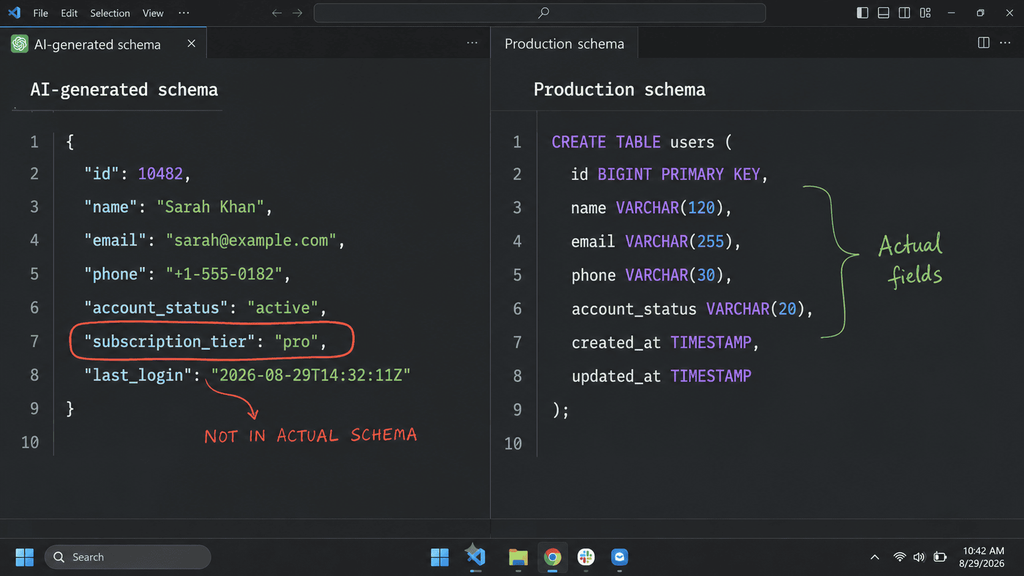
This is where volume of failure was highest. Fifteen of the 40 prompts fell into this category, and only one passed cleanly. The core problem was hallucinated fields. When I asked ChatGPT to explain a JSON schema without pasting the actual schema first, it invented plausible sounding fields that did not exist in our real API. The moment I changed the prompt to require pasting the exact schema and instructing the model not to add fields that were not present, accuracy jumped dramatically.
Category Three: Authentication and Error Handling
Authentication documentation is deceptively hard because it requires sequencing. A developer needs to know the order of operations, get a token, attach it correctly, handle expiration, before anything else makes sense. Prompts that asked for authentication docs “in general” produced boilerplate about OAuth concepts nobody asked about. Prompts that asked for the exact header format, the exact expiration behavior, and the exact refresh flow for our specific implementation performed far better.
Category Four: Code Sample Generation
Code samples are where I expected the biggest wins, and they mostly delivered, with one catch. ChatGPT is good at generating syntactically correct code in Python, JavaScript, and cURL. It is not naturally good at matching your actual base URL, your actual authentication header name, or your actual variable naming conventions unless you specify them directly in the prompt. Left to its own devices, it defaults to generic placeholder patterns like YOUR_API_KEY_HERE that a developer then has to manually fix throughout every sample.
Category Five: Full Section Generation From a Style Guide
The final category tested whether ChatGPT could take our existing documentation style and apply it consistently to a new endpoint, matching tone, heading structure, and formatting. This produced the most dramatic split. Prompts without a pasted style reference produced documentation that looked nothing like the rest of our site. Prompts that included two full paragraphs of existing documentation as a style anchor came back nearly indistinguishable from our own writing.
The 6 Prompts That Actually Passed Dev Review
Here is the exact breakdown of what worked, in the order our reviewers scored them.
1. The Schema Lock Prompt
This prompt pasted the actual JSON response schema and explicitly instructed the model to describe only fields present in that schema, flagging nothing as optional unless the schema marked it that way. This was the single highest scoring prompt of all 40. It eliminated the hallucination problem almost entirely because there was nothing left to guess.
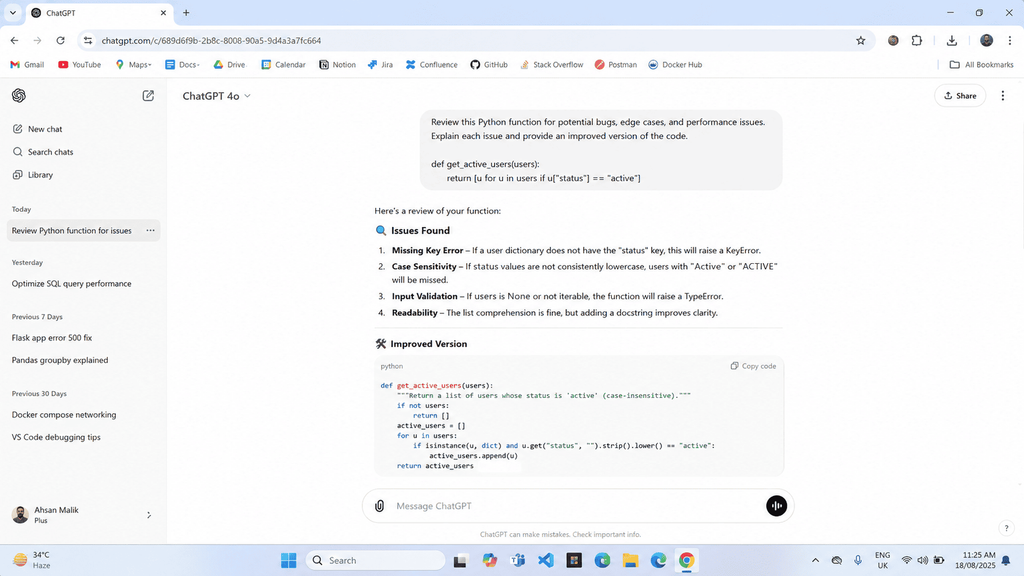
2. The Real World Use Case Prompt
Instead of asking “describe this endpoint,” this prompt asked ChatGPT to imagine a specific developer persona building a specific feature, then explain why they would call this endpoint as part of that feature. The output stopped sounding like a dictionary definition and started sounding like something a developer would actually read before their coffee got cold.
3. The Sequenced Authentication Prompt
This prompt broke authentication into numbered steps and asked the model to fill in each step using our exact token format, header name, and expiration window, rather than asking for “authentication documentation” as one open ended block. Sequencing the request forced sequencing in the output, which is exactly what a developer needs when they are trying to make their first successful call.
4. The Copy Paste Ready Code Prompt
This prompt specified our exact base URL, our exact header key, and asked for a working example using a live sounding but clearly fake test key, with a comment explaining where to swap in a real credential. Because every variable was defined up front, the generated code required almost no cleanup.
5. The Error Code Table Prompt
Instead of asking for “error handling” generally, this prompt supplied the specific list of status codes that endpoint could realistically return and asked for a table format explaining what triggers each one and what the developer should do about it. Tables consistently outperformed prose for this section, both for accuracy and for how quickly our reviewers could scan it.
6. The Style Match Prompt
Prompt provided two sections of the content of our currently published documentation and requested ChatGPT to write another section matching the tone, length, and heading pattern. It was the sole prompt that produced content that needed no further iterations to achieve consistency.
What Failed, and the Pattern Behind It
Looking across all 40 results, the failures clustered around three habits.
Vague scope requests failed almost every time
Any prompt that asked ChatGPT to “write documentation for this API” without specifying which section, which endpoint, or which format produced generic, unusable output. The wider the ask, the weaker the result.
Missing source material caused hallucination
Every prompt that asked the model to explain something without first pasting the real schema, real error codes, or real response payload produced at least one invented detail. This is not a ChatGPT flaw specifically, it is a predictable outcome of asking a language model to describe data it has never seen.
Generic tone requests produced generic tone
Asking for documentation to be “clear and professional” did nothing. Asking for documentation to match a specific pasted example did everything. The model needs an anchor, not an adjective.
The Prompt Formula That Worked Best Across Categories
After scoring all 40, a clear formula emerged for the prompts that consistently passed review.
- State the exact audience, meaning a developer integrating this specific endpoint, not a general reader
- Paste the real data, the actual schema, actual error codes, actual authentication details, never a description of them
- Specify the exact output format, table, numbered steps, or code block, rather than leaving structure open ended
- Include a real world scenario for why this endpoint matters, not just what it does
- Anchor tone with a pasted style example whenever consistency with existing docs matters
Thanks to this method, the original fifteen percent pass rate has changed into as much as what could be called a potentially higher pass rate had the steps been applied accordingly.
How to Use This on Your Own API
If you want to replicate this process on your own project, here is the sequence that worked for us.
Step One: Gather Your Raw Material First
Before writing a single prompt, pull the actual schema, actual status codes, and a real sample request and response for the endpoint you are documenting. Do this before opening ChatGPT at all.
Step Two: Write One Prompt Per Section
Do not ask for the whole documentation page in one shot. Ask for the description, then the parameters, then the response, then the errors, then the code sample, each as its own prompt using the real data you gathered.
Step Three: Paste a Style Anchor Every Time
Keep two or three paragraphs of your best existing documentation saved somewhere you can quickly copy from. Paste it into every prompt where tone consistency matters.
Step Four: Run It Through a Real Review
Even the six prompts that passed our review still got a final human read before publishing. Treat ChatGPT as a strong first draft generator, not a replacement for the review step itself.
Final Thoughts
Forty prompts taught me that API documentation is not a single writing task you can hand to ChatGPT with one clever instruction. It is five smaller tasks, each with its own failure pattern, and the prompts that survived dev review were the ones that respected that structure. If you paste real data, split the work by section, and anchor the tone with your own existing writing, ChatGPT stops being a novelty and starts being a genuinely useful first pass on documentation you would otherwise be writing alone at midnight before a deadline.
FAQ’s
Can ChatGPT write full API documentation on its own?
Not reliably in one shot. Broken into focused prompts with real schema data pasted in, it produced sections that needed only light editing, but a full unsupervised documentation page still needs a human pass for accuracy and voice.
Why did ChatGPT invent fields that did not exist in our API?
This happens when the model is asked to describe a schema it never actually saw. Without the real data pasted directly into the prompt, it fills gaps with statistically plausible but incorrect guesses.
What is the biggest mistake developers make when prompting for documentation?
Asking for too much at once. A single prompt asking for an entire documentation page produces shallow, generic output. Splitting the task into description, parameters, response, errors, and code samples produces far more usable results.
Does this process work for OpenAPI or Swagger specs specifically?
Yes, with one adjustment. Paste the actual YAML or JSON block from your OpenAPI definition directly into the prompt rather than summarizing it in your own words, and ask ChatGPT to generate the human readable explanation from that exact source.
How long did it take to test all 40 prompts?
The full test, including scoring by two engineers, took about two days spread across a weekend. Most of that time went into gathering consistent source material for every prompt, not into running the prompts themselves.

Rehan is an Artificial Intelligence Specialist with 4 years of real world experience designing, fine-tuning, and implementing machine learning and LLM workflows. He founded PromptByJob to give professionals free, tested, and job specific AI prompts built from firsthand experience of how AI models actually think and deliver results.