An AI response can be grammatically correct and still be difficult to use. A lesson plan might ignore your available materials. A blog introduction might sound polished but say little. A code suggestion might address a different problem from the one you actually have.
When that happens, one useful starting point is to review the request itself: have you explained the task, provided the necessary context, and described what a usable answer should contain?
OpenAI’s prompt engineering best practices for ChatGPT recommend clear, specific instructions, sufficient context, and iterative refinement—reviewing a response and adjusting the request rather than expecting the first attempt to be final.
This guide applies that approach to five work-related tasks.
Editorial Note: The examples below are illustrative prompt rewrites, not results from a controlled experiment. No AI-response comparisons, professional trials, or measured time savings are claimed. “Before” and “after” refer to the prompts themselves.
Why an AI Response May Sound Generic
Consider this request:
The task is recognizable, but several important details are missing:
- Who will receive the email?
- What should the recipient know or do?
- Which facts must be included?
- What tone fits the relationship?
- Is there a deadline or word limit?
A more useful request supplies the information needed to distinguish your email from thousands of other possible emails.
This does not mean every prompt should be long. Specificity matters more than adding instructions for their own sake. OpenAI’s guidance recommends describing the desired context, outcome, length, format, and style while reducing vague wording.
For the examples in this guide, use five questions:
- What task should the AI complete?
- What information does it need?
- What constraints must it respect?
- What should the output look like?
- What will you check before using it?
1. Lesson Planning: Add the Objective and Classroom Constraints
Before: a broad request
What is missing?
The request does not specify the learners, the concept to teach, the time available, or the materials the teacher can use.
“Fractions” could mean recognizing halves, comparing fractions, finding equivalent fractions, or performing calculations. The prompt leaves that decision open.
After: a task specific prompt
Draft a 30-minute introductory lesson on equivalent fractions.

Class context:
- Grade 4.
- Students have already practiced recognizing halves and quarters.
- Available materials: paper strips, pencils, and a whiteboard.
- No student devices or projector.

Learning objective:
Students should explain, using a drawing or paper model,
why 1/2 and 2/4 represent the same amount.

Include:
1. A short opening question.
2. A teacher demonstration using paper strips.
3. A paired activity.
4. Two questions to check understanding.
5. A brief exit ticket with a suggested answer.

Give an approximate time for each stage.
Keep the total at 30 minutes.

Include an optional support activity for students who need
more practice and an extension for students who finish early.

Do not claim alignment with a named curriculum or standard.
Flag any assumed prior knowledge for the teacher to check.
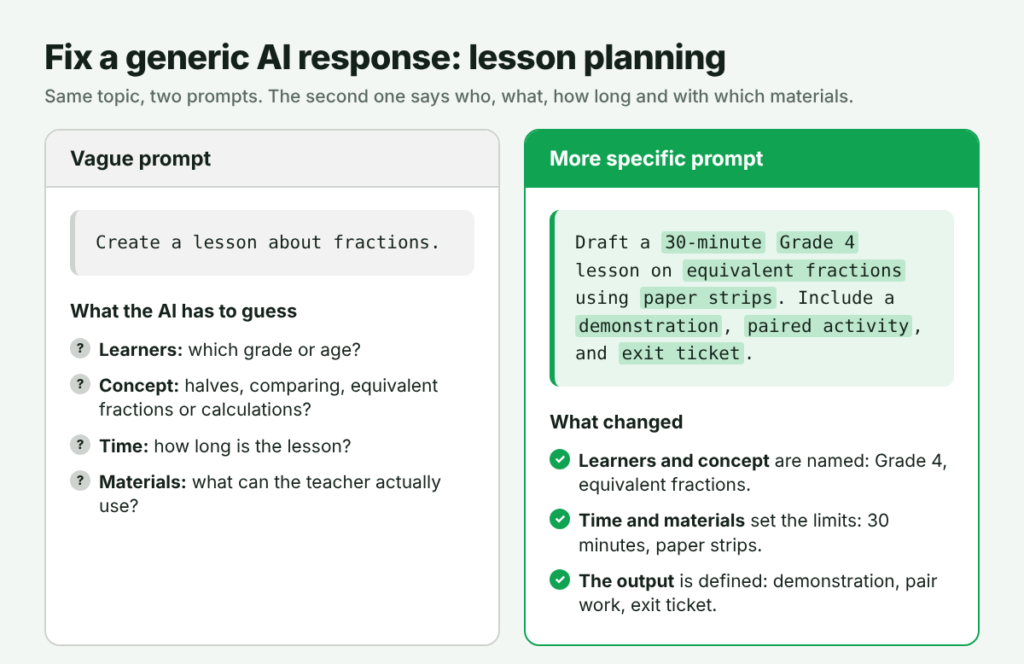
What changed?
The revised prompt defines a particular concept and a practical teaching situation. It asks for an observable outcome—explaining equivalence with a model—rather than simply requesting content about fractions.
It also gives the eventual reviewer something concrete to evaluate: whether the activities support the objective and fit the available time and materials.
What to check before using the response
Check that:
- The mathematical explanations and suggested answers are correct.
- The activities fit your students’ actual prior knowledge.
- The timing is realistic for your classroom.
- The support activity addresses a specific difficulty.
- No equipment appears that you said was unavailable.
This is an illustrative planning prompt, not a classroom tested lesson or a claim of curriculum approval.
For a more detailed planning process, read our guide to using AI prompts for classroom differentiation.
2. Debugging: Supply the Code and Define Correct Behavior
Before: a broad request
What is missing?
Without the code, an error message, or a description of the expected result, the request does not identify a specific problem to solve.
Even with the code attached, “fix” can remain ambiguous. The reviewer needs to know what behavior counts as correct.
After: reproducible debugging prompt
Help debug this JavaScript function.

Environment:
Modern browser JavaScript. No framework or external library.

Expected behavior:
Calculate the arithmetic mean of an array of finite numbers.
Return null for an empty array.
For an array containing a non-number, NaN, or Infinity,
throw a TypeError.

Current code:

function average(values) {
  return values.reduce((sum, value) => sum + value, 0)
    / values.length;
}

Observed issue:
Calling average([]) returns NaN, but the intended result is null.

Please provide:
1. A short explanation of the empty-array issue.
2. A minimal corrected function.
3. Example checks for:
   - [2, 4, 6]
   - []
   - [0]
   - [-2, 2]
   - [2, "4"]
   - [NaN]
   - [Infinity]

Assume the argument itself is an array.
Do not add a library or rewrite this as an application.
Do not claim the checks passed unless you actually executed them.
Clearly distinguish expected results from executed test results.
What changed?
The revised prompt includes:
- A small code sample.
- A specific observed issue.
- Explicit behavior for edge cases.
- Limits on the scope of the change.
- A requirement to distinguish code inspection from execution.
That final distinction matters to the usefulness of the answer: proposed checks are not evidence that the code has been run.
What to check before using the response
Run the code in your actual environment. Check that it handles the stated cases and does not introduce unrelated changes.
If the issue involves a larger application, provide the smallest relevant example rather than pasting unrelated files or confidential configuration.
3. Blog Writing: Replace Vague Style Requests With an Editorial Brief
Before: a broad request
What is missing?
“Engaging” describes a desired impression, but not the article’s purpose. The request does not identify the audience, central argument, or information the introduction should lead into.
It also leaves room for unnecessary statistics or invented personal anecdotes.
After: a focused writing prompt
Draft an introduction for a practical blog article.

Working title:
How to Write a Clear Async Project Update

Audience:
People preparing their first written project update
for a distributed team.

Article scope:
- State what changed.
- Identify blockers.
- Assign next steps and owners.
- Include relevant deadlines.

Introduction requirements:
- 100–130 words.
- Plain, direct English.
- Open with a clearly hypothetical situation:
  a teammate receives an update but cannot tell
  whether action is required.
- Explain what the article will help the reader do.
- End with a transition into the update template.

Do not invent statistics, quotations, company examples,
personal experience, or claims of measured productivity gains.

Avoid phrases such as:
"in today's fast-paced world,"
"game-changer," and
"unlock your potential."

Return only the introduction.
What changed?
The revised prompt supplies an editorial brief instead of relying on the adjective “engaging.”
The hypothetical opening is explicitly labeled as hypothetical, so it does not need to be presented as something the author personally experienced.
What to check before publishing
Read the introduction alongside the finished article:
- Does the article deliver what the introduction promises?
- Does the wording suit your usual voice?
- Has the draft introduced any unsupported facts?
- Is the opening specific without pretending to describe a real event?
If a sentence sounds impressive but adds no meaning, remove it.
4. Job Descriptions: Separate Supplied Facts From Missing Information
Before: a broad request
What is missing?
The request does not define the role, responsibilities, seniority, or hiring requirements. It also provides no company information.
A useful draft should not fill those gaps with invented benefits, salary ranges, or workplace policies.
After: a fact bounded drafting prompt
Draft a job description using only the supplied role details. Role: Frontend Developer. Responsibilities: - Build responsive interfaces. - Maintain accessible form components. - Write unit tests. - Collaborate with a designer and a backend developer. Required skills: - HTML. - CSS. - JavaScript. - Git. Preferred skills: - React. - ExperienceWhat changed?
The revised prompt draws a boundary around the available information.
It also protects an important distinction: a preferred skill should not silently become a required qualification.
What to check before publication
Confirm that the draft reflects the actual role and approved hiring requirements.
Add missing employment details and obtain appropriate review for the relevant location. A polished draft is not proof that a job advertisement meets every applicable requirement.
5. Data Analysis: Define the Metric Before Requesting Insights
Broad: a broad request
Analyze this spreadsheet and tell me what is happening.What is missing?
The request does not identify the business question, define the columns, or explain how to handle incomplete records.
The word “revenue,” for example, needs a definition: should the calculation include cancelled orders, discounts, shipping, or refunds?
After: a structured analysis prompt
Prompt — Sales CSV AnalysisHelp analyze a sales CSV using the definitions below. Columns: - order_id: order identifier. - order_date: date in YYYY-MM-DD format. - status: completed or cancelled. - product_category: category label. - quantity: number of units. - unit_price: price per unit in USD before discounts. - discount_amount: total discount for the row in USD. Business question: How did recorded sales revenue change month by month, and which categories contributed to the change? Revenue definition for this task: For completed orders only: row revenue = quantity × unit_price - discount_amount. Do not include taxes or shipping. Refund information is not supplied, so do not describe this metric as revenue after refunds. Before calculating: 1. Check whether order_id is unique or whether an order can legitimately contain multiple rows. 2. Identify missing required values. 3. Identify invalid dates and unexpected status values. 4. Flag negative quantities or prices for review. 5. Report blank discount values rather than assuming zero. If an unresolved issue could materially change the result, explain it and ask for clarification before presenting final totals. Then provide: - A monthly revenue table. - Month-over-month absolute and percentage changes where calculable. - Category contributions to those changes. - A short summary separating observed patterns from possible explanations. Do not infer causes from the table alone. Do not invent missing values or business context. If you cannot access the file or execute calculations, say so and provide code or spreadsheet steps instead of fabricated results.What changed?
The revised prompt defines the metric before asking for conclusions. It also specifies how uncertainty and data-quality issues should be handled.
Instead of asking for broad “insights,” it requests a particular comparison and distinguishes observed changes from explanations that would require more evidence.
What to check before relying on the analysis
Review the calculation rules, excluded records, and treatment of missing values. Independently check important totals.
Use synthetic or appropriately anonymized examples when demonstrating a workflow publicly, and avoid sharing confidential data without authorization.
How to Review the Next Response
A more detailed prompt is not automatically a better prompt. It can still contain conflicting instructions, irrelevant detail, or missing information.
Use this review process after receiving an answer.
1. Identify the specific mismatch
Instead of saying:
This is too generic.Name the problem:
This lesson includes a video, but the classroom has no projector.Or:
The job description lists React as required, but I specified it as preferred.A precise correction gives the next revision a clear target.
2. Request a focused change
You do not always need to restart the task.
For example:
Prompt — Revise Required SkillsRevise only the required-skills section. Keep React in preferred skills. Do not change the responsibilities or add new requirements.OpenAI’s guidance describes prompting as an iterative process: review the initial response, then adjust wording, context, or scope as needed.
3. Check facts separately from presentation
A response can follow your requested format while still containing incorrect information.
For these examples, that means checking different things:
Task Important Review Lesson planning Mathematical accuracy and suitability for the learners Debugging Actual execution and edge-case behavior writing Factual support and alignment with the article Job descriptions Accuracy of role details and appropriate publication review Data analysis Metric definitions, calculations, and missing-data treatment Treat formatting compliance and factual correctness as separate checks.
A Reusable Prompt Template
Use this as a starting point. Delete sections that do not serve your tasks.
Prompt TemplateTask: [What should be completed?] Context: [Who is this for, and what situation matters?] Source information: [The facts, text, code, or data to use.] Constraints: [Limits on time, scope, materials, tone, or methods.] Output format: [The sections, table, code, checklist, or length needed.] Missing information: [What should happen if important details are unavailable?] Quality checks: [What must be checked before the output is considered useful?]OpenAI’s guide to specifying prompt instructions and output formats illustrates how clear requirements and format examples can make a request more concrete.
What if the answer is still generic?
Look for the unresolved gap:
- Is the intended audience unclear?
- Does the AI lack necessary source material?
- Have you defined the required output?
- Are two instructions in conflict?
- Is the task too broad for one response?
Correct the specific problem rather than adding more adjectives such as “advanced,” “expert,” or “high-quality.”
Final Checklist
Before sending a work-related prompt, ask:
- Have I named a specific task?
- Have I supplied the facts needed to complete it?
- Have I defined ambiguous terms or calculations?
- Have I stated the important constraints?
- Have I described a usable output?
- Have I explained how to handle missing information?
- Have I avoided unnecessary confidential details?
- Do I know what I will verify before using the response?
The purpose of these rewrites is not to make prompts sound technical. It is to make the request easier to understand and the result easier to evaluate. Start with the missing detail that matters most, review the answer, and revise from there.
FAQ's
Do I need to tell the AI to “act as an expert”?
You can describe a useful role or perspective, but that is not a substitute for explaining the task.
For the examples above, the important information is the objective, source material, constraints, and expected deliverable not an unsupported claim that the system possesses professional credentials.
Should every prompt be long?
No. Start with enough information to define the task.
A request to shorten a supplied paragraph may need only a sentence. A request to analyze a dataset needs more detail because the calculation rules and data limitations affect the answer. For complex tasks, OpenAI recommends breaking work into smaller, focused requests where appropriate.
Can I say that a prompt is “tested”?
Use that description only when you actually ran it, and explain what you checked.
For example, “I ran this prompt once using a fictional dataset and checked the displayed totals” describes a limited activity. It does not establish that the prompt is reliable across other datasets or models.

Rehan Malik is a blogger and the creator of PromptByJob. He publishes articles and prompt examples about using AI tools for different tasks. He uses AI-assisted drafting in his writing process. He is not a healthcare professional, and his nursing-related content should not be treated as medical advice or evidence of clinical testing.