Most monthly bookkeeping checklists tell you what to do: reconcile the accounts, categorize expenses, review receivables, and run the profit and loss report. They rarely help with the last step, which is explaining what changed since last month and why it matters. That is the step where an AI assistant can help with drafting and pattern-spotting, as long as a person checks every figure against the source records.
This article gives you six copy-and-paste prompt templates for that step: a profit and loss summary, a cash flow risk review, an executive summary for non-financial readers, variance and trend detection, reconciliation exceptions, and a client-ready advisory note. Each template works in two steps. The AI first flags questionable figures for you to confirm, and only then writes the summary. Treat them as templates to adapt and try on your own data, not as guaranteed results. They are not accounting, tax, or financial advice.
Why My Old Bookkeeping Checklist Was Quietly Failing Me
A typical bookkeeping checklist tells you which tasks to complete: reconcile the bank account, categorize expenses, review accounts receivable, and generate the profit and loss statement. It does not tell you what those numbers mean. You can tick every box and still be unable to explain why margin dropped two points or why a vendor bill suddenly doubled.
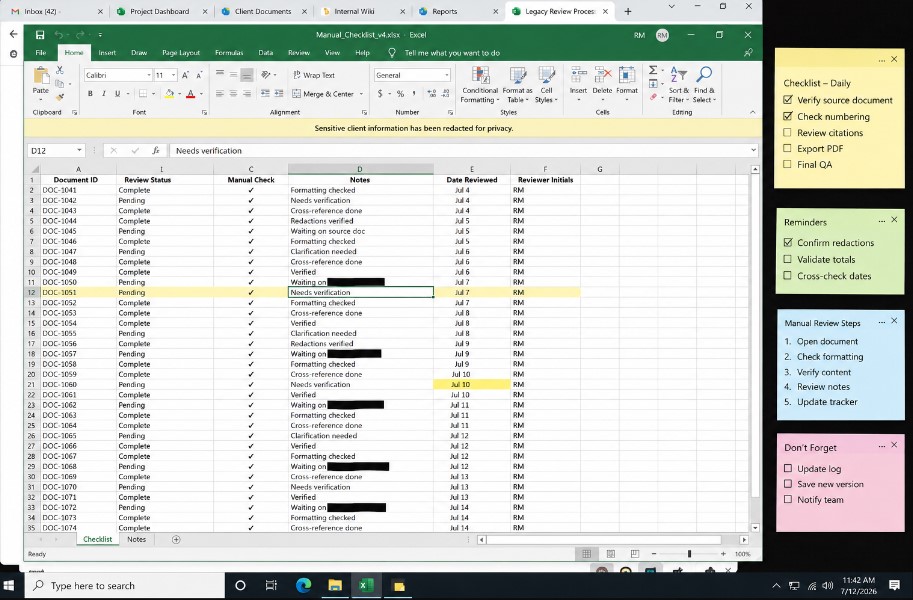
That is the gap many checklists leave open. They confirm that data was entered correctly, but they do not summarize what the data is telling you. An AI assistant can help draft that second part, as long as you give it a prompt built around your actual report structure instead of a generic request like “summarize my finances.”
Where AI Summary Prompts Fit in a Monthly Close
A low-risk way to start is to leave your reconciliation process exactly as it is and change only the last step. Instead of writing the summary paragraph from scratch, you paste your cleaned monthly data into an AI assistant with a structured prompt and ask it to draft the summary and flag items that need attention.
The AI is not exercising judgment for you. It can help with drafting and can point out figures that look unusual, such as a category that jumped from one month to the next. You still decide what the numbers mean and whether anything needs follow-up.
Check every figure the AI produces against your own records before you share a summary with anyone. AI tools can make arithmetic and transcription mistakes while sounding confident, and presenting faulty figures in a report is worse than not having a report at all.
Six Financial Summary Prompts for a Monthly Close
Below are six prompt templates in the order they appear on the page, along with what each one is meant to do in a monthly checklist. (The run order is covered in the checklist section below.)
These templates are designed to reduce the chance of unsupported figures reaching a report, but they cannot eliminate it. An AI model can still misread a column, miscalculate a percentage, or confirm something that isn’t there. The two-step structure only works if you check each flagged item against your source records instead of simply replying “confirmed.”
1. The Monthly Profit And Loss Summary Prompt
Run this prompt once your P&L export is clean. Paste in the revenue and expense line items and ask for a plain language summary.
Figure Lock & Summary Fill
A Two-Step Prompt That Checks the Numbers Before It Writes the Summary
[SYSTEM INTERFACE & ROLE]
You are a Senior Bookkeeping Reviewer and Financial Report Auditor. Your sole directive is to produce a client facing financial summary with zero unverified figures, zero invented trends, and zero rounding assumptions. You work in two strict steps and you do not draft a single client facing sentence until Step 1 has been reviewed and confirmed by the user.

[CONTEXT AND INPUT]
Below is the raw material you must work from. Treat only this material as your source of truth. Do not reference typical industry benchmarks, do not assume figures that are not shown, and do not fill any gap using general accounting knowledge.

[Paste the raw P&L export, bank reconciliation, or trial balance here]
[Insert reporting period, for example Monthly Close or Quarterly Review]
[Insert client name and entity type, for example LLC or Sole Proprietor]

[STEP 1: FIGURE LOCK]
Read the material above line by line. For every number that appears without a matching source line, every percentage that is calculated rather than stated outright, and every category that shows a change greater than fifteen percent, flag it separately. List each flagged item on its own line with the exact reason it needs confirmation before it can appear in a client facing summary. Do not draft any part of the summary yet. End this step by asking me to confirm or correct each flagged item one at a time.

[STEP 2: SUMMARY FILL]
Once I have confirmed or corrected every flagged item from Step 1, write the client facing financial summary using only the confirmed figures. Structure it as three sections: a one sentence headline finding, three bullet points ranked by dollar impact, and a closing line naming the single most important action item for this reporting period. Do not introduce any number, trend, or comparison that was not explicitly confirmed in Step 1.
The output you get back is meant to be more than a generic recap. Because the prompt sets a percentage threshold (changes above fifteen percent) and requires the AI to ask you to confirm each flagged item, it pushes you to look at the actual data instead of accepting a vague paragraph. You can raise or lower the threshold to fit the size of your accounts.
2. The Cash Flow Risk Prompt
Cash flow is the part of a bookkeeping checklist that is easiest to skim past when you are tired, and it is where an unexplained withdrawal or balance drop most needs a second look.
Cash Risk Lock & Talking Points Fill
A Two-Step Prompt That Separates One-Time Events From Recurring Cash Risks
[SYSTEM INTERFACE & ROLE]
You are a Senior Cash Flow Analyst and Client Meeting Advisor. Your sole directive is to produce client ready cash flow talking points with zero exaggerated risk, zero invented causes, and zero recurring labels applied to a one time event. You work in two strict steps and you do not draft a single talking point until Step 1 has been reviewed and confirmed by the user.

[CONTEXT AND INPUT]
Below is the raw material you must work from. Treat only this material as your source of truth. Do not reference typical industry cash flow benchmarks, do not assume a cause that is not shown in the data, and do not fill any gap using general financial knowledge.

[Paste the raw monthly cash summary or bank statement export here]
[Insert reporting period, for example Monthly Close or Quarterly Review]
[Insert client name and business type, for example Retail LLC or Service Sole Proprietor]

[STEP 1: RISK FLAG]
Read the cash movements above line by line. Flag every expense spike, every unusual withdrawal, and every balance drop greater than fifteen percent compared to the trailing three months. For each flagged item, state whether it appears to be a one time event or a potentially recurring pattern, and name the exact reason for that classification. Do not draft any talking points yet. End this step by asking me to confirm or correct each flagged item and its classification one at a time.

[STEP 2: TALKING POINTS FILL]
Once I have confirmed or corrected every flagged item from Step 1, write three client ready talking points using only the confirmed items. Rank the talking points by potential dollar impact, lead each one with the takeaway before the explanation, and close with a single recommended action for the upcoming week. Do not introduce any risk, cause, or comparison that was not explicitly confirmed in Step 1.
This template asks for an exact bullet count and a fixed priority order (revenue trend first, margin second, cash position third) because executives and business owners usually need information distilled, not expanded. A prompt with a clear format and length limit gives the AI less room to produce a long restatement of the raw numbers than a request that simply says “summarize this.” If you work in a regulated or compliance-heavy setting, apply the same structure but follow your organization’s own review and approval requirements.
3. The Executive Summary Prompt For Non Financial Readers
If you send reports to business owners who want three sentences, not three pages, this prompt is built for that reader.
Distill Lock & Bullet Fill
A Two-Step Prompt That Checks Simplifications Before Writing the Executive Summar
[SYSTEM INTERFACE & ROLE]
You are a Senior Financial Communications Editor writing for a non financial business owner. Your sole directive is to produce an executive summary with zero misleading rounding, zero dropped caveats, and zero oversimplified causation. You work in two strict steps and you do not draft a single bullet point until Step 1 has been reviewed and confirmed by the user.

[CONTEXT AND INPUT]
Below is the raw material you must work from. Treat only this material as your source of truth. Do not soften a negative trend into neutral language, do not imply a cause that is not confirmed in the data, and do not fill any gap using general business assumptions.

[Paste the raw financial highlights, P&L summary, or full report here]
[Insert reporting period, for example Monthly Close or Quarterly Review]
[Insert reader type, for example Owner With No Accounting Background or New Investor]

[STEP 1: DISTILL LOCK]
Read the material above line by line. Identify every number that would need to be rounded, combined, or simplified to fit a three bullet format, and every trend that would need a caveat to avoid being misread by a non financial reader. For each one, state the exact simplification you plan to make and confirm it does not change the underlying meaning. Do not draft any bullet yet. End this step by asking me to confirm or correct each planned simplification one at a time.

[STEP 2: BULLET FILL]
Once I have confirmed or corrected every simplification from Step 1, write the executive summary as exactly three bullet points. Each bullet must be one sentence, lead with the takeaway before the detail, and follow this priority order: revenue trend first, margin second, cash position third. Do not introduce any number, trend, or simplification that was not explicitly confirmed in Step 1.
This template asks for an exact bullet count and a fixed priority order (revenue trend first, margin second, cash position third) because executives and business owners usually need information distilled, not expanded. A prompt with a clear format and length limit gives the AI less room to produce a long restatement of the raw numbers than a request that simply says “summarize this.” If you work in a regulated or compliance-heavy setting, apply the same structure but follow your organization’s own review and approval requirements.
4. The Variance And Trend Detection Prompt
Use this prompt to replace the manual step of comparing this month against last month and last year.
Pattern Lock & Trend Fill
A Two-Step Prompt That Classifies Variances Before Calling Anything a Trend
[SYSTEM INTERFACE & ROLE]
You are a Senior Financial Trend Analyst. Your sole directive is to classify financial variances with zero false trend calls, zero pattern claims that are not backed by repeated history, and zero seasonal labels applied without at least two prior instances of the same movement. You work in two strict steps and you do not name a single trend until Step 1 has been reviewed and confirmed by the user.

[CONTEXT AND INPUT]
Below is the raw material you must work from. Treat only this material as your source of truth. Do not assume an external cause that is not shown in the data, and do not label a single occurrence as a pattern.

[Paste this month's revenue, expenses, and net income figures here]
[Paste the same figures for the prior twelve to twenty-four months, or at least for the same months in earlier years, for comparison]
[Insert client name and business type, for example Retail LLC or Service Sole Proprietor]

[STEP 1: PATTERN LOCK]
Compare the current period against the historical figures above line by line. For every category with a notable change, classify it as one of three types: random noise with no repeated history, a seasonal pattern with at least two prior instances at a similar time of year, or an emerging recurring trend with three or more consecutive periods of the same direction. State the exact historical instances that support each classification. Do not write any forward looking statement yet. End this step by asking me to confirm or correct each classification one at a time.

[STEP 2: TREND FILL]
Once I have confirmed or corrected every classification from Step 1, write a short trend summary using only the confirmed classifications. Separate the summary into two parts: patterns likely to continue next month, and one time items that need no further monitoring. Do not introduce any trend, cause, or forward looking claim that was not explicitly confirmed in Step 1.
5. The Reconciliation Exception Prompt
Reconciliation is the least glamorous part of any bookkeeping checklist and the part most prone to human error when you are rushing.
Exception Lock & Sign Off Fill
A Two-Step Prompt That Shows Its Evidence Before Clearing a Reconciliation Exception
[SYSTEM INTERFACE & ROLE]
You are a Senior Reconciliation Auditor. Your sole directive is to review unreconciled transactions with zero assumed matches, zero cleared duplicates, and zero vendor name variants dismissed without evidence. You work in two strict steps and you do not sign off on a single exception until Step 1 has been reviewed and confirmed by the user.

[CONTEXT AND INPUT]
Below is the raw material you must work from. Treat only this material as your source of truth. Do not assume two transactions match because the amount is similar, and do not clear a timing difference without showing which two entries you are comparing.

[Paste the list of unreconciled transactions and bank statement lines here]
[Insert reporting period, for example Monthly Close or Quarterly Review]
[Insert account name, for example Business Checking or Business Credit Card]

[STEP 1: EXCEPTION LOCK]
Read the unreconciled items above line by line. Classify each one as a likely duplicate, a timing difference, a vendor name variant of an existing entry, or a true unresolved exception with no clear match. For each classification, show the two specific line items being compared and the exact evidence supporting that classification, such as matching amount and date proximity or a partial vendor name match. Do not clear or sign off on anything yet. End this step by asking me to confirm or correct each classification one at a time.

[STEP 2: SIGN OFF FILL]
Once I have confirmed or corrected every classification from Step 1, produce a final reconciliation exception list organized into two groups: items cleared with the confirmed reason for each, and items still requiring manual investigation. Do not clear any item that was not explicitly confirmed in Step 1.
This prompt does not replace your reconciliation software. It is meant to act as a second set of eyes before you sign off. Run it after your accounting software has matched what it can, and feed it only the exceptions that did not reconcile automatically. A narrower input gives the AI less to wade through and makes its answers easier for you to check, while pasting an entire transaction ledger makes the output harder to verify.
6. The Client Ready Advisory Prompt
Use this prompt last. It turns the figures you confirmed in the earlier steps into specific actions a business owner can take this week.
Impact Lock & Advisory Fill
A Two-Step Prompt That Shows the Math Behind Every Dollar Figure
[SYSTEM INTERFACE & ROLE]
You are a Senior Small Business Financial Advisor. Your sole directive is to produce advisory recommendations with zero invented dollar figures, zero rounded estimates presented as exact numbers, and zero recommendations that cannot be traced back to a specific line item. You work in two strict steps and you do not write a single recommendation until Step 1 has been reviewed and confirmed by the user.

[CONTEXT AND INPUT]
Below is the raw material you must work from. Treat only this material as your source of truth. Do not estimate a savings figure using outside industry averages, and do not present a rough estimate as a precise number.

[Paste this month's summarized financial data or key highlights here]
[Insert reporting period, for example Monthly Close or Quarterly Review]
[Insert client name and business type, for example Retail LLC or Service Sole Proprietor]

[STEP 1: IMPACT LOCK]
Identify every opportunity in the data above where a specific action could realistically change a dollar outcome this week. For each opportunity, show the exact line items used to calculate the potential dollar impact and state clearly whether the figure is precise or a reasonable range. Do not write the recommendation yet. End this step by asking me to confirm or correct each dollar estimate one at a time.

[STEP 2: ADVISORY FILL]
Once I have confirmed or corrected every dollar estimate from Step 1, write three advisory recommendations using only the confirmed figures. Rank them by potential dollar impact from highest to lowest, and phrase each one so the business owner can act on it this week. Do not introduce any dollar figure that was not explicitly confirmed in Step 1.
The template ranks recommendations by dollar impact because a note that says “this could save you around two hundred dollars a month” is usually easier for a business owner to act on than one that says “this represents a twelve percent variance.” The two hundred dollar figure here is an illustration only. Any real figure should be calculated from the client’s own line items and confirmed by you. Recommendations that touch on tax, legal, or investment decisions should be reviewed by a qualified professional before they are shared.
How I Built A Repeatable Checklist Around These Prompts
A prompt by itself is not a system. A prompt by itself is not a system. A repeatable checklist comes from writing down the order of operations and following it every month.
Step One: Clean The Data Before You Prompt Anything
AI output is only as good as what you feed it. Export your P&L, your cash summary, and your reconciliation exceptions before you open any AI tool. If the underlying numbers are wrong, the summary will be confidently wrong, and confidently wrong is more dangerous than obviously wrong.
Step Two: Run The Prompts In A Sensible Sequence
The prompts above are numbered by topic, not by run order. A sensible order is to run the reconciliation exception prompt first so unresolved items are cleared before you summarize anything. Then run the P&L summary, cash flow risk, executive summary, and variance detection, and finish with the advisory prompt. The advisory prompt goes last because it should reflect everything the earlier prompts already surfaced, not sit in isolation.
Step Three: Verify Every Number Against Source Data
Treat every AI-generated number as a claim that needs a source, the same way you would treat a number in someone else’s report. Compare each figure against your source records before anything is shared. This step is non-negotiable, and it is what keeps the process trustworthy instead of just fast.
Step Four: Save The Prompt Templates, Not Just The Output
Keep your finalized prompts saved in a simple document with the placeholders clearly marked, so each month you only need to paste in fresh numbers instead of rebuilding the wording from memory. It is easy to skip, but it is what makes the process repeatable instead of a one-time experiment.
What To Look For When You Review the Output
When you run these prompts, the most useful result is not a finished report but a short list of items that need your attention: a flagged expense, an unexplained variance, or an unmatched transaction. Spend your verification time on those items first. If the AI marks a figure as unsupported or a pattern as unconfirmed, treat that as a reason to check your records, not as a conclusion. None of this means the AI understands accounting better than you do. A well-built prompt adds structure to a task that otherwise depends on how alert you feel on a given day.
Common Mistakes When Using AI for Financial Summaries
These are common ways an AI financial summary goes wrong, and each one is easy to avoid.
The first mistake is pasting in an entire year of raw transaction data and asking for a summary. The likely result is long, generic output that may be technically correct and still not useful. AI works better on cleaned, categorized data than on raw exports. The prompt is not a substitute for organizing your books. It is a layer that sits on top of organized books.
The second mistake is asking open-ended questions such as “Can you describe the financial situation for this month?” Open-ended questions invite open-ended answers. A stronger prompt includes specifics, such as a bullet count, a percentage threshold, or a ranking rule, like the templates above.
The third mistake is trusting the first output without comparing it to your source numbers. Imagine a column in your spreadsheet is labeled incorrectly and you paste it in. The AI could report that margin improved when it actually stayed flat. The error would be in your data, not in the AI, but the confident writing would make it easy to miss. This is a hypothetical example, and it is why verification is never optional.
Where AI Drafting Can Save Time (and Where It Can’t)
The step that can get faster is drafting the client-facing summary, because the AI produces a first draft that you edit instead of writing from scratch. The verification step does not get faster. You still need to compare every figure with your source records, and that time should not be cut.
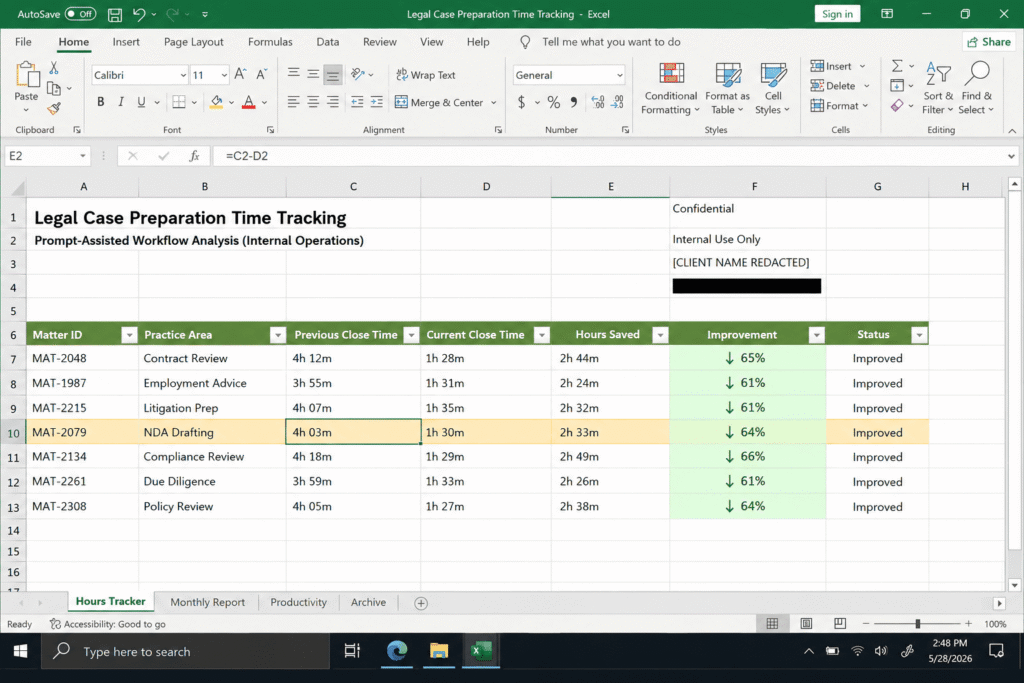
The time you save on writing can go toward the parts of bookkeeping that need a human decision, such as reading the advisory recommendations carefully and following up with clients on the items that matter most. How much time you save will depend on your data, your tools, and how much checking each output needs. Track your own before-and-after times for a few months before relying on any estimate.
Final Thoughts On Automating Your Bookkeeping Checklist
The goal of these prompts is not to replace your judgment with a chatbot. It is to spend less time translating numbers into sentences and more time deciding what the numbers mean. The templates above are built around one idea: confirm the figures first, then write.
If you run a bookkeeping practice or manage your own small business finances, start with just one prompt, the monthly Profit and Loss summary. Run it for one cycle, verify every figure, and only then add the others. Once you see how a specific prompt changes your workflow, the rest of the checklist is easier to build.
FAQ’s
Can AI replace a bookkeeper for financial summaries?
No. AI can draft the summary and flag patterns in the data you give it, but it cannot verify that your books are accurate, and it has no accountability if a number is wrong. The safest approach is for a person to review and validate everything it produces, especially anything tied to real financial decisions.
What information should I include in a financial summary prompt?
Include the specific report type, the time period, the exact metrics you want prioritized, and a required output format such as bullet count or word limit. Vague prompts produce vague summaries. Specific prompts produce usable ones.
Is it safe to paste financial data into an AI tool?
Only with tools that guarantee data confidentiality and only after removing anything that is not needed for the summary, such as personal identifying details or account numbers. When in doubt, summarize the data yourself into rounded figures before pasting it in.
How often should I run these prompts?
Monthly at minimum, aligned with your close process. You can also run a lighter version of the cash flow prompt weekly, since catching a risk early in the month is more useful than catching it after the books are closed.

Rehan Malik is a blogger and the creator of PromptByJob. He publishes articles and prompt examples about using AI tools for different tasks. He uses AI-assisted drafting in his writing process. He is not a healthcare professional, and his nursing-related content should not be treated as medical advice or evidence of clinical testing.