I teach a mixed ability classroom, and if you have ever tried to write three versions of the same lesson before 7am, you already know the feeling I am talking about. Last August I decided to stop winging it. I built a set of specific grade level AI prompts, one for each band I teach, and I used them for an entire semester. Not one week. Not one unit. A full semester, roughly sixteen weeks, across three different grade level groups.
This article is not a theory piece. It is my actual planning log turned into a guide, including the prompts I used word for word, what worked, what I had to fix by hand, and how much time it really saved once the AI stopped guessing and I started giving it real instructions.
What Differentiated Instruction Actually Means When You Add AI Prompts
Differentiated instruction is the practice of adjusting content, process, and product so students at different readiness levels can access the same learning goal. Carol Ann Tomlinson’s research on this is basically the foundation every teacher prep program still teaches, and it has not changed much because the core idea still holds up. You are not lowering the bar for some students and raising it for others. You are changing the path to the same destination.
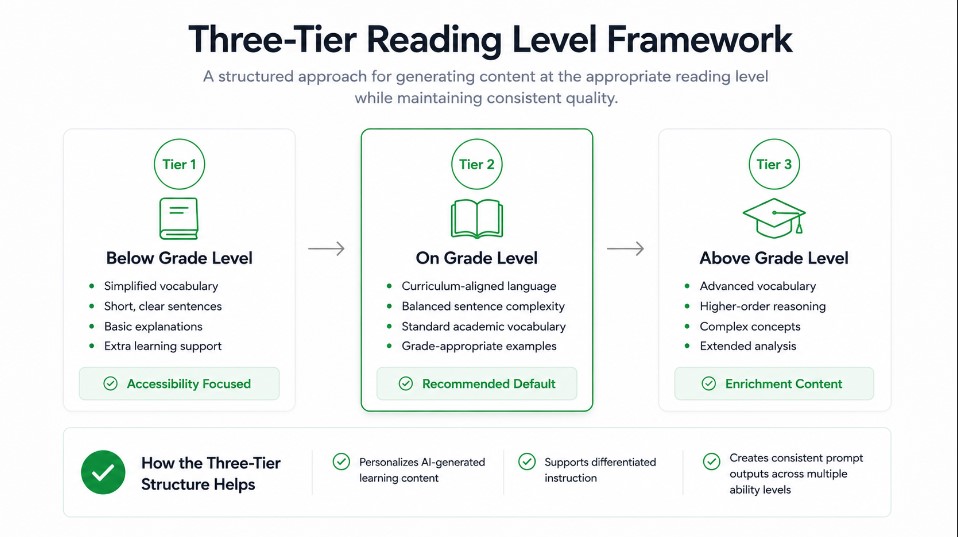
What has changed is how fast a teacher can produce that path. A few years ago, writing a below level version, an on level version, and an above level version of one reading passage could eat an entire planning period. Now, with the right prompt structure, I can generate all three inside of two or three minutes, then spend my actual time reviewing and adjusting instead of drafting from a blank page.
The keyword here that matters for search intent is grade level specific, not generic. A prompt that says write a lesson plan for kids gives you mush. A prompt that names the exact grade, the exact standard, and the exact output format gives you something you can teach from tomorrow.
Why I Started Testing Grade Level Specific AI Prompts for a Full Semester
I teach three sections that span very different developmental stages, so a one size fits all prompt was never going to work for me. I needed:
- One prompt structure for my early elementary group that needed short sentences and heavy scaffolding
- One prompt structure for my middle school group that needed choice and independence built in
- One prompt structure for my high school group that needed rigor, source analysis, and real world application
I also wanted proof, not a vibe. So before the semester started, I timed how long it normally took me to write one differentiated lesson by hand. It came out to roughly forty five minutes for a lesson with three tiers. My goal was to see if grade level AI prompts could cut that number in half without cutting quality.
The Framework I Used to Build Grade Level Specific AI Prompts
Every prompt I built followed the same four part structure, something I picked up from watching how prompt engineers at Anthropic describe good instruction design. I call it Role, Task, Rules, Format.
Role
I always open by telling the AI what kind of expert to act as. For example, act as a veteran second grade reading specialist, or act as a tenth grade chemistry curriculum designer. This single line changes the tone and vocabulary level of everything that follows.
Task
This is the actual ask. Create a lesson plan, rewrite a passage at three reading levels, build a station rotation, generate an exit ticket bank. One clear task per prompt, not five stacked together.
Rules
This is the part most teachers skip, and it is the part that fixed almost every problem I had in my first two weeks of testing. Rules are the constraints. Keep sentences under twelve words for this grade band. Do not introduce vocabulary above a third grade reading level. Include a teacher note explaining what changed between versions. Align to this specific standard code.
Format
I always specify exactly how I want the output structured. Bullet points, a table, a numbered list, a specific number of questions. Without this, the AI decides for you, and it usually decides wrong for whatever tool you plan to paste the output into.
Once I had this four part skeleton, building a new prompt for a new grade band took me about five minutes instead of starting from scratch every time.
“For the bookkeeping side of finance, I ran a similar test on financial summary prompts.”
Elementary Grade Prompts I Tested (K to 5)
For my younger students, the biggest need was reading level control and heavy visual scaffolding. Here is the core prompt I used all semester, adjusted slightly per grade:
Three Level Reading Rewrite
The one prompt that keeps the main idea locked while the reading level moves
Act as a first grade reading specialist. Rewrite this passage at three reading levels: below grade level, on grade level, and above grade level. Keep the core vocabulary and main idea the same across all three versions.

For the below grade level version, shorten sentences, add context clues, and preview any tricky words.

For the above grade level version, add one critical thinking extension question.

Add a short teacher note under each version explaining exactly what changed and why.

Format as three clearly labeled sections.
This one prompt became my most used tool of the semester. I ran it on nearly every reading passage, science text, and social studies excerpt I taught. The teacher notes it generated were genuinely useful because they explained the reasoning, not just the change, which meant I could defend my differentiation choices in a parent conference without having to remember my logic from three months earlier.
For math, I used a tiered assignment version:
Tiered Multi Step Word Problems
Three ready to print assignments built off the same word problems, sorted by support level
Act as a fourth grade math teacher. Give me three tiered assignments on solving multi step word problems, with varying levels of complexity and support.

Include a version with a visual model for struggling students, a version at grade level, and a version with an added extension problem for advanced students.

Keep the numbers realistic for fourth graders.
Middle School Grade Prompts I Tested (6 to 8)
Middle school students respond well to choice, so my prompts leaned into that instead of pure reading level splits. My most reused prompt for this band was a choice board generator:
Six Mode Novel Unit Choice Board
One prompt, six activities across writing, drawing, discussion, and project modes, each with its own rubric line
Act as an eighth grade English language arts teacher. Create a choice board with six activities for a class studying a novel unit. Each activity should use a different mode, such as writing, drawing, discussion, or a short project.

Include clear instructions for each activity and a simple rubric line for how each will be graded.

Keep the tone appropriate for thirteen year olds.
I also leaned on a scaffolding prompt for my English language learners, since I have several students at different proficiency stages in the same class period:
Theme Identification Scaffolds for ELLs
Two classroom tested strategies sized for a real forty five minute period with a full roster
Act as an inclusive middle school teacher focused on supporting English language learners. Suggest two ways to scaffold the identification of theme in a short story for a student at the developing proficiency level.

Keep the strategies practical for a forty five minute class period with twenty eight students.
High School Grade Prompts I Tested (9 to 12)
My high school students needed rigor and real world framing more than simplified language, so the prompts shifted again. This is the one I used most for tenth grade geometry:
Three Tier Geometric Proof Sets
One problem set rebuilt for three readiness groups without losing the shared learning objective
Act as a tenth grade geometry teacher. I have three distinct readiness groups in this class. Generate three versions of this problem set on geometric proofs, one with additional scaffolding and guided steps, one at standard difficulty, and one with a stretch challenge that requires students to justify each step in writing.

Preserve the same core learning objective across all three versions and explain the reasoning behind each version.
For discussion based classes, I found this prompt useful for building curiosity and engagement before a new unit:
Skeptical Student Question Bank
Ten hard questions a bored twelfth grader would actually ask during a supply and demand lesson
Act as a skeptical twelfth grade student who does not think this topic matters. Generate ten tough questions this student might ask during a lesson on supply and demand.

Include questions that challenge the relevance of the topic and the reliability of typical textbook examples.
Running that one before I taught economics genuinely changed how I opened the unit. I used three of the ten questions as my actual warm up, and student engagement in that first ten minutes was noticeably higher than any warm up I had written on my own that year.

How I Adjusted Reading Levels Without Changing Core Content
The single biggest technical lesson from this semester was learning to separate content from reading level in my head before I ever typed a prompt. Early on, I made the mistake of asking the AI to simplify a passage, and it simplified the ideas along with the language, which meant my below level group was learning less content, not just reading easier sentences.
“Legal teams face the same compliance pressure see how I stress-tested legal research prompts.”
The fix was adding one explicit rule to every prompt: keep the key ideas and vocabulary concepts identical across all versions, only adjust sentence length, sentence complexity, and word choice. Once I added that single line, the quality jump was immediate. All three versions taught the same thing. Only the entry point changed, which is the entire point of differentiation in the first place.
What Happened When I Ran These Prompts for a Full Semester
Time saved each week
By week four, my average planning time for a differentiated lesson dropped from about forty five minutes down to roughly eighteen minutes, including the time I spent reviewing and editing the AI output. Across sixteen weeks and an average of four differentiated lessons per week, that comes out to somewhere around twenty nine hours saved over the semester. That is not a marketing number. That is me literally timing myself with my phone for the first six weeks because I did not believe it either.
Where the AI got it wrong
I want to be honest about the misses, because a real testing article is useless without them. The AI consistently struggled with three things.
First, it sometimes invented specific numbers or statistics for social studies content that sounded plausible but were not accurate. I had to fact check every historical figure or statistic before using a passage with my class.
Second, it occasionally overcorrected on reading level, making the below level version feel babyish for the actual age of my students, even when the content was right. Fourth graders reading at a first grade level still want fourth grade appropriate topics and tone, not toddler phrasing.
Third, it needed a second pass almost every time I asked for state standard alignment. The first draft would reference a standard number, but I always had to double check it against my actual state curriculum document because the AI would occasionally cite the wrong code or a slightly outdated version.
None of these misses were deal breakers, but they confirmed something I already believed. Grade level AI prompts are a first draft engine, not a replacement for teacher judgment. I edited every single output before it reached a student.
“My full model comparison covers how each AI handled compliance-sensitive tasks specifically.”
Common Mistakes Teachers Make With Differentiated AI Prompts
After talking with a few colleagues who tried similar prompts and got frustrated, I noticed a pattern in what went wrong for them.
They typed vague requests like write a lesson plan for my class, without naming the grade level, subject, or format they needed. Vague input produces vague output every time.
They asked for everything in one prompt, a full unit, three reading levels, a quiz, and a parent letter, all at once. Stacking too many tasks into a single prompt made the AI lose focus on any one piece.
They skipped the rules section entirely. Without constraints like reading level, sentence length, or standard alignment, the AI defaults to a generic middle of the road answer that fits nobody well.
They did not save their working prompts anywhere, so every week felt like starting over. I kept a simple running document of every prompt that worked well, organized by grade band and subject, and reused it constantly.
My Grade Level Specific Prompt Templates You Can Copy
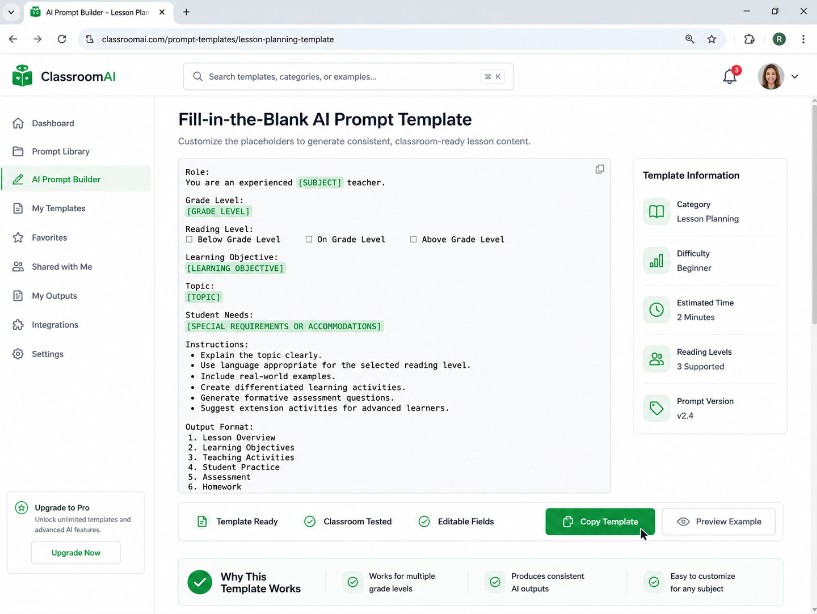
Here is the exact shape I now use for any new grade band or subject, based on everything above:
Any Grade Any Subject Resource Builder
One master template that swaps in for grade, subject, resource type, and format so you never rebuild a prompt from scratch
Act as a [grade level] [subject] teacher. Create a [type of resource] for [topic or standard].

Keep sentences appropriate for a [grade level] reading level.

Include [specific rule, such as a teacher note, a rubric line, or an extension question].

Format as [bullet points, a table, or numbered sections].
I fill in the brackets differently every time, but the skeleton stays the same, and it works whether I am asking for a lesson plan, a reading passage, a set of exit tickets, or a parent communication draft.
Final Thoughts
I did not expect a set of text prompts to change how I plan an entire semester, but that is exactly what happened. The difference was never really about the AI being smart. It was about me finally being specific. Once I named the grade, the subject, the reading level, and the exact format I needed, every single output got dramatically better.
If you teach a mixed ability classroom and you are still writing three versions of every lesson by hand, start with one grade level specific prompt this week. Test it on one lesson. Time yourself. Then decide if it earns a permanent spot in your planning routine the way it did in mine.
FAQ’s
Do grade level AI prompts actually save teachers time?
In my own semester long test, yes. My differentiated planning time dropped by more than half once I switched from vague requests to structured, rule based prompts.
Can AI fully replace differentiated lesson planning?
No. Every output I used still needed a human review pass, especially for factual accuracy and standard alignment. Think of it as a fast first draft, not a finished product.
What is the biggest mistake teachers make with these prompts?
Being too vague. A prompt without a named grade level, subject, and format will always produce something you have to rewrite from scratch anyway.
Which AI tool works best for building a mega prompt for lesson planning?
Any major chatbot can handle single prompts well. For longer, multi part instructions that need to be followed consistently across a whole semester, a tool that holds detailed, multi step instructions with strong consistency will save you more editing time in the long run.

Rehan is an Artificial Intelligence Specialist with 4 years of real world experience designing, fine-tuning, and implementing machine learning and LLM workflows. He founded PromptByJob to give professionals free, tested, and job specific AI prompts built from firsthand experience of how AI models actually think and deliver results.