This playbook collects seven AI prompt templates for school counselors, organized around two common planning tasks: outlining workshop agendas and summarizing student success metrics. Each template is written to be copied into ChatGPT, Claude, or a similar tool and adjusted for your grade level, group size, and goals. Treat the prompts as starting points rather than professionally validated materials, and review and edit any output before it is used with students, parents, or administrators.
This is not a general list of AI prompts for education. It focuses on tasks school counselors commonly handle, such as planning a workshop, choosing aggregate indicators, and explaining results to a principal or to parents. For each prompt you will see the exact wording, what it is designed to do, and how to adapt it. Later sections cover what goes wrong when a prompt lacks context and a set of privacy and professional-judgment guidelines.
Why I Started Building an AI Prompt Playbook as a School Counselor
School counselors are often asked to balance very different kinds of work: planning programs, working with data, responding to student needs, and communicating with families and administrators. Workshop planning and results reporting are two tasks that can take significant preparation time, which is why they are the focus of this playbook. The ASCA National Model, published by the American School Counselor Association, is a useful reference for the program-planning and data side of the work.
Many AI prompt lists are written with classroom teachers in mind. Counselor work overlaps with teaching in places, but it also includes tasks such as small group curriculum, college readiness presentations, MTSS check-ins, and annual program summaries. The prompts below are written with those tasks in mind, and each one is a template to adapt rather than a finished product.
A prompt that gives the AI a clear role, specific context, and an output format is more likely to return something usable than a vague request. Vague prompts tend to produce vague answers, so each template below states the grade level, group size, and goal up front.
What Makes a Counseling Prompt Actually Work
Before the prompts, it helps to understand the structure behind them. Each template follows a similar pattern drawn from basic prompt engineering principles: a role, specific context, and a requested format, adapted here for school counseling tasks.
Give the AI a Role:
Opening a prompt by telling the model who it should act as is called role prompting. For example: act as an experienced middle school counselor planning a parent workshop. A role like this tends to narrow the tone and vocabulary of the response so it reads less like generic corporate training material. The role only shapes the style of the answer. It does not make the output professionally reviewed or reliable.
Provide Real Context Without Real Names:
Include the grade level, setting, group size, and goal of the session. Leave out real names and any other identifying details, and describe a composite or hypothetical situation instead. This keeps the output relevant while avoiding identifiable student information. Privacy requirements for student records, including FERPA and your district’s own policies on AI tools, still apply, so check them before entering any information into an AI tool. The responsible-use section below covers this in more detail.
Ask for a Specific Format:
If you do not say how you want the output structured, AI tools often return long blocks of paragraphs that need reformatting. Asking for a table, a numbered timeline, or bullet points with time stamps makes the result easier to scan and edit.
Request a Reason for Each Suggestion:
For workshop agendas especially, ask the model to briefly explain why it placed each activity where it did. This turns the output from a random list into something closer to an instructional design rationale, and it makes weak spots easier to catch before you run the session. Treat the explanations as reasoning to evaluate, not as evidence. The model may state reasons confidently even when they are wrong.
The Exact Prompts I Use to Build Workshop Agendas
These are the four prompts for building a workshop agenda. Each can be adapted for elementary, middle, or high school audiences by changing the grade level, group size, and topic. The structure stays the same.
Prompt One: The Needs Based Opening Prompt
Use this at the very start of planning, before you have decided on activities.
Ranked Outcomes for a Stress Workshop
The top five outcomes for a pre-exam stress workshop, ranked by urgency, with a short rationale for each
Act as a school counselor with fifteen years of experience running student workshops. I am planning a forty five minute workshop for tenth grade students on managing academic stress before final exams. The group will have around twenty five students.

List the top five outcomes this workshop should achieve, ranked by how urgent they are for this age group, and briefly explain why each outcome matters. If you refer to research, name the source so I can verify it, and tell me clearly when you are not sure.
This prompt works well as a first step because it asks the AI to settle the goals of the workshop before choosing any activities. Planning from outcomes toward activities is a common approach in instructional design. Starting with icebreakers puts the activities ahead of the reasons for them.
Prompt Two: The Time Blocked Agenda Builder
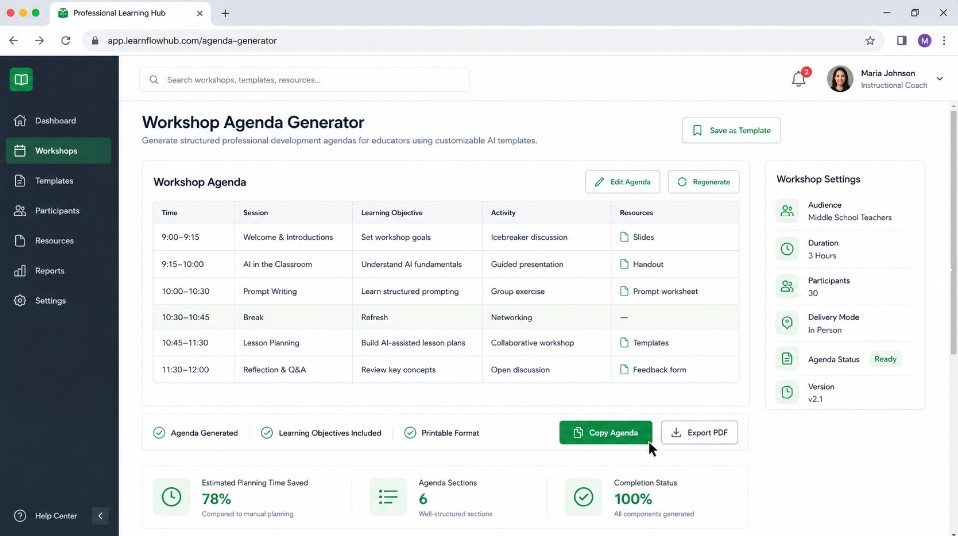
Prompt Two repeats Prompt One as its first step and then adds a second step that turns the confirmed outcomes into a timed agenda. Use it when you want both steps in one reusable template.
Stress Workshop Outcomes to Agenda
A two-step prompt that turns a ranked outcome list into a timed agenda table with purpose and materials
[STEP 1: OUTCOME LOCK]
Act as a school counselor with fifteen years of experience running student workshops. I am planning a forty five minute workshop for tenth grade students on managing academic stress before final exams. The group will have around twenty five students.

List the top five outcomes this workshop should achieve, ranked by how urgent they are for this age group, and briefly explain why each outcome matters based on adolescent development research.

Do not draft any agenda, activities, or timing yet. Wait for confirmation that this outcome list is correct before moving to Step 2.

[STEP 2: AGENDA BUILD]
Using the outcomes below, build a forty five minute workshop agenda for high school students on managing academic stress. Present it as a table with columns for time, activity name, purpose, and materials needed.

Include a two minute buffer at the end for questions.

Outcomes: [paste the outcomes from Step 1 here]
Requesting a table makes the output easier to paste into Google Docs or slides. Expect to still check and adjust the timing, wording, and materials to match your room, your schedule, and your group.
Prompt Three: The Engagement and Icebreaker Prompt
Some groups need extra help warming up, especially first period workshops or groups that do not know each other well.
No Materials Stress Themed Icebreakers
Three five minute icebreakers for teens that open the door to a stress and coping workshop instead of just filling time
Suggest three low prep icebreaker activities appropriate for fifteen to seventeen year olds that connect thematically to academic stress and coping skills.

Each should take five minutes or less and require no materials beyond paper.

Explain the connection between each icebreaker and the workshop theme.
Prompt Four: The Follow Up and Feedback Prompt
After the workshop, use this prompt to draft a short feedback survey.
Post Workshop Stress Survey
A short five-question feedback survey in plain language for students to complete after the session
Write a short five question feedback survey for high school students to complete after a workshop on managing academic stress.

Include a mix of rating scale questions and one open ended question.

Keep the language simple and avoid clinical terminology.
The survey responses can serve as raw material for the metrics section below, which covers how to organize and report the results.
How I Turn Raw Data Into Student Success Metrics With AI
Building a workshop is only half the job. The other half is showing what happened and explaining it to people who do not have time to read a spreadsheet. Simple self-reported ratings can show how students described their experience, but they cannot by themselves prove that a workshop caused a change. The prompts below help you choose indicators, organize aggregate results, and write plain-language summaries. For a framework describing the social and emotional skills behind many workshop goals, see CASEL’s SEL framework.
Prompt Five: The Baseline Data Prompt
Before any workshop, use this prompt to think through what you should measure.
Privacy Safe Workshop Impact Indicators
“Three before-and-after indicators, requested without identifiable student data”
Act as a program evaluation specialist working in K12 education. I am launching a workshop series on academic stress management for tenth graders.

Suggest three measurable indicators I could track before and after the series to show impact, avoiding anything that requires identifiable student data.

Explain how each indicator connects to the workshop goals.
This prompt may return options such as self-reported stress ratings, counselor referral rates, and attendance at optional follow-up sessions. Pick the two or three that fit your school’s existing systems, since a metric you cannot realistically collect is not useful no matter how good it sounds. Be cautious with indicators such as referral counts or attendance in small groups, where even aggregate numbers can point to individual students.
Prompt Six: The Progress Monitoring Prompt
Once you have collected a round of data in aggregate form, use this prompt to help organize your interpretation of it.
Aggregate Survey Pattern Check
Summarize patterns, flag results that do not fit, and suggest two follow-up questions for the next cycle
Here is a summary of aggregate, de identified survey results from a workshop series: [paste general trends, no names or scores tied to individuals].

Identify any patterns worth highlighting, note any results that seem inconsistent with the others, and suggest two follow up questions I should explore in the next data cycle.
Do not put student-level data into public AI tools. Enter only aggregated trends that cannot be tied back to a specific student, and be careful with very small groups, where even summary numbers can point to individuals. If you are unsure whether a piece of data is safe to enter, check your district’s policy or ask your administrator or district privacy contact first.
Prompt Seven: The Metric Translation Prompt
Use this prompt when you need to explain results to people who are not counselors, such as a principal or parents.
Principal Brief and Parent Newsletter Blurb
One data summary rewritten twice, a thirty second principal brief and a plain language parent newsletter version
Translate this data summary into a short paragraph a school principal could read in under thirty seconds, focused on the impact of the workshop program rather than raw numbers: [paste data summary here].

Then write a second, simpler version suitable for a parent newsletter.

Avoid jargon in both versions.
Administrators and parents do not always use the same language counselors do. Asking the AI for two separate versions of the same summary, one for school leadership and one for families, saves you from rewriting the same report by hand for each audience. Always compare both versions against your original data before sharing them.
An Illustrative Example: Planning a Test Anxiety Group (Hypothetical)
The following is a hypothetical scenario, not a report of a real workshop or real results. Imagine a counselor planning a six-week small group on test anxiety for eighth graders whose benchmark assessment scores are lower than their classroom grades would suggest. The counselor could use Prompt One to rank the outcomes for the series, Prompt Two to turn those outcomes into a weekly agenda, and Prompt Three to choose warm-up activities for the first sessions. The prompts above are written for a single forty-five minute workshop for tenth graders, so the grade level, number of sessions, and topic would need to be changed before use.
To track the series, the counselor could ask students to rate their test-day stress on a simple five-point scale at the start and end of the group, and record only the total number of students at each rating, not individual responses. Prompt Six could then help organize those aggregate counts, and Prompt Seven could turn them into a short principal summary and a parent newsletter version. Whatever the results show, the summary should describe them as self-reported and should not claim that the group caused the change. In a small group, self-reported ratings give only a limited picture.
What Happens When You Skip Context
It helps to know what goes wrong when a prompt is missing key details, so this section walks through three common problems.
Consider a request as basic as: give me a workshop on stress for students. With no grade level, group size, or goal, the AI has nothing to tailor its answer to, so the result is likely to be flat and generic, the kind of output that could apply to any grade level or any school. It reads as if it were written for nobody in particular, because it was.
If you leave out the target grade level, the result can swing between content that is too young and content that is too advanced for your real audience. If you do not ask for a table or timeline, you may get a block of text that you have to restructure by hand, which cancels out some of the time you hoped to save. And if you include real student names or test scores, you may create a serious privacy problem under FERPA or your district’s policies. Never enter identifying student information into a public AI tool.
The lesson across all of these situations is the same. The quality of what you get back is almost always a direct reflection of the quality and specificity of what you put in.
My Rules for Using AI Responsibly as a Counselor
These are general guidelines to follow every time you use an AI tool for school-related work. They are good practice, not legal advice, and they do not replace your district’s policies.
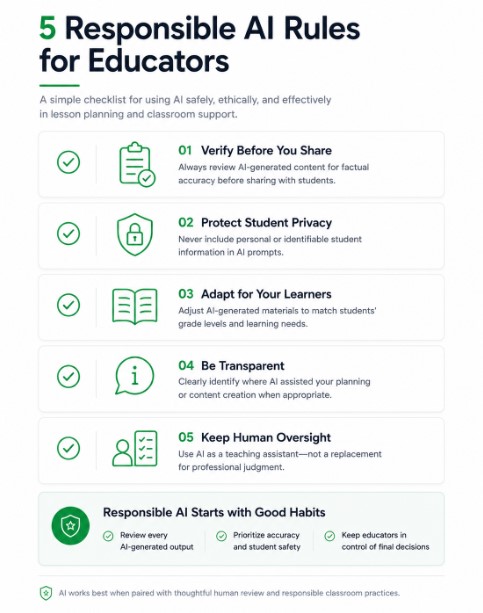
Do not enter a student’s full name, ID number, or any other individually identifying detail into a public AI chatbot. Work only with de-identified, aggregated, or hypothetical scenarios, and remember that very small groups can still be identifiable. Review and edit every AI-generated response before it reaches a student, parent, or administrator, because these tools can produce confident-sounding information that is simply wrong. Check each suggestion against your district’s policies and your FERPA obligations before using it in any official capacity. And do not let AI make clinical judgments about a student’s mental health or safety. Concerns about a student’s wellbeing or safety should be handled by qualified staff following your school’s established procedures.
If you also plan lessons or classroom activities, you can try the Teacher Prompt Generator.
How to Build Your Own Counselor Prompt Playbook
If you want to build your own set of AI prompts for school counselors, here is a simple process you can follow.
Start by listing the five tasks that take up the most of your time each month. For many counselors this might include workshop planning, parent communication, data summaries, meeting agendas, and small group curriculum, but your list should reflect your own job. Next, choose one of those tasks and write a first prompt using the structure above: a role, realistic context without identifying details, and the output format you want. Run the prompt three or four times, adjusting the wording each time based on the results, and save the version that works best in a simple document.
Repeating this process for each of your recurring tasks gradually builds a personal playbook shaped by your own caseload, school culture, and reporting requirements, rather than a generic list copied from somewhere else. Keep every saved prompt free of student names and other identifying details so the document can be reused without carrying private information.
Final Thoughts
A useful collection of AI prompts for school counselors is built gradually, through small adjustments after prompts that fall flat. If you spend evenings preparing workshops or analyzing survey data, try one prompt from this list on a low-stakes task and adjust it to fit your students, your school, and your reporting needs. Keep the privacy and review guidelines above in mind each time, and treat every AI output as a draft that you review before anyone else sees it.
FAQ’s
Can AI replace a school counselor?
No. AI can speed up administrative work like agenda building and data summarization, but it cannot replace the relationship, judgment, and clinical training a human counselor brings to student support.
Is it safe to use ChatGPT with student data?
In general, identifying student information should not go into a public AI tool. Never enter names, ID numbers, health information, or discipline records, and remember that even aggregated data can point to individual students when groups are small. Follow your district’s technology and FERPA policies, and check with your administrator or district privacy contact before entering any student-related data. This is general information, not legal advice.
What is the best AI tool for school counselors?
There is no single best tool, and this article does not rank them. ChatGPT and Claude are two general-purpose assistants that can handle writing and planning tasks like the ones in this playbook, and both offer ways to save background instructions so you do not have to retype them. Check which tools your school or district has approved before using any of them, and confirm current features and privacy settings on each tool’s own website.
How do I measure whether a counseling workshop actually worked?
Choose two or three simple, aggregate indicators before the workshop starts, such as self-reported stress ratings or optional session attendance, and compare them before and after the series rather than trying to track dozens of metrics at once. Keep in mind that a before-and-after comparison shows whether the numbers changed, not why, so describe the results as what students reported rather than as proof that the workshop worked.

Rehan Malik is a blogger and the creator of PromptByJob. He publishes articles and prompt examples about using AI tools for different tasks. He uses AI-assisted drafting in his writing process. He is not a healthcare professional, and his nursing-related content should not be treated as medical advice or evidence of clinical testing.