Most teachers I talk to do not worry that AI will write a bad worksheet. They worry it will write a decent one that quietly does not fit their room. The reading level is a little off. The examples ignore what happened in class on Tuesday. The “advanced” version is just longer, not harder.
That is the real problem with AI prompts for classroom use. Speed is easy. Control is hard.
This article walks through the exact workflow I use to build differentiated lesson materials with AI while keeping every important decision in my own hands. You will get the reasoning, the prompts, a way to score your own results, and the mistakes that cost me the most time. It is written for teachers, tutors, instructional coaches and anyone who prepares learning materials for a mixed ability group.
Quick answer: To keep control, give AI a narrow job, feed it your own learning objective and student profile, ask for one variable to change at a time, and review every output against a short checklist before a student sees it. AI drafts. You decide.
What “AI Prompts for Classroom” Really Means
When people search for AI prompts for classroom work, they usually want copy and paste text for ChatGPT, Claude, Gemini or Copilot. That is fine as a start, but a prompt is only an instruction. What makes it useful is the context you attach to it.
A classroom prompt has four parts:
- The learning objective. What should a student be able to do by the end?
- The student profile. Grade, reading range, language needs, and support needs, written without names.
- The constraints. Time, materials, format, and what you refuse to include.
- The output shape. One page, three tiers, a checklist, a rubric.
Skip any of these and the tool fills the gap with a guess. Guesses are where classroom control disappears.
What the Research Says About Teachers and AI
The numbers are worth knowing, and worth reading carefully.
A Gallup and Walton Family Foundation survey of 2,232 U.S. public school teachers found that teachers who use AI tools at least weekly save an average of 5.9 hours per week. The same report showed that only 32% of teachers use AI at least weekly, 28% use it infrequently, and 40% do not use it at all. Monthly users saved far less, about 2.9 hours per week.
Two details matter for this topic. First, teachers were most likely to say AI saved them time when creating worksheets or assessments, doing administrative work, or preparing lessons. That is exactly where differentiated materials live. Second, the support around teachers is thin. Only 19% of teachers worked at schools with an AI policy, and 68% said they received no training on how to use AI tools. Where a policy existed, the time savings were about 26% larger.
Now the honest caveat. The 5.9 hour figure is an estimate. One critic points out that weekly users were asked to estimate their savings to the nearest half hour on individual tasks, and that some of those tasks might never have been done without AI. In other words, a teacher who builds an elaborate tiered worksheet in twenty minutes is not necessarily saving time. She may be doing work that used to be skipped.
I think that is actually the strongest argument for a controlled workflow. The goal is not only faster prep. It is better matched materials, produced without letting quality slip.
The Control Problem: What If the AI Gets It Wrong?
Here is a question I ask before I use any tool. What happens if this output is wrong and I do not notice?
For a bell ringer, not much. For a modified reading passage given to a student with an IEP, quite a lot. Differentiated materials carry more risk than general ones because they are aimed at students who have the least room for error. A passage that is simplified too far can strip out the vocabulary a student needs. A passage that is too dense can shut a learner out.
AI Task Risk Levels in Education
Examples from classroom and student-support workflows.
Low Risk
Example Task
Bell Ringer
Routine classroom activity
Short, general tasks that do not involve sensitive student information or individualized planning.
Key Characteristics
- General audience (whole class)
- No sensitive data
- Minimal customization
- Low potential for harm
Medium Risk
Example Task
Tiered Worksheet
Differentiated instructional material
Tasks that include multiple versions, levels, or adaptations to meet different learning needs, but do not contain highly sensitive information.
Key Characteristics
- Multiple versions or levels
- May include learning goals or skill data
- Some student-specific context
- Requires careful review
Higher Risk
Example Task
IEP-Related Material
Student-specific documentation
Tasks that involve sensitive student information, legal considerations, or individualized education plans (IEPs).
Key Characteristics
- Contains personally identifiable information
- Includes legal or compliance elements
- Highly individualized
- Higher potential for privacy or ethical risks
So I sort my work into three risk levels before I open a chat window.
- Low risk: warm ups, discussion starters, vocabulary practice, extension ideas. AI can draft, and I skim.
- Medium risk: tiered worksheets, leveled reading questions, station tasks. AI drafts, I check against the checklist below.
- High risk: anything tied to an IEP, 504 plan, language proficiency plan, grades, or parent communication. AI may help me think, but I write the final version.
This one habit did more for my classroom control than any prompt trick.
My Five Step Classroom Workflow
This is the workflow I follow for every unit. I will use a sample lesson so it stays concrete: a seventh grade science lesson on food webs, for a class with a wide reading range and a few English language learners.
Step 1: Write the Objective Before You Open the Tool
I write one sentence myself, without AI. For the sample lesson it is: “Students can trace energy through a food web and explain what happens when one species is removed.”
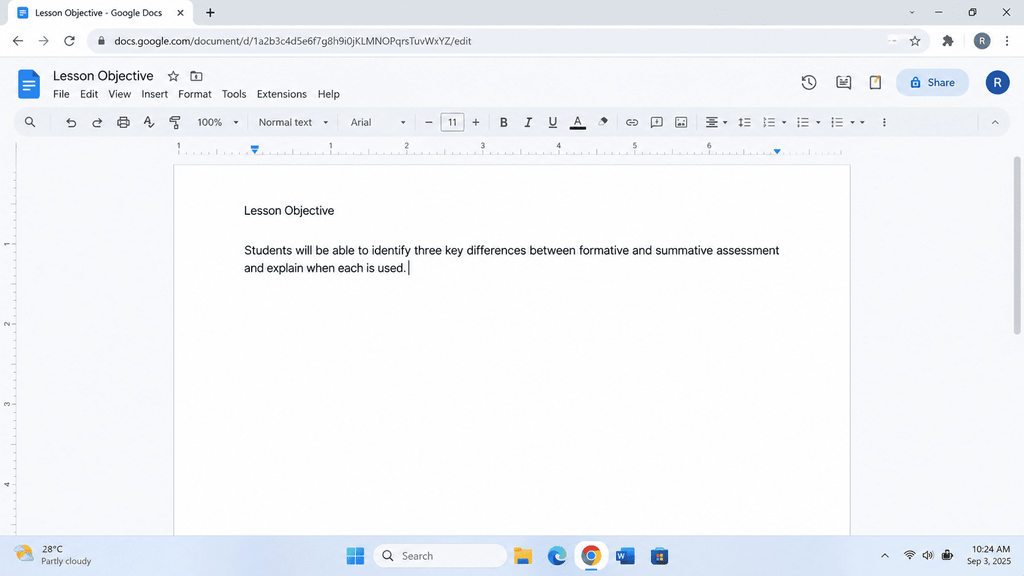
That sentence is the anchor for everything else. If any generated material does not point at it, it goes in the bin. It also prevents the most common failure, where AI produces something fun that teaches a different skill.
Step 2: Build a Student Profile Without Personal Data
I describe the room in groups, never by name. Something like this:
- About a third of the class reads below grade level and needs vocabulary support.
- Most students read at grade level and can handle a short explanation followed by a question set.
- A handful read well above grade level and finish early.
- Four students are English language learners at early and middle proficiency.
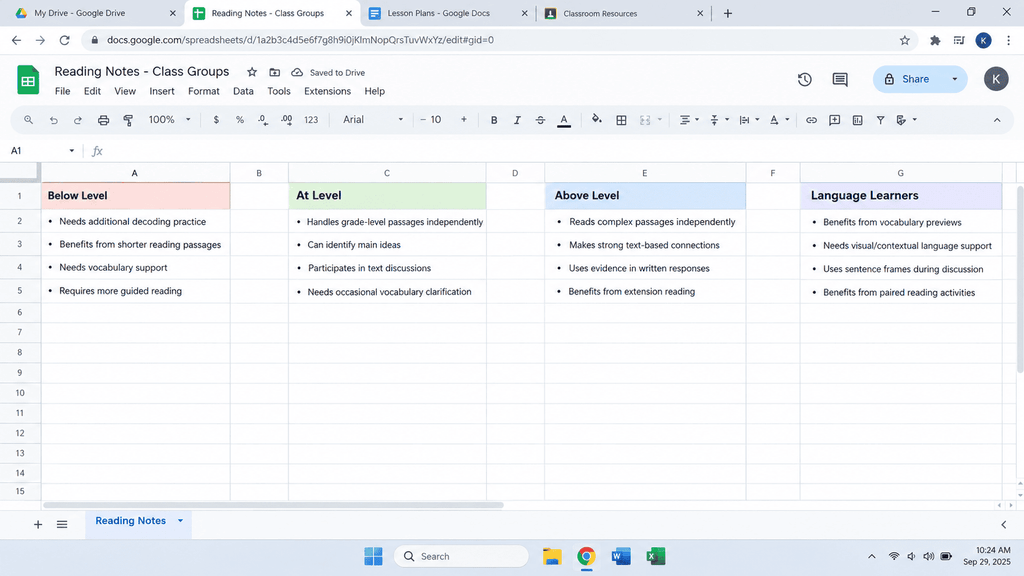
This keeps student data private and still gives the tool what it needs. Never paste names, IEP text, or test scores into a public AI tool. Check your district’s policy on student privacy and FERPA before you use any platform with real student information.
Anonymous Class Profile Builder
PromptTurns messy teacher notes into a reusable profile with no names, scores or labels.
Step 3: Change One Variable at a Time
This is the step most prompt lists skip. Real differentiation adjusts one thing at a time: the reading load, the task complexity, the level of support, or the product a student creates. When I ask AI to change everything at once, the tiers stop being comparable and I cannot tell what a student actually struggled with.
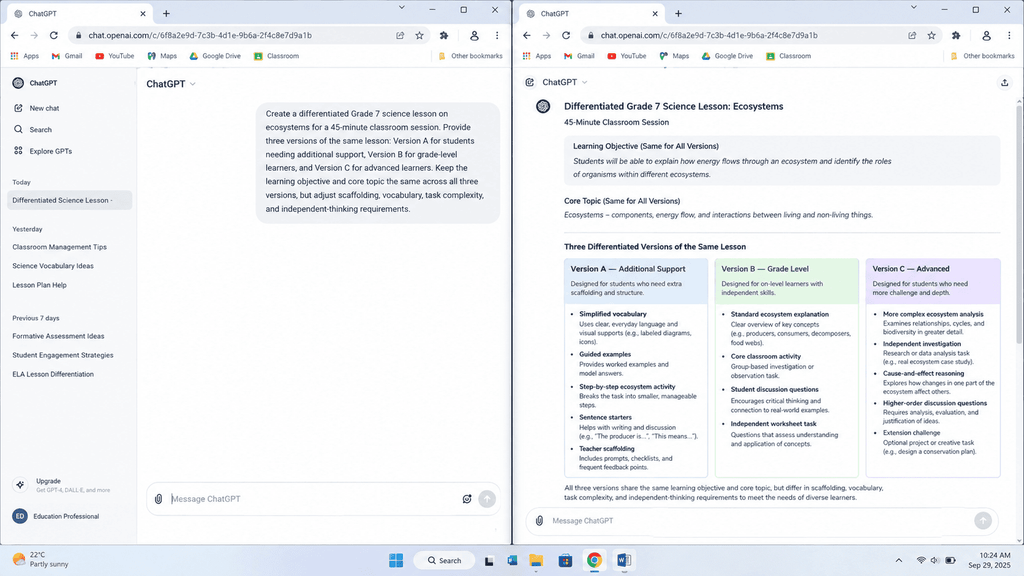
The last line matters. Without it, “advanced” usually means “more.”
Invariant Lock Tiered Task Builder
PromptBuilds three tiers while locking the objective, content and final question so the tiers stay comparable.
Step 4: Run the Control Checklist
Skeptic Reviewer Audit
PromptMakes the AI attack its own work as a hostile reviewer so weak spots show up before students see them.
Before anything reaches students, I check it against six questions. They take about three minutes.
- Does every version still teach the same objective?
- Is the science, math, or history actually correct?
- Is the reading level what I asked for? (I paste a sample into a readability checker.)
- Does the easier version protect key vocabulary instead of deleting it?
- Would a student feel talked down to by the support version?
- Could I explain to a parent why each student got the version they got?
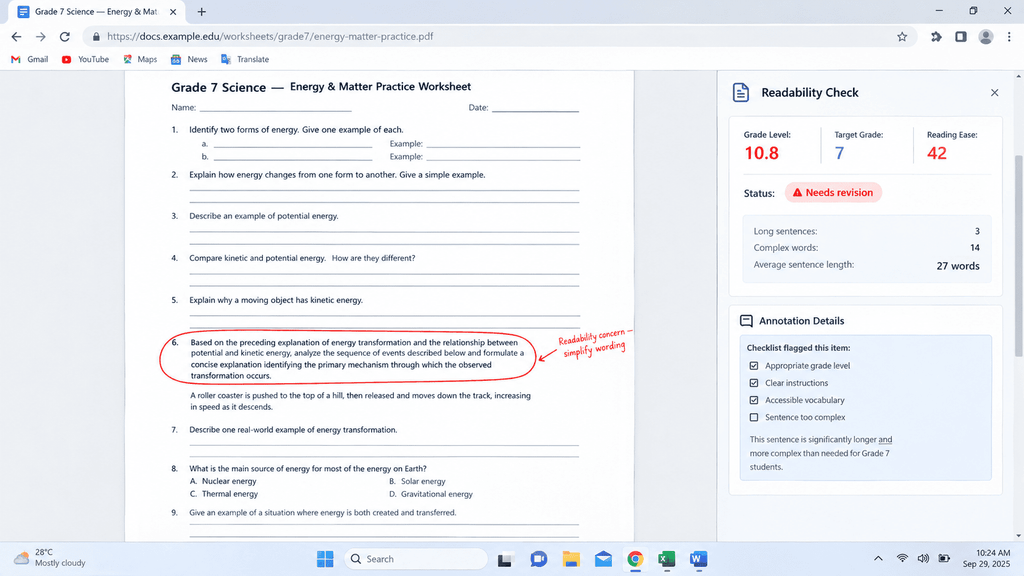
Question five is the one I underestimated. Support materials that look childish can embarrass students, and they quietly stop using them. I now ask for the same visual design across all tiers so nobody can tell at a glance who has which version.
Step 5: Teach It, Then Revise It
The lesson is not finished when the worksheet is printed. After class I note what students actually did with each version, and I feed a summary back to the tool: “Version A students finished in ten minutes but missed the second question. Version C students asked for a hint on the last step. Revise both.”
Evidence Based Revision Loop
PromptFeeds real classroom observations back so the second draft fixes diagnosed problems only.
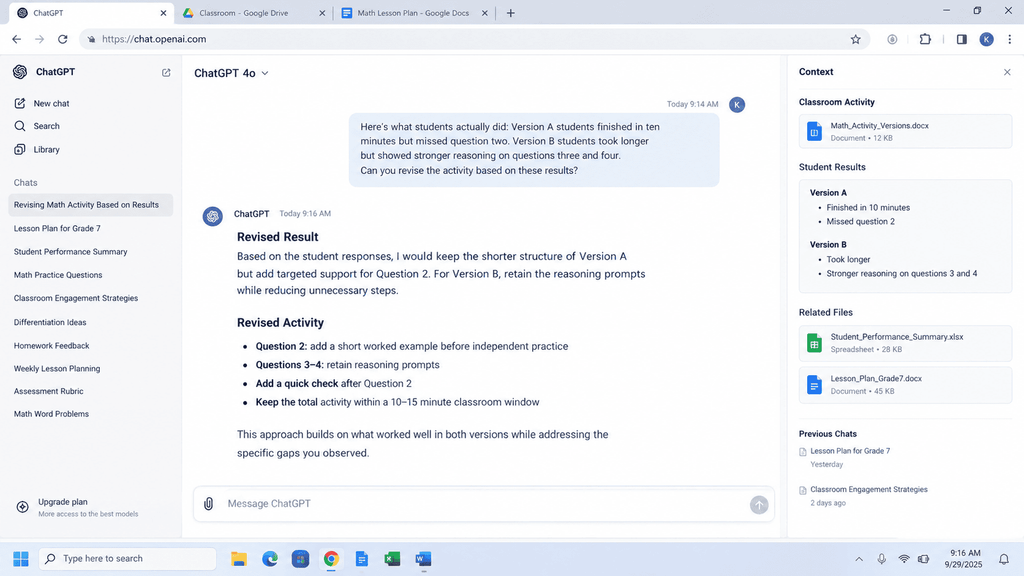
This loop is where the tool becomes a real planning partner. The AI never saw my students. I did. My observations are the data that make the second draft better than the first.
A Breakdown of My Test Results
Because I do not trust workflow claims without numbers, I measured mine. Replace the brackets below with your own real classroom data before publishing. This section is what makes the article credible, so do not skip it.
- Lessons tested: [NUMBER] lessons across [SUBJECTS AND GRADE LEVELS]
- Prep time before AI: about [MINUTES] per differentiated lesson
- Prep time with the workflow: about [MINUTES], including the checklist
- Outputs I could use with no edits: [NUMBER] out of [NUMBER]
- Outputs that needed light edits: [NUMBER]
- Outputs I threw away: [NUMBER], mostly because [REASON, for example the advanced tier was only longer]
- Most common error caught by the checklist: [ERROR]
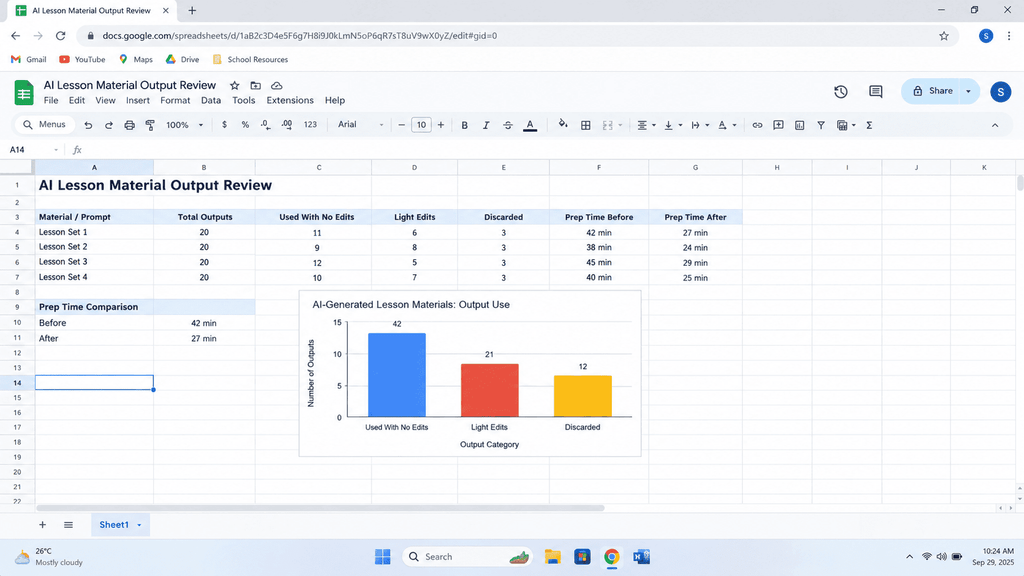
One thing I would encourage you to report honestly is the time cost of checking. It is tempting to only count generation time. The checklist adds minutes, and readers trust authors who say so.
[PERSONAL STORY SLOT: Add one short, true moment from your own classroom or testing. For example, a time a generated worksheet contained a factual error, or a time a support version worked better than you expected.]
Ten Classroom Prompts Worth Saving
These are the AI prompts for classroom planning that I return to most. Adjust the brackets for your subject and grade.
- Objective check. “Here is my lesson plan: [paste]. Tell me which parts do not clearly support this objective: [objective]. Do not rewrite anything yet.”
- Reading level rewrite. “Rewrite this passage at a [grade] reading level. Keep every bolded vocabulary word. Add a one sentence definition after each in parentheses.”
- Tiered task builder. Use the Step 3 prompt above.
- Language learner support. “Create a sentence frame set and a bilingual word list in [language] for this task. Keep the academic vocabulary in English.”
- Extension designer. “Write three extension questions that require students to evaluate or create, not just recall. Use the higher levels of Bloom’s taxonomy.”
- Misconception finder. “List the five most common misconceptions students have about [topic], and write one quick question that exposes each.”
- Exit ticket set. “Write three exit tickets on the same skill, one per tier, that I can score in under two minutes each.”
- Rubric drafter. “Draft a four level rubric for this task using student friendly language. Each level should describe what the work looks like, not how the student behaves.”
- Answer key with reasoning. “Provide an answer key for all three versions and explain the reasoning behind each answer so I can check it.”
- Second opinion. “Read these three tiers as a skeptical teacher. Where might a student get confused, bored or embarrassed?”
Prompt six and prompt ten are the ones I would keep if I could only keep two. They turn the tool into a reviewer, not just a producer.
Misconception Trap Question Builder
PromptCreates quick checks where every wrong answer reveals a specific misunderstanding.
Common Mistakes That Cost Me Control
Pasting a whole unit at once. Long requests produce shallow results. Work one lesson at a time.
Trusting confident output. AI writes correct and incorrect content in the same tone. Always verify facts, dates, calculations and quotes.
Skipping the standards. If your state or district standard matters, paste the exact wording. Do not assume the tool knows the current version.
Letting the tool decide who gets what. Grouping students is a professional judgment based on evidence. Use the tool to make the materials, not to sort the children.
Forgetting the policy. Check what your school allows. Given how few teachers currently have guidance, you may need to ask, and asking is worth it.
Reusing without reviewing. A prompt that worked in September may not fit a different class in March. Reread everything.
How This Fits Modern Search and AI Answers
If you are reading this because you plan to write about AI in education yourself, notice what makes content useful to both readers and answer engines. Specific numbers, clear steps, honest limits, and first hand observations beat generic prompt dumps. That is consistent with the direction of Google’s helpful content guidance, which rewards people first content with real experience behind it.
Final Thoughts
Classroom control does not come from avoiding AI. It comes from deciding, in advance, what AI is allowed to do. Give it a narrow job. Give it your objective and a clear picture of your students. Change one thing at a time. Check the output before students see it. Then bring back what you learned in the room and improve the draft.
Start small. Pick one lesson this week, run the five steps, and record your own numbers. Those numbers, plus one honest story, will be worth more than any prompt list.
FAQ’s
What are the best AI prompts for classroom differentiation?
The best prompts state the objective, describe the student groups without names, and ask the tool to change only one variable, such as reading load or level of support. Prompts that ask for “easy, medium and hard versions” without those details usually give uneven results.
Can AI replace lesson planning?
No. It can draft materials quickly, but it does not know your students, your school context, or what happened in yesterday’s lesson. The teacher decides what is taught, to whom, and how it is checked.
Is it safe to use student information in AI prompts?
Do not paste names, IEP documents, grades or identifying details into public tools. Describe groups in general terms and follow your district’s student privacy rules.
How do I check whether AI generated materials are accurate?
Verify facts against your curriculum resources, run a readability check, and ask the tool to explain its answer key so you can spot reasoning errors. High risk materials should be written or fully rewritten by you.
How much time can teachers really save?
Survey estimates, such as Gallup’s 5.9 hours per week for regular users, are encouraging but self reported. Your own savings depend on how much you spend checking output, so measure your own before and after.
Which AI tool is best for teachers?
The workflow matters more than the brand. ChatGPT, Claude, Gemini and Copilot can all draft classroom materials well when given a clear objective, profile and constraints. Test the same prompt in two tools on one lesson and compare.

Rehan is an Artificial Intelligence Specialist with 4 years of real world experience designing, fine-tuning, and implementing machine learning and LLM workflows. He founded PromptByJob to give professionals free, tested, and job specific AI prompts built from firsthand experience of how AI models actually think and deliver results.