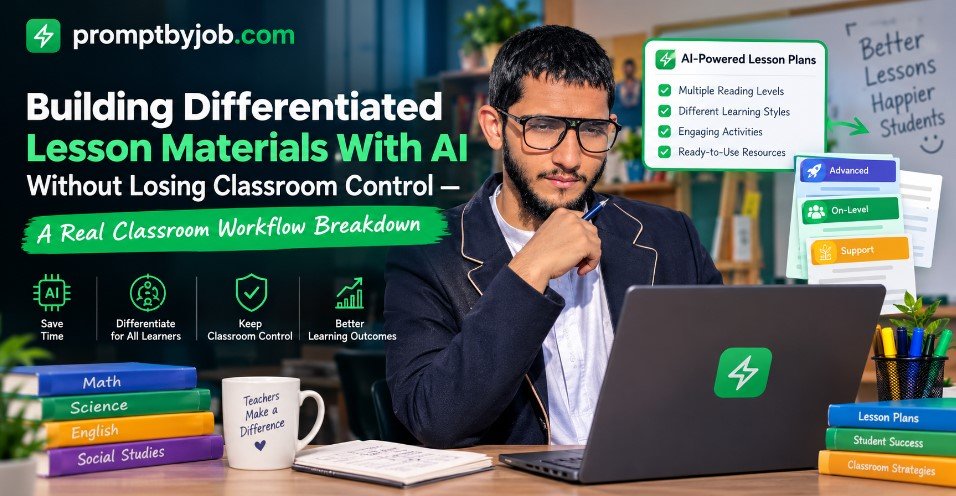
If you teach a mixed ability classroom, you already know how long it takes to write three versions of the same lesson. Grade level specific AI prompts can help you draft each version, but only if the prompt names the grade, the task, the constraints, and the output format. This guide shares six example prompts, a four part framework for building your own, and a short list of things to check before you use any AI output with students.
The prompts below are examples to adapt and review, not finished materials. Paste one into an AI chat tool, swap in your own passage, topic, or standard, and check the result against your students’ needs before it reaches the classroom.
What Differentiated Instruction Actually Means When You Add AI Prompts
Differentiated instruction is the practice of adjusting content, process, and product so students at different readiness levels can work toward the same learning goal. Carol Ann Tomlinson is one of the educators most closely associated with the approach. You are not lowering the bar for some students and raising it for others. You are changing the path to the same destination.
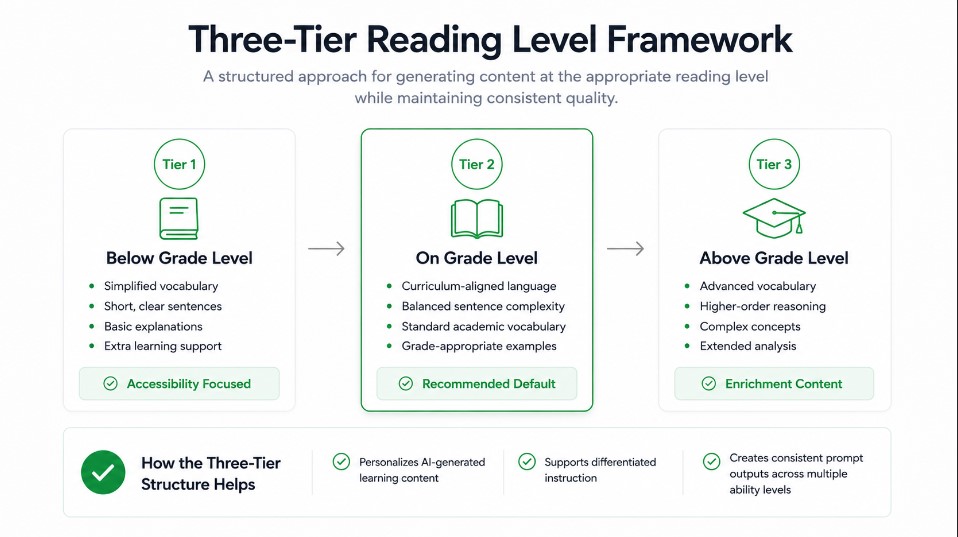
What AI changes is how quickly you can get a first draft of that path. Writing a below level version, an on level version, and an above level version of one reading passage by hand can take a large share of a planning period. With a structured prompt, an AI tool can produce all three drafts in a few minutes, and your time shifts to reviewing and adjusting them instead of drafting from a blank page. That review step is still yours, and it is where most of the quality comes from.
Specific beats generic. A prompt that says write a lesson plan for kids tends to return a generic draft. A prompt that names the exact grade, the exact standard, and the exact output format gives the AI enough to produce a draft you can review and adapt for tomorrow’s lesson.
Why Grade Level Specific Prompts Matter
Different grade bands need different things from a prompt, so a one size fits all prompt rarely works. Here is what each band usually needs:
- Early elementary: short sentences and heavy scaffolding
- Middle school: choice and independence built in
- High school: rigor, source analysis, and real world application
If you want to know whether a prompt actually saves you time, measure it. Time yourself writing one three tier lesson by hand, then time the full process of generating and editing the same lesson with a prompt. Compare both the time and the quality, not just the speed.
The Framework I Used to Build Grade Level Specific AI Prompts
The prompts in this article follow a simple four part structure: Role, Task, Rules, Format. It is a quick way to check that a prompt covers who the AI should act as, what you want, what limits apply, and how the answer should look.
Role
Open by telling the AI what kind of teacher or specialist to act as. For example, act as a second grade reading specialist, or act as a tenth grade chemistry curriculum designer. A role line can shift the tone and vocabulary of the response, but it does not make the AI an expert, so the grade level, task, and rules still do most of the work.
Task
This is the actual ask. Create a lesson plan, rewrite a passage at three reading levels, build a station rotation, generate an exit ticket bank. One clear task per prompt, not five stacked together.
Rules
This is the part that is easiest to skip, and it is where much of your control comes from. Rules are the constraints. Keep sentences under twelve words for this grade band. Do not introduce vocabulary above a third grade reading level. Include a teacher note explaining what changed between versions. Align to this specific standard code.
Format
Specify exactly how you want the output structured: bullet points, a table, a numbered list, or a specific number of questions. Without this, the AI chooses a format for you, and it may not suit the document or tool you plan to paste the output into.
Once you have this four part skeleton, building a prompt for a new grade band is mostly a matter of swapping in the grade, subject, rules, and format.
Elementary Grade Prompts I Tested (K to 5)
For younger students, the biggest needs are usually reading level control and heavy visual scaffolding. Here is an example prompt you can adjust for each grade:
Three Level Reading Rewrite
The one prompt that keeps the main idea locked while the reading level moves
Act as a first grade reading specialist. Rewrite this passage at three reading levels: below grade level, on grade level, and above grade level. Keep the core vocabulary and main idea the same across all three versions.

For the below grade level version, shorten sentences, add context clues, and preview any tricky words.

For the above grade level version, add one critical thinking extension question.

Add a short teacher note under each version explaining exactly what changed and why.

Format as three clearly labeled sections.
The teacher note under each version is the most practical part of this prompt. Because it explains the reasoning behind each change, not just the change itself, it gives you something to check the rewrite against and something to refer back to if a parent or colleague asks how a version was adapted. Read each note against the original passage before you rely on it.
For math, here is a tiered assignment prompt:
Tiered Multi Step Word Problems
Three ready to print assignments built off the same word problems, sorted by support level
Act as a fourth grade math teacher. Give me three tiered assignments on solving multi step word problems, with varying levels of complexity and support.

Include a version with a visual model for struggling students, a version at grade level, and a version with an added extension problem for advanced students.

Keep the numbers realistic for fourth graders.
Middle School Grade Prompts I Tested (6 to 8)
Middle school students often benefit from having some choice, so prompts for this band can lean on options instead of pure reading level splits. Here is an example choice board prompt:
Six Mode Novel Unit Choice Board
One prompt, six activities across writing, drawing, discussion, and project modes, each with its own rubric line
Act as an eighth grade English language arts teacher. Create a choice board with six activities for a class studying a novel unit. Each activity should use a different mode, such as writing, drawing, discussion, or a short project.

Include clear instructions for each activity and a simple rubric line for how each will be graded.

Keep the tone appropriate for thirteen year olds.
For English language learners at different proficiency stages in the same class period, a scaffolding prompt can help. Here is an example
Theme Identification Scaffolds for ELLs
Two scaffolding strategies for theme identification, sized for a forty five minute period
Act as an inclusive middle school teacher focused on supporting English language learners. Suggest two ways to scaffold the identification of theme in a short story for a student at the developing proficiency level.

Keep the strategies practical for a forty five minute class period with twenty eight students.
High School Grade Prompts I Tested (9 to 12)
igh school students often need rigor and real world framing more than simplified language, so the prompts shift again. Here is an example for tenth grade geometry:
Three Tier Geometric Proof Sets
One problem set rebuilt for three readiness groups without losing the shared learning objective
Act as a tenth grade geometry teacher. I have three distinct readiness groups in this class. Generate three versions of this problem set on geometric proofs, one with additional scaffolding and guided steps, one at standard difficulty, and one with a stretch challenge that requires students to justify each step in writing.

Preserve the same core learning objective across all three versions and explain the reasoning behind each version.
For discussion based classes, a prompt like this can help you anticipate student questions before a new unit. Here is an example:
Skeptical Student Question Bank
Ten tough questions a skeptical twelfth grader might ask during a supply and demand lesson
Act as a skeptical twelfth grade student who does not think this topic matters. Generate ten tough questions this student might ask during a lesson on supply and demand.

Include questions that challenge the relevance of the topic and the reliability of typical textbook examples.
One way to use the output is to pick two or three of the questions as a warm up and have students discuss them in pairs. If you try it, note how students respond so you can judge whether it works for your class.

How I Adjusted Reading Levels Without Changing Core Content
The most useful habit is to separate content from reading level before you type a prompt. If you ask an AI to simplify a passage, it may simplify the ideas along with the language, which means the below level group ends up learning less content, not just reading easier sentences.
The fix is to add one explicit rule to the prompt: keep the key ideas and vocabulary concepts identical across all versions, and only adjust sentence length, sentence complexity, and word choice. Then compare the versions side by side with the original to confirm they teach the same thing. Only the entry point should change, which is the whole point of differentiation.
What to Check Before You Use AI Output
Measure your own time savings
Time savings vary by teacher, subject, and how much editing a draft needs, so it is worth measuring your own. Time how long a three tier lesson takes you by hand, then time the full process with a prompt, including review and editing. Run that comparison on a few lessons before deciding whether a prompt earns a permanent place in your routine.
Where AI output needs checking
AI output needs a human check in at least three places. First, AI tools can state invented or inaccurate numbers, dates, and statistics, especially in social studies content, so verify every historical figure or statistic before using a passage with students.
Second, a below level version can come out sounding too young for the students who will read it. Fourth graders reading at a first grade level still want fourth grade appropriate topics and tone, not toddler phrasing.
Third, AI tools can cite the wrong or an outdated standard code, so check any standard alignment against your own state curriculum document.
None of this makes the prompts useless, but it is why grade level AI prompts work best as a first draft engine, not a replacement for teacher judgment. Review and edit every output before it reaches a student.
My full model comparison covers how each AI handled compliance-sensitive tasks specifically.
It is off-topic for this article and mentions “compliance-sensitive tasks”. If you want to keep a link to that article, use a neutral sentence in the FAQ instead, but only after confirming that article is accurate.
Common Mistakes Teachers Make With Differentiated AI Prompts
These are common mistakes to avoid when you write differentiated AI prompts.
Being vague. A request like write a lesson plan for my class does not name the grade level, subject, or format, so the AI has to guess. Vague input tends to produce vague output.
Asking for everything at once. A full unit, three reading levels, a quiz, and a parent letter in one prompt is a lot of tasks for a single request. Splitting them into separate prompts gives you more control over each piece.
Skipping the rules. Without constraints like reading level, sentence length, or standard alignment, the AI is more likely to return a generic, middle of the road answer that fits no group well.
Not saving prompts that work. If you do not keep your working prompts somewhere, every week feels like starting over. A simple running document, organized by grade band and subject, makes them easy to reuse.
My Grade Level Specific Prompt Templates You Can Copy
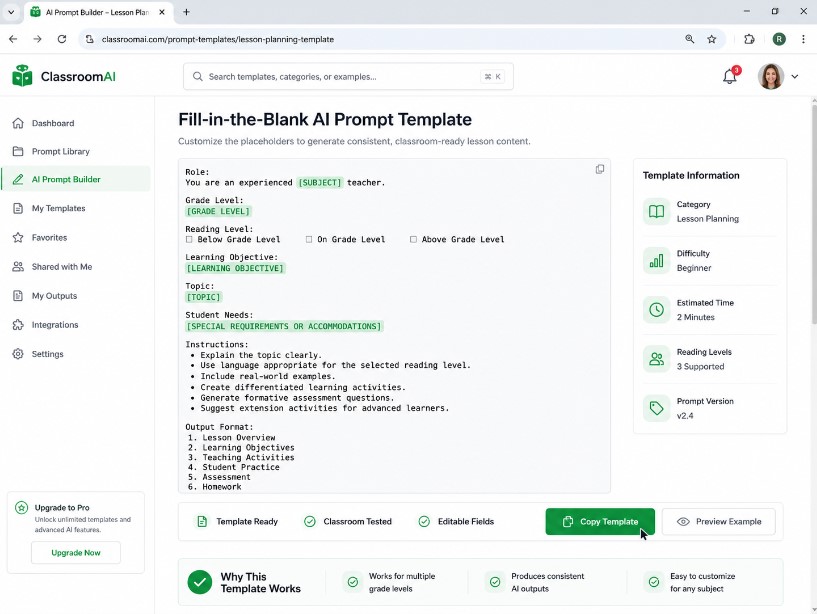
Here is a reusable shape for any new grade band or subject, based on the framework above:
Any Grade Any Subject Resource Builder
One master template that swaps in for grade, subject, resource type, and format so you never rebuild a prompt from scratch
Act as a [grade level] [subject] teacher. Create a [type of resource] for [topic or standard].

Keep sentences appropriate for a [grade level] reading level.

Include [specific rule, such as a teacher note, a rubric line, or an extension question].

Format as [bullet points, a table, or numbered sections].
Fill in the brackets differently each time and keep the skeleton the same. You can adapt it for a lesson plan, a reading passage, a set of exit tickets, or a parent communication draft. Review each output before it goes to students or families.
Final Thoughts
Grade level AI prompts work best when you are specific. Naming the grade, the subject, the reading level, and the exact format gives the AI the information it needs to produce a usable first draft, and your review is what turns that draft into something you can teach from.
If you teach a mixed ability classroom and you are still writing three versions of every lesson by hand, start with one grade level specific prompt this week. Test it on one lesson and time yourself. Then decide whether it earns a permanent spot in your planning routine.
FAQ’s
Do grade level AI prompts actually save teachers time?
They can, but it depends on your subject, your students, and how much editing each draft needs. Prompts that name the grade, rules, and format give the AI more to work with than vague requests, which can reduce rework. The most reliable way to find out is to time your own process with and without a prompt.
Can AI fully replace differentiated lesson planning?
No. Every AI output still needs a human review pass, especially for factual accuracy and standard alignment. Think of it as a fast first draft, not a finished product.
What is the biggest mistake teachers make with these prompts?
Being too vague. A prompt without a named grade level, subject, and format is more likely to produce something you have to rewrite from scratch.
Which AI tool works best for building a mega prompt for lesson planning?
This article does not rank AI tools, and the example prompts are plain text, so you can paste them into the chatbot you already use. If you are choosing between tools, run the same prompt on a lesson you know well in each one and compare how closely the output follows your rules, how accurate it is, and how much editing it needs.

Rehan Malik is a blogger and the creator of PromptByJob. He publishes articles and prompt examples about using AI tools for different tasks. He uses AI-assisted drafting in his writing process. He is not a healthcare professional, and his nursing-related content should not be treated as medical advice or evidence of clinical testing.