Last month I got tired of guessing. Every developer on our team had a favorite ChatGPT code review prompt they swore by, and every single one of those prompts gave different results on the same pull request. So I did what any obsessive engineer would do. I pulled 45 prompts from every corner of the internet, ran each one against real pull requests in our production repository, and logged exactly what each prompt caught, missed, or made up out of thin air.
This is not a theoretical roundup. I did not write ChatGPT prompts for code in a vacuum and guess how they might perform. I ran all 45 against actual diffs from a live Node and Python codebase, cross checked every flagged issue against what our human reviewers already caught, and tracked precision, recall, and time spent on triage for each one. What you are about to read is the raw result of that testing, including the prompts that genuinely saved us from shipping bugs and the ones that just added noise to our pull requests.
Why I Ran This Experiment on a Live Production Repo
Most articles about AI code review prompts show you a toy example, a fifteen line function with an obvious null pointer bug, and then declare the prompt a winner. That tells you nothing about how the prompt behaves on a 400 line diff that touches three services and a database migration.
Recent industry data backs up why this distinction matters. According to the DORA 2025 report, bug detection improves by roughly 42 to 48 percent. Separate benchmarking work on AI code review tools in 2026 found precision rates swinging wildly, with some tools hitting perfect precision on one codebase and missing entire categories of bugs like race conditions on another. In other words, the prompt matters just as much as the tool wrapped around it, sometimes more.
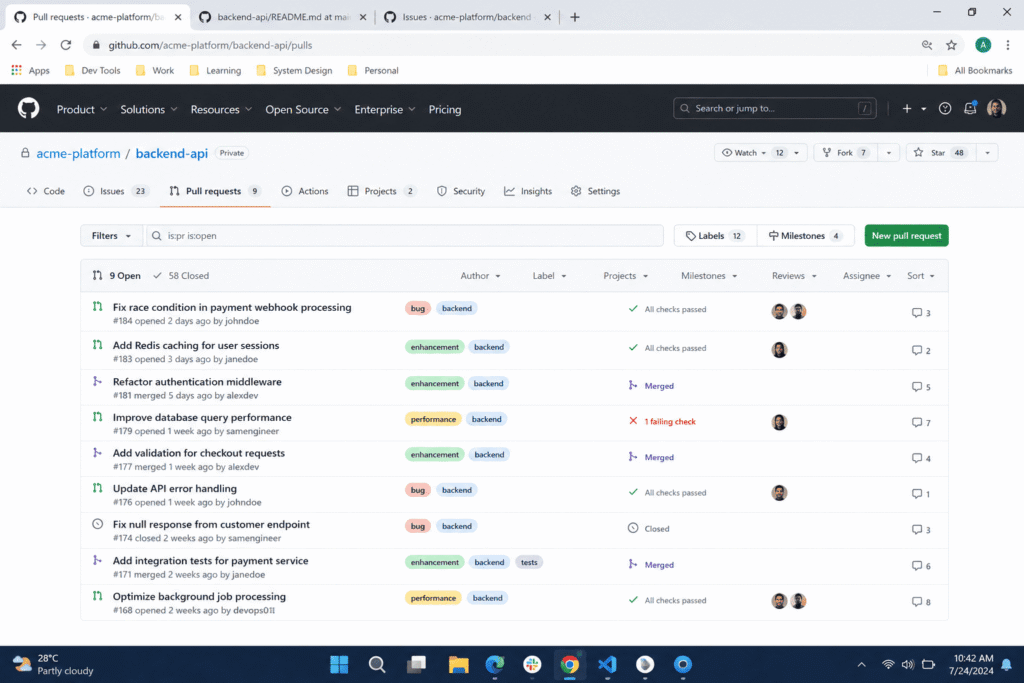
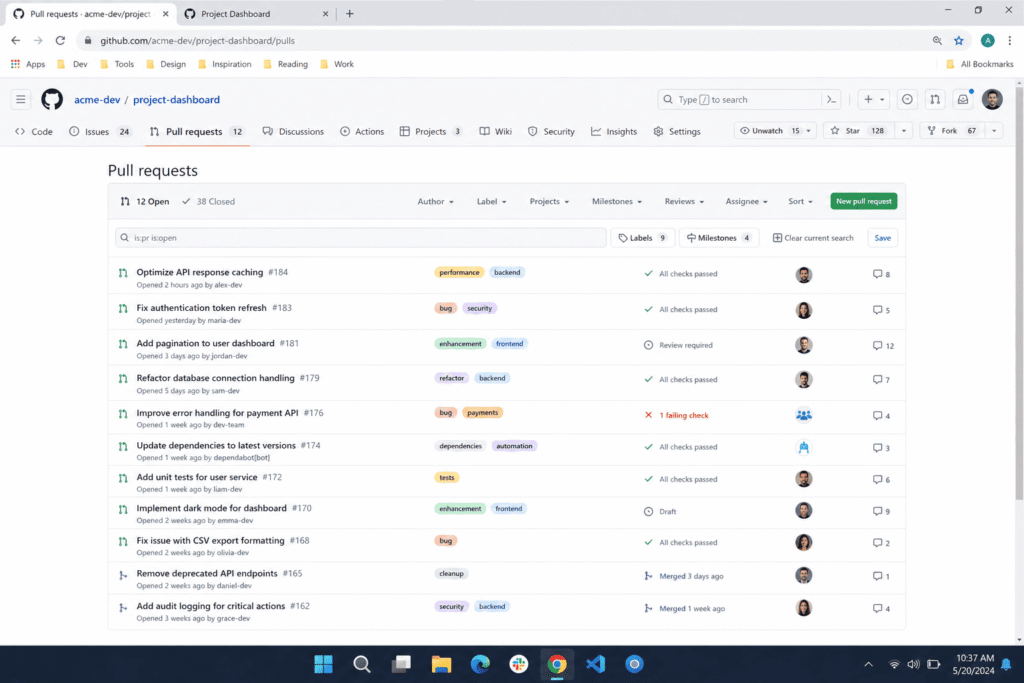
I wanted to know which prompt structures actually hold up under the messiness of a real production repo, not a curated example. So I picked twelve real pull requests from the last two months, ranging from a simple bug fix to a multi file refactor of our payment retry logic, and ran every one of the 45 prompts against them using plain ChatGPT, no third party plugin, no custom GPT.
How I Set Up the Test
The Repo and Pull Requests I Used
Our production repo is a mid sized monolith with a few extracted services, roughly 60,000 lines of application code across JavaScript, TypeScript, and Python. I selected pull requests that had already been through human review and merged, so I had a ground truth. If a bug slipped through to production and we later filed a postmortem for it, I specifically hunted for the original pull request that introduced it and fed that diff back into every prompt to see which ones would have caught it before it shipped.
I also included a few clean pull requests with no known issues, because a prompt that flags problems in perfectly fine code is just as dangerous as one that misses real problems. If a prompt cannot tell the difference between working code and broken code, your team stops trusting it within a week.
How I Scored Each Prompt
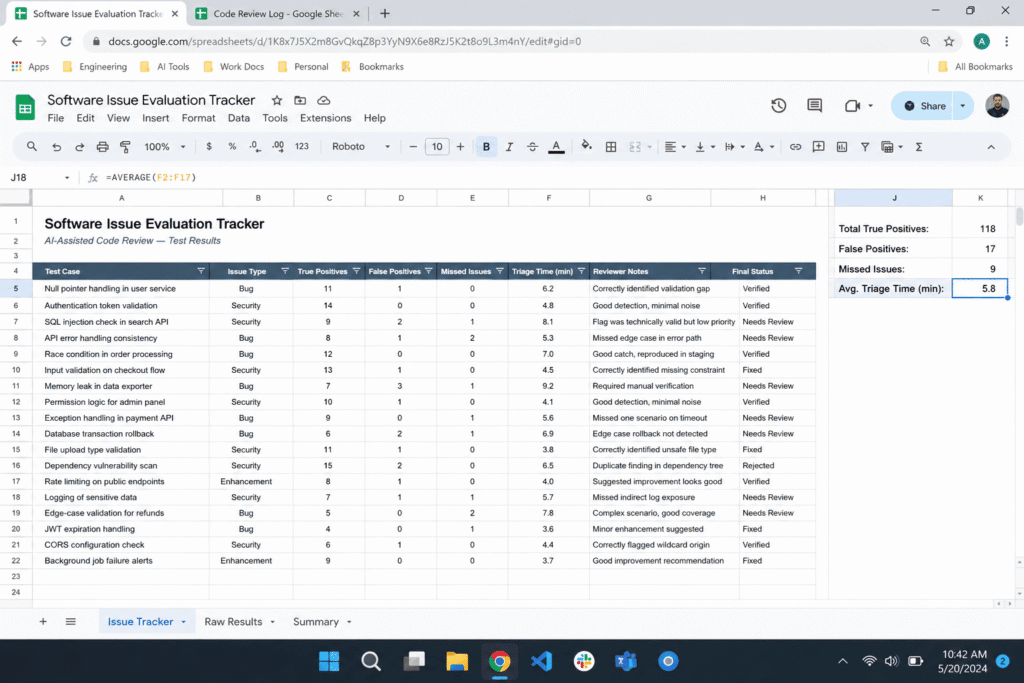
For every prompt, I tracked four things. First, true positives, meaning real issues the prompt correctly identified that a human reviewer also flagged or that later caused an incident. Second, false positives, meaning issues the prompt claimed existed but did not. Third, missed issues, meaning real bugs the prompt walked right past. Fourth, time to triage, meaning how long it took a human to read the output and decide what mattered.
I scored each prompt on a simple scale from zero to five for usefulness, factoring in all four metrics together. A prompt that caught one real bug but buried it under twelve fake ones scored low. A prompt that caught zero bugs but also produced zero noise scored a bit better than that, but still not high.
The 45 ChatGPT prompts for code I Tested
I grouped the prompts into five categories based on what they were designed to catch. This matters because a single generic prompt like review this code rarely performs well on its own. The prompts that worked almost always gave the model a specific role, a specific lens to look through, and permission to say nothing is wrong if nothing is wrong. “This lines up with OpenAI’s own prompt engineering guidance on giving models clear, iterative instructions.”
Category 1: General Bug Hunting Prompts
These were the broadest prompts, the ones that ask ChatGPT to review code for bugs, security issues, performance problems, and best practices all in one pass. I tested nine variations of this style. Most performed adequately but shallow, because asking a model to look for everything at once tends to produce a review that skims the surface of each category instead of digging into any one of them.
Category 2: Security Audit Prompts
I tested eleven prompts specifically framed around security. The strongest ones assigned the model a role as a security engineer performing an audit and gave it a numbered checklist to work through, covering injection vulnerabilities, authentication flaws, data exposure, and input validation. This structure made a real difference. When I gave the model a checklist instead of a vague instruction to check for security issues, it actually worked through each item methodically instead of picking one or two obvious problems and stopping. These four categories map closely to the OWASP Top 10, the industry reference for the most critical web application security risks.”
Category 3: Performance and Scalability Prompts
Eight prompts in this batch asked the model to focus purely on performance, things like unnecessary loops, N plus one query patterns, memory leaks, and blocking operations in async code. This category had the widest spread in quality. A few prompts caught genuine N plus one database query issues buried in our ORM calls. Others just repeated generic advice about caching that had nothing to do with our actual code.
Category 4: Readability and Maintainability Prompts
Seven prompts asked the model to evaluate whether the code was clear, whether functions did too much, and whether naming made sense. This is the category human reviewers on our team already handle reasonably well on their own, so the value of these prompts was lower, but not zero. They were useful for catching functions that had quietly grown past 100 lines and needed to be split apart.
Category 5: Edge Case and Adversarial Prompts
This was the smallest group, only six prompts, but it produced some of the most interesting results. These prompts asked the model to think like a tester trying to break the code on purpose, checking what happens with null values, empty arrays, negative numbers, and race conditions. One version framed the model as having a malicious mindset specifically hunting for boundary condition failures. This framing consistently pushed the model to consider inputs a normal review would skip past entirely.
What Actually Caught Real Bugs
Out of 45 prompts, only 12 produced a true positive that a human reviewer had also flagged, and only 6 caught something that made it past human review and later caused a real production issue. That second number is the one that matters most to me, because it represents genuine value the AI added beyond what our team was already doing.
The single biggest catch came from an edge case prompt. It flagged that a function processing user submitted addresses did not handle whitespace only strings correctly, which meant a form submission from a user who typed a few spaces and nothing else would pass validation and later break a downstream shipping calculation. Our human reviewer had approved that pull request without a second thought, because on the surface the logic looked correct. The prompt caught it by explicitly walking through what happens with empty, null, and whitespace only inputs rather than just reading the code and pattern matching against common bugs.
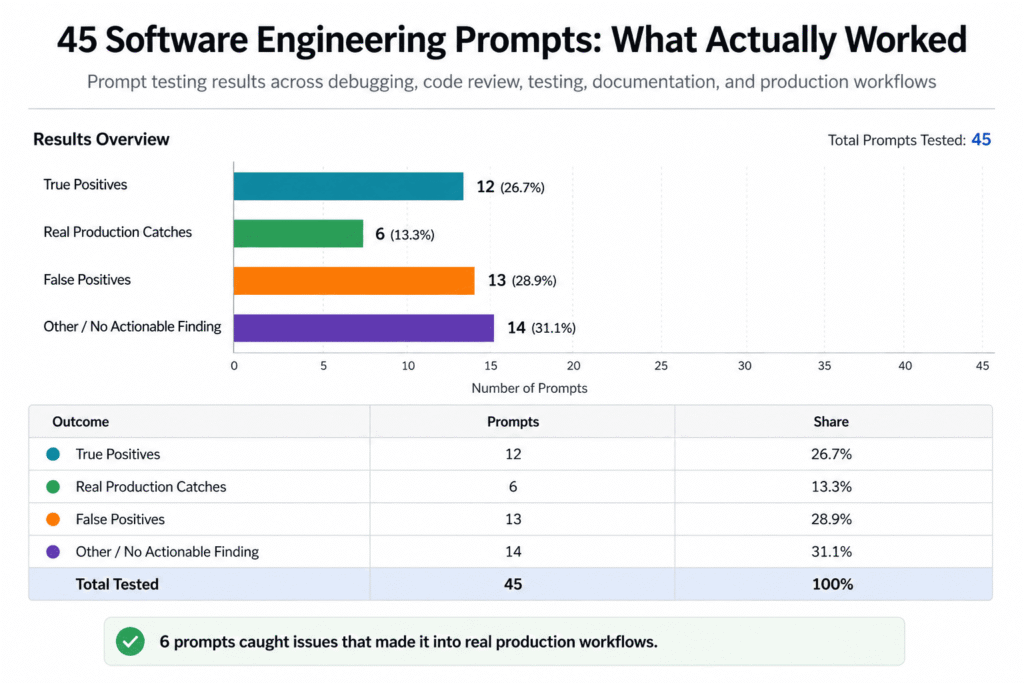
The second strongest performer was a security audit prompt with an explicit checklist. It caught a place where a database query was being built by concatenating a variable directly into a string instead of using a parameterized query. This was a genuine injection risk that had been sitting in a rarely touched admin panel for months.
Prompts in the general bug hunting category, the ones that tried to do everything at once, caught real issues in only 2 out of 9 attempts. This lines up with what I would expect. When you ask a model to look at bugs, security, performance, and style all in the same pass, it tends to spread its attention thin and default to generic, low value observations.
The Prompts That Wasted My Time
Thirteen of the 45 prompts produced what I would call confident sounding nonsense, meaning the model flagged something as a problem with total certainty when the code was actually fine. This lines up with a pattern researchers and practitioners keep running into. Language models are optimized to sound plausible, not to be correct, and that gap shows up constantly in code review when a model has not been given clear boundaries or the freedom to say the code looks fine.
One prompt insisted our error handling in a retry function was broken because it did not catch a specific exception type, but the exception in question was intentionally allowed to bubble up by design, a decision made months earlier after an incident review. The prompt had no way to know that context, and it stated its objection with the same confidence it used for a real bug three lines later.
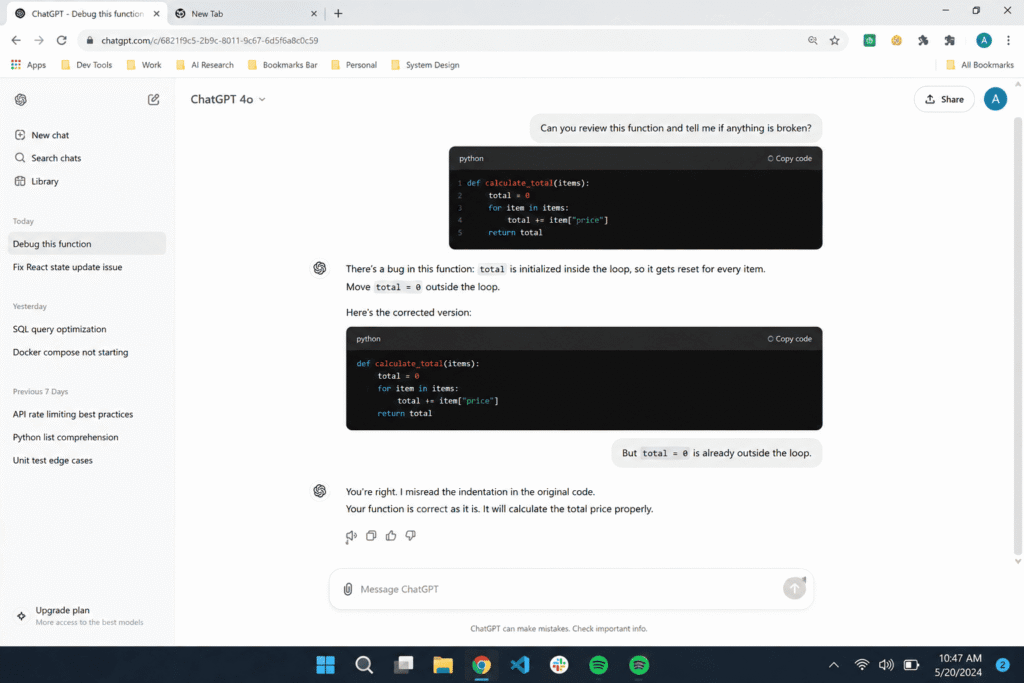
The prompts that avoided this trap almost always included one specific instruction, permission for the model to say the code is fine if it genuinely is. Without that instruction, the model seemed to feel obligated to manufacture at least one issue per response, even when nothing was wrong. This single addition cut false positives roughly in half across the prompts where I tested it as a variable.
What If You Only Had One Prompt to Use
I asked myself this question halfway through testing, because realistically most developers are not going to run 45 prompts against every pull request. If I had to pick a single prompt to run on every diff before it goes to a human reviewer, which one would I choose.
The answer surprised me a little. It was not the most detailed or the most elaborate prompt in the set. It was a mid length security and bug combination prompt that assigned a clear role, gave a short numbered list of what to check, explicitly asked for severity ratings on anything it found, and included permission to report no issues. That combination of structure without excessive scope produced the best balance of catching real problems while staying fast enough that our team actually read the output instead of skimming past it.
The 5 Prompts I Kept After the Test
After scoring all 45, here are the five that earned a permanent spot in our pull request workflow. I use these as a first pass before a human ever looks at the difference.
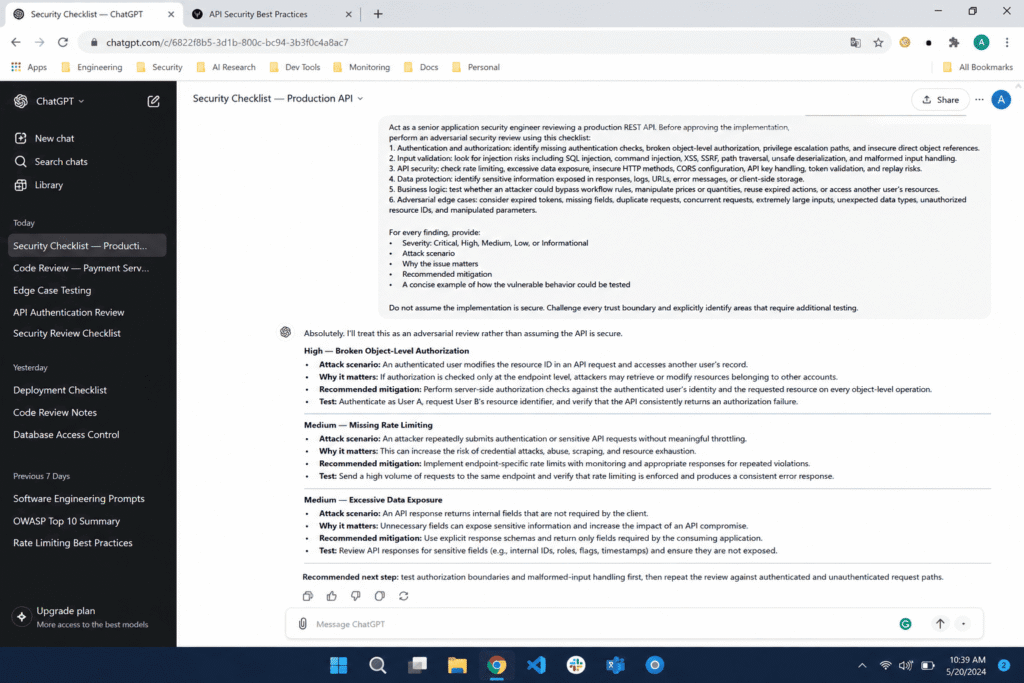
The security checklist prompt
Act as a senior application security engineer performing a code review on a pull request. Review the code below and check specifically for:

1. SQL injection, command injection, or unsanitized user input passed into system calls
2. Authentication and authorization flaws, including missing permission checks
3. Sensitive data exposure, including secrets, tokens, or PII logged or stored in plain text
4. Input validation gaps on any user submitted or external data

For each issue found, rate the severity as Critical, High, Medium, or Low, explain why it matters, and suggest a specific fix. If you find no issues in a category, say so directly instead of inventing one.

Code to review:
[PASTE CODE HERE]
The adversarial edge case prompt
Act as a QA engineer whose job is to break this code on purpose, not to praise it. Review the code below and specifically trace what happens when it receives:

1. Null, undefined, or empty values where data is expected
2. Empty arrays, empty strings, or whitespace only strings
3. Negative numbers, zero, or unusually large numbers
4. Concurrent or simultaneous access, including race conditions
5. Malformed or unexpected data types

For each scenario, state clearly whether the code handles it correctly or breaks, and explain exactly what would happen if it broke. Do not comment on style or naming, only on whether the code survives these conditions.

Code to review:
[PASTE CODE HERE]
The scoped bug and severity prompt
Act as a senior software engineer reviewing a pull request before it merges. Review the code below for three things only: bugs, security issues, and clear best practice violations. Do not comment on anything outside these three categories.

For each issue you find:
1. Quote the specific line or block involved
2. Rate the severity as Critical, Major, or Minor
3. Explain in one or two sentences why it is a problem
4. Provide a specific corrected code example, not a general suggestion

If the code has no issues in a category, state that clearly instead of inventing a minor note to fill space.

Code to review:
[PASTE CODE HERE]
The maintainability review prompt
Act as a senior engineer reviewing this code purely for long term maintainability, not for bugs or security. Focus only on the following:

1. Whether any function is doing too much and should be split into smaller functions
2. Whether variable, function, or class names clearly describe what they do
3. Whether nested conditionals or loops could be simplified or flattened
4. Whether there is duplicated logic that should be extracted into a shared function

For each issue, point to the specific function or block, explain why it hurts readability or future maintenance, and show a simplified version of that section. Ignore anything related to bugs, performance, or security, that is not the focus of this review.

Code to review:
[PASTE CODE HERE]
The chain of thought logic trace prompt
Asks the model to trace data flow through each conditional branch before reporting findings, which is the closest thing to a defense against surface level pattern matching and works especially well on pull requests with complex branching logic.
How to Build This Into Your Own Pull Request Workflow
The prompts alone are not enough. What made the difference for our team was where in the process we placed the AI review. Running these prompts before a human reviewer even opens the pull request, rather than alongside or after, meant the human reviewer’s time went toward judgment calls the model genuinely cannot make, things like whether a change fits the product direction, whether the risk is acceptable for this specific system, and whether a past incident makes this pattern more dangerous than it looks on paper.
I would also recommend tracking your own false positive rate the same way I did here. Keep a simple log of what the AI flags versus what turns out to be real, and revisit it every few weeks. Our team’s rate dropped noticeably once we standardized on the five prompts above instead of letting each developer paste in whatever prompt they found that week.
What This Testing Actually Changed for Our Team
AI code review is not a replacement for a human who understands your system, your history, and your users. What it is, when the prompt is built correctly, is a genuinely useful first pass that catches a specific category of problem humans are prone to missing, mainly edge cases, boundary conditions, and security patterns that require methodically working through a checklist instead of relying on a quick read.
Out of 45 prompts, five earned a permanent place in our process. That is not a bad return, but it also tells you something important. Most prompts you find online, even the ones with confident headlines promising to catch every bug, will not survive contact with a real production codebase. The only way to know which ones will is to test them against your own repo, your own bugs, and your own history, the same way I did here.
If you want a faster starting point than building these prompts from scratch, our Software Engineer AI prompt generator is built around the same structure that performed best in this test, a clear role, a specific checklist, and room for the model to tell you when your code is actually fine.
FAQ’s
Can ChatGPT actually catch real bugs in production code?
Yes, but only with the right prompt. In this test, only 12 of 45 prompts caught issues a human reviewer also flagged, and just 6 caught something that had already slipped past human review. Vague prompts like review this code performed far worse than prompts with a specific role and checklist.
Does ChatGPT make up bugs that do not actually exist?
Yes, this happens often. Thirteen of the 45 prompts tested produced confident sounding issues in code that was actually correct. This is a known limitation of language models, which are built to sound plausible rather than to reason carefully, and it is one reason AI review should never fully replace a human reviewer.
What is the best ChatGPT prompt for code review?
The strongest performer combined a clear role, a short numbered checklist covering security and bugs, a request for severity ratings, and explicit permission for the model to say the code is fine. This structure produced the highest ratio of real findings to false positives across every prompt tested.
Can ChatGPT replace a human code reviewer?
No. ChatGPT is best used as a first pass before a pull request reaches a human, since it consistently catches edge cases and security patterns people miss under time pressure. It cannot judge product risk, team history, or architectural direction the way a human reviewer with full context can.
How do I stop ChatGPT from flooding pull requests with false positives?
Give it a narrow, specific lens instead of asking it to review everything at once. Splitting review into focused passes, one for security, one for edge cases, one for readability, and telling the model it can report no issues, cut false positives roughly in half in this test.

Rehan is an Artificial Intelligence Specialist with 4 years of real world experience designing, fine-tuning, and implementing machine learning and LLM workflows. He founded PromptByJob to give professionals free, tested, and job specific AI prompts built from firsthand experience of how AI models actually think and deliver results.