
I used to dread the last week of every month. A few months ago I decided to stop complaining and start testing. I built a set of AI prompts for month end close, the exact checklist I use every single month. Not because the numbers were hard, but because the process around the numbers ate my entire week. Pulling reports, chasing invoices, writing the same reconciliation notes in slightly different words every time, and rebuilding the same variance commentary from scratch. If you have ever closed a set of books by yourself, you already know exactly what I am talking about.
A few months ago I decided to stop complaining and start testing. I took my actual month end close checklist, the one I use every single month for a small services business I handle the books for, and I ran it against a set of AI prompts I built specifically for each stage of the close. I tracked my time before and after with a stopwatch, not a guess. This article is the honest breakdown of what happened, what worked, what did not, and how many real hours I got back.
Why I Decided to Test AI Prompts on My Month End Close
I am a staff accountant by trade, and I also do part time bookkeeping for two small businesses on the side. My close process is not glamorous. It is bank reconciliations, accounts receivable and accounts payable tie outs, prepaid expense schedules, accrued liabilities, a light depreciation entry, and a set of financial statements that need to look clean enough to hand to an owner who does not speak accounting.
I had read plenty of articles claiming that generative AI tools like ChatGPT and Claude could speed up a close cycle. Most of them read like marketing copy. Big claims, no receipts. So I set a rule for myself. I would only trust a prompt if I could prove, with a timer running, that it actually shaved time off my process without creating rework later. I had read plenty of reporting on how generative AI is reshaping the monthly close.
That single rule changed how I built every prompt. I stopped asking the AI to just do the task. I started asking it to think and act like a controller reviewing a junior accountant’s work, because that framing consistently produced cleaner, more usable output.
The Old Way My Month End Close Checklist Looked Like Before AI
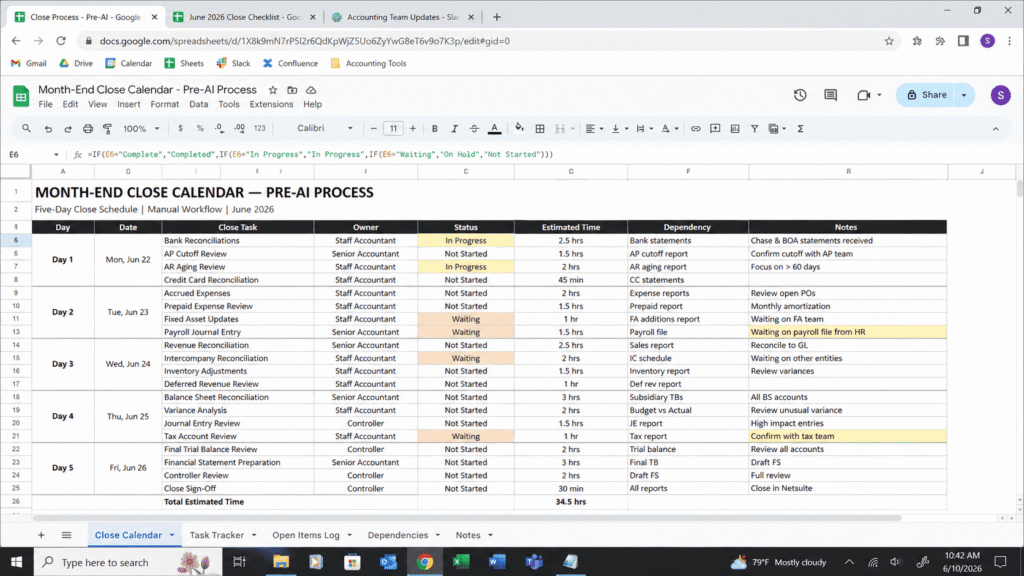
Before I touched a single prompt, my close looked like this across five working days.
Day one was bank and credit card reconciliation. Day two was accounts receivable and accounts payable subledger tie outs. Day three was accruals, deferred revenue, and prepaid expense amortization. Day four was the trial balance review and flux analysis against the prior month. Day five was final financial statement generation, a written summary for the owner, and a last pass to catch anything unusual before I called it closed. Follows the same core stages most standard month end close checklists are built around.
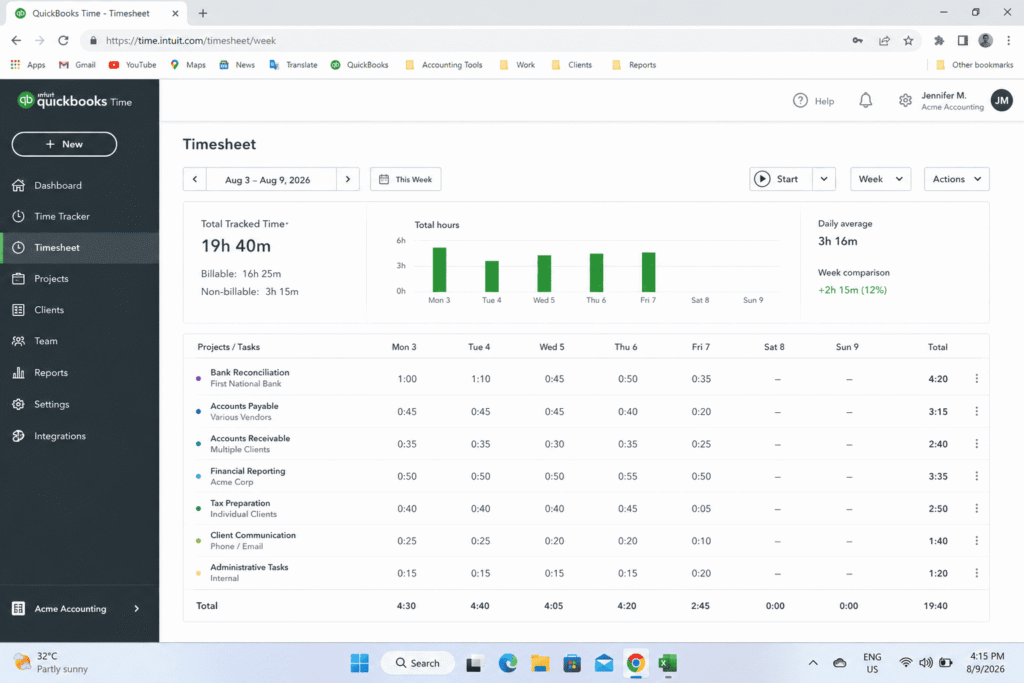
Total time across those five days, tracked honestly with a time tracking app, averaged nineteen hours and forty minutes per month. That number matters because it becomes my baseline for everything that follows. The same way I used to handle bookkeeping report checklists before testing AI prompts for that process too.
The 5 AI Prompts for Month End Close I Tested
I did not throw random questions at a chatbot and hope for magic. Every prompt below follows the same pattern I now teach other accountants: give the model a role, give it the accounting standard you are working under, give it your real structure, and tell it exactly what format you need back. Vague prompts produce vague output. Specific prompts produce workpaper ready output.
The Pre Close Prep Prompt
Before I open a single ledger, I now run this prompt to organize my week.
Act as a controller preparing a month end close calendar for a staff accountant. Build a five day close checklist for a service based small business using accrual accounting. Organize tasks by day, assign each task to a role, note which tasks depend on bank feeds or vendor confirmations, and flag anything that historically causes delays. Format as a numbered checklist with checkboxes.
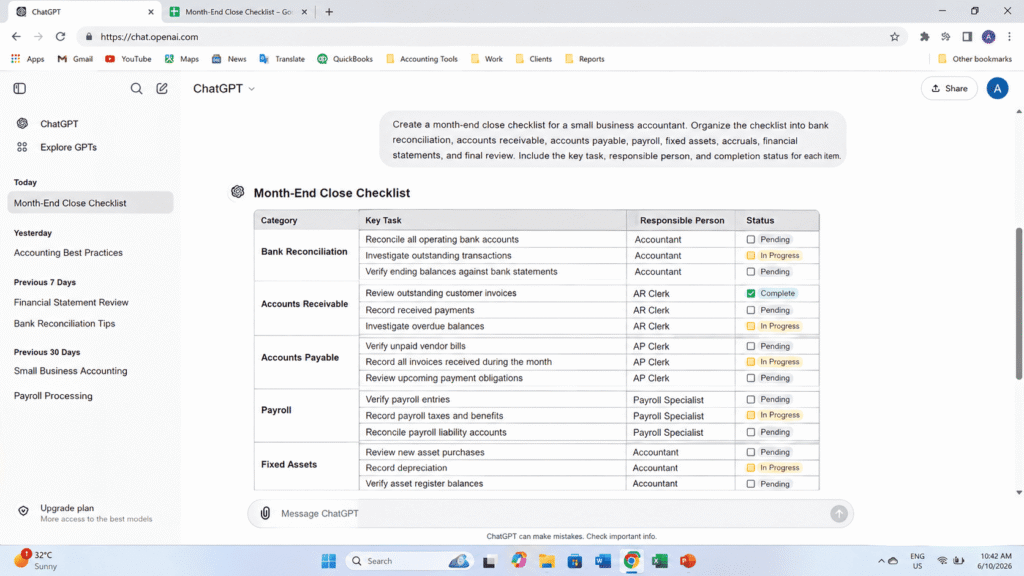
This single prompt replaced roughly forty five minutes I used to spend each month rebuilding my calendar in a spreadsheet and cross checking it against last month’s version.
The Bank Reconciliation Prompt
Reconciliation itself still requires me to pull actual numbers, but the write up around it used to take almost as long as the reconciliation. I now use this prompt once I have my book balance, statement balance, and list of reconciling items.
Act as a senior accountant preparing a bank reconciliation workpaper. Here is my book balance, my bank statement balance, and my list of outstanding checks and deposits in transit. Write a clear reconciliation summary explaining each variance, formatted for a reviewer, and flag any item that looks unusual or requires follow up.
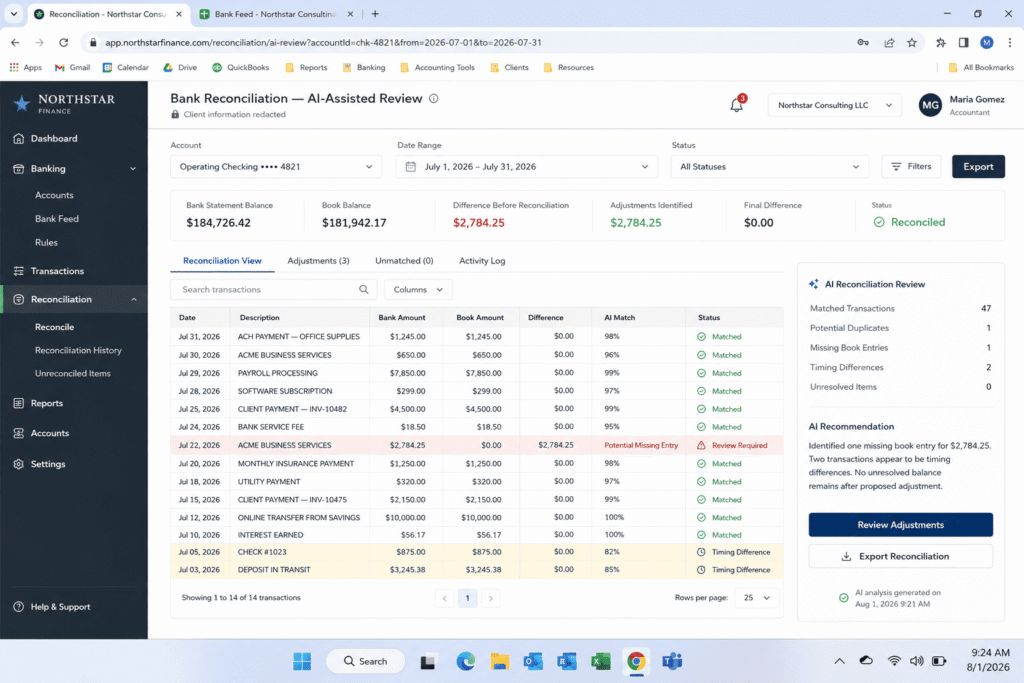
I paste in the actual figures, never anything I have not already verified myself, and the AI turns raw numbers into a clean, reviewer ready explanation in under a minute.
The Accruals and Deferred Revenue Prompt
This is the task that used to cost me the most mental energy, because every month the specific accruals change slightly.
Act as a staff accountant preparing month end accrual entries under US GAAP. Given this list of expenses incurred but not yet invoiced, and this list of prepaid balances with their amortization schedules, draft the journal entries needed, including account names, debit and credit amounts, and a one line explanation for each entry.
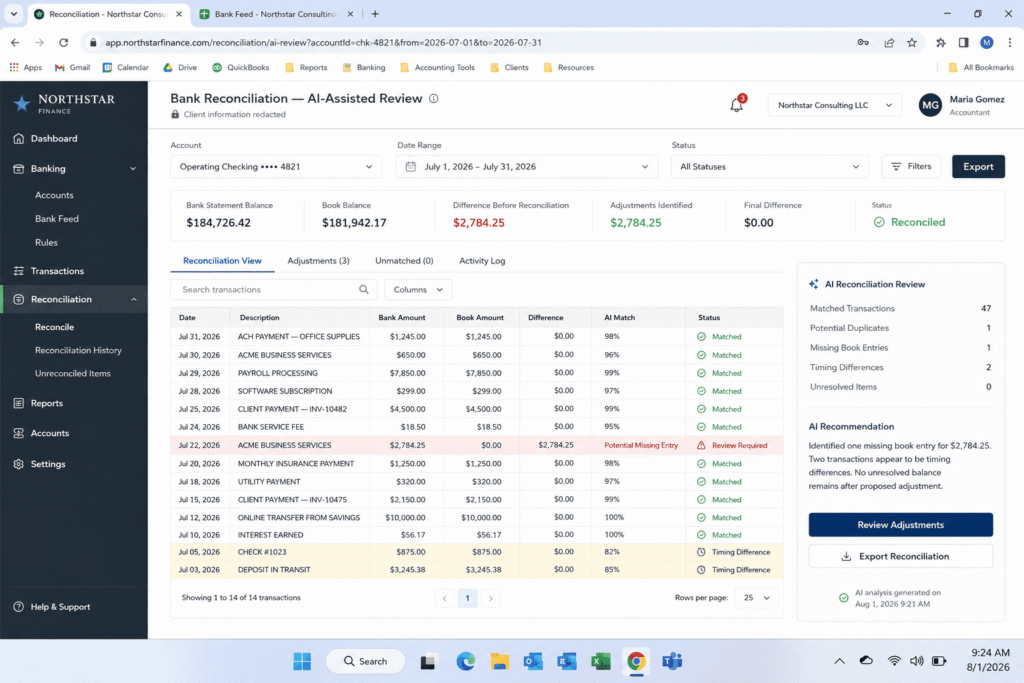
I still verify every dollar amount against source documents before posting anything, but the drafting step, which used to mean typing the same explanation format over and over, now happens instantly.
The Variance Explanation Prompt
Flux analysis was always my least favorite part of the close because writing readable commentary about why an expense line moved takes real thought, and thinking clearly at hour fourteen of a close week is not easy.
Act as a financial analyst writing variance commentary for a management review. Here is this month's trial balance compared to last month, with the dollar and percentage change for each account. Write a short explanation for any account that moved more than ten percent, in plain language a non accountant owner could understand.
The Review Ready Summary Prompt
The last prompt I built pulls everything together into something I can actually hand off.
Act as a controller writing a month end close summary for a business owner with no accounting background. Summarize the financial results in plain language, highlight anything that needs their attention, and keep it under three hundred words.
Similar to how I approached turning raw spreadsheet data into executive ready summaries in a separate test.
My Real Testing Results Broken Down Day by Day
I ran this exact set of prompts across three full close cycles before I trusted the numbers enough to write about them. Here is what changed, day by day, once the workflow was live.
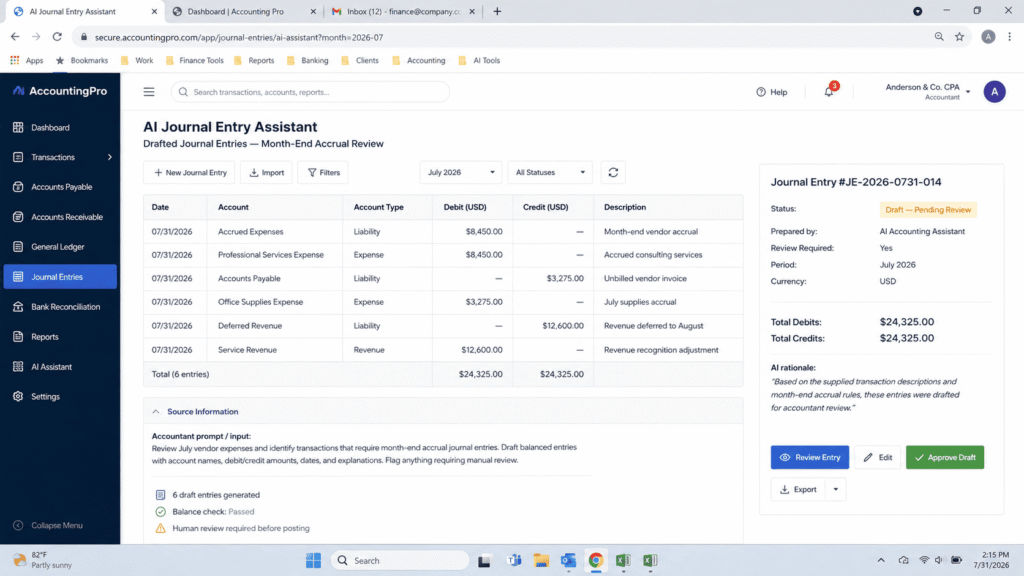
Day one, bank reconciliation, dropped from roughly three hours to just under two hours. The reconciliation itself did not get faster, since I still have to verify every transaction, but the write up and documentation step nearly disappeared.
Day two, accounts receivable and accounts payable tie outs, dropped from four hours to about two and a half hours. The biggest win here came from using the prompt to draft collection follow up notes and aging summaries instead of writing them manually.
Day three, accruals and deferred revenue, dropped from four and a half hours to two hours and forty minutes. This was the single biggest improvement in the entire process, because journal entry drafting used to be pure repetitive typing.
Day four, trial balance review and flux analysis, dropped from four hours to two hours and fifteen minutes. Variance commentary that used to take me most of an afternoon now takes about twenty minutes of prompting and editing.
Day five, final statements and owner summary, dropped from four hours ten minutes to two hours twenty minutes.
How Much Time I Actually Saved
Adding up the real numbers from my time tracker across those three test cycles gives me an average close time of eleven hours and fifty five minutes, compared to my original nineteen hours and forty minutes baseline. That is a reduction of roughly seven hours and forty five minutes per month, or about forty percent of my total close time.
I want to be direct about what that time saving does and does not include. It does not mean the close happens with less thinking. I still verify every reconciling item, every journal entry, and every number before it touches a financial statement. What disappeared was the repetitive drafting, formatting, and explanation writing that surrounded the actual accounting work.
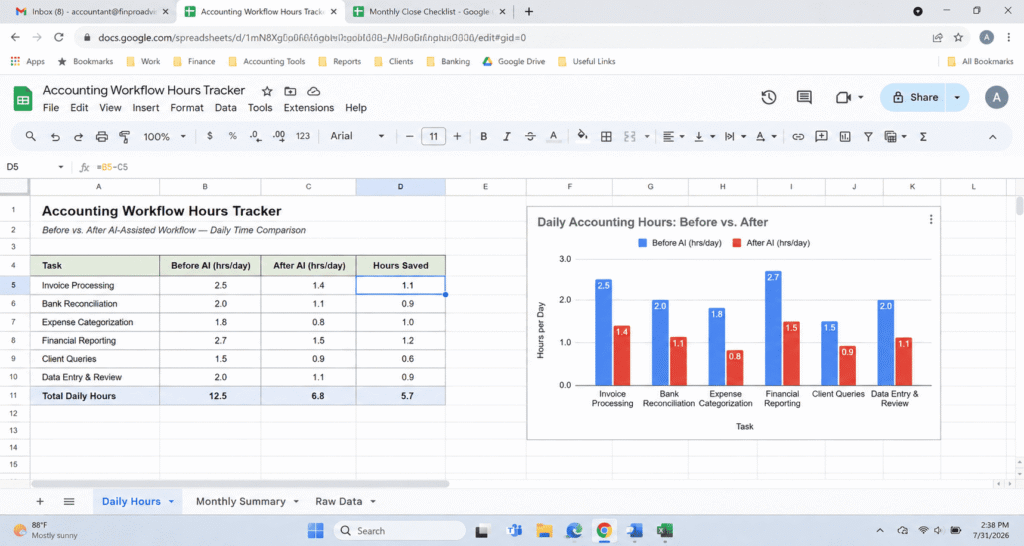
That lines up closely with what larger studies have found industry wide, where accountants using AI in their close process report closing books multiple days faster on average, which matched what I felt firsthand once I stopped fighting the process and started prompting it properly. which lines up closely with what a joint MIT and Stanford study of 277 accountants found industry wide
What AI Got Wrong and Where I Had to Step In
I would be lying if I said this was flawless. A few things went wrong along the way, and they taught me exactly where the line needs to sit between AI assistance and human judgment.
ROLE
Act as an external auditor reviewing a colleague's month end close workpapers before sign off. You are not helping draft anything. Your only job is to find what does not hold up.

INPUT
Here are my draft close entries and explanations for this month:
[PASTE YOUR DRAFTED ENTRIES AND EXPLANATIONS HERE]

INSTRUCTIONS
Do not summarize what looks correct. Only flag the following:

1. Any entry or explanation that relies on an assumption without a stated source document behind it.
2. Any number mentioned in an explanation that does not appear anywhere in the input above.
3. Any account treatment that would change depending on whether we are on accrual basis or cash basis, and state which one this appears to assume.
4. Any explanation that is vague enough it could apply to more than one possible transaction.

OUTPUT FORMAT
For each flag, state:
– The exact entry or line it applies to
– Why it cannot be approved as written
– The specific document or confirmation needed to close the gap

If nothing needs to be flagged, say so directly. Do not invent a concern just to have something to report.
The AI occasionally suggested a treatment that sounded confident but did not match how our specific chart of accounts was set up. It has no idea what your general ledger actually looks like unless you tell it, and even then it can guess wrong. It also, on one occasion, invented a plausible sounding variance explanation instead of admitting it did not have enough context, which is a known behavior with language models and exactly why I never let it touch a number I have not already verified myself. matches what researchers call AI augmenting rather than replacing professional accounting expertise
My rule now is simple. AI drafts the structure and the language. I verify every figure against the source. Nothing gets posted, reconciled, or sent to an owner until I have personally checked it against the ledger.
What If I Had Skipped the Verification Step
I want to sit on this for a second, because it is the part most articles about AI in accounting skip over. During my second test cycle, I got curious and let myself imagine a version of this process where I trusted the AI output without checking it against the ledger. What would that close have looked like on paper.
The financial statements would have looked clean. The variance commentary would have read smoothly. The accrual entries would have balanced. And two of those entries would have been wrong, because the AI assumed a prepaid expense schedule that did not match the actual invoice terms in our records. Nothing about the output signaled that it was wrong. It was confident, well formatted, and incorrect.
That single experiment is why I do not recommend this workflow to anyone who is tempted to treat AI as a second set of eyes instead of a first draft generator. The value here is speed on the parts of the close that are mechanical, not a shortcut around the parts that require professional judgment. A misstatement that slips through a close because nobody double checked an AI generated entry is still the accountant’s responsibility, not the tool’s.
The Tools I Used and How I Set Them Up
I tested this workflow using both ChatGPT and Claude side by side during the first cycle, then settled into a routine using whichever tool was open at the time, since the prompt structure mattered far more than the specific platform. What made the biggest difference was not the tool. It was keeping a saved document of my exact prompts so I was never rewriting them from memory each month.
I keep a simple text file with each prompt labeled by close day, and I fill in the brackets with that month’s real numbers before running it. That five minute habit of saving and reusing prompts is honestly the single highest leverage change in this entire experiment. Most accountants I have talked to who tried AI for their close once and gave up were rebuilding their prompts from scratch every time, which wastes most of the time savings before the AI even gets a chance to help.
My Final Verdict After One Full Close Cycle
I went into this expecting a modest improvement and a lot of disappointment. What I found instead was a close process that still demands the same level of accuracy and professional judgment, but no longer drains me with repetitive writing and formatting. Seven hours and forty five minutes a month does not sound dramatic on paper, but across a year that is more than ninety hours returned to actual analysis, client conversations, and work that pays better than retyping the same reconciliation note for the twelfth time.
If you close books every month and you have not tried building your own prompt library around your specific checklist, start with just one task. Pick the part of your close you dread the most, build a prompt around it using the structure I laid out here, and time yourself for one cycle. The proof is always in the stopwatch, not in the promise.
FAQ’s
Is it safe to paste real client financial data into ChatGPT or Claude?
I never paste identifiable client names, account numbers, or anything that could tie data back to a real business without checking the tool’s data retention policy first. For sensitive figures, I strip identifying details and use rounded or anonymized numbers whenever the task allows it.
Can AI actually perform the reconciliation itself?
No, and it should not. AI is good at explaining, drafting, and formatting. It should never be the one calculating or confirming a balance without a human checking the underlying source documents.
Will this work for a full finance team, not just a solo bookkeeper?
Yes, the same prompt structure scales up. A controller can adapt the pre close prep prompt into a shared close calendar assigning tasks across AP, AR, and staff accountant roles, which is exactly how larger finance teams are already using this approach.
How long did it take to build this prompt library?
About two hours total, spread across one weekend, mostly spent testing wording until the output stopped needing heavy editing.

Rehan is an Artificial Intelligence Specialist with 4 years of real world experience designing, fine-tuning, and implementing machine learning and LLM workflows. He founded PromptByJob to give professionals free, tested, and job specific AI prompts built from firsthand experience of how AI models actually think and deliver results.