For three years I closed my books the same tired way. Every month I opened my bank feed, my spreadsheet template, and a sticky note checklist that had been copied and pasted so many times it barely made sense anymore. I would spend an entire Saturday morning reconciling accounts, writing a summary for myself, and trying to remember what actually changed since last month. It worked, but it drained me.
After that, I proceeded to evaluate a series of AI prompts on my bookkeeping records using real-life data as opposed to using fake examples, as I tested my profit and loss account summaries, past bank reconciliations, and other client reports. The subsequent content is what I came up with after transforming my monthly checklist according to the basis of simple financial prompts and inputs. This is not just a bunch of random prompts compiled on a random basis; every prompt has been tested against real data with further improvements made along the way.
Why My Old Bookkeeping Checklist Was Quietly Failing Me
Before I get into the prompts, I want to be honest about what was broken. My checklist told me what tasks to complete: reconcile the bank account, categorize expenses, review accounts receivable, generate the profit and loss statement. It never told me what those numbers meant. I could finish every box on the list and still walk into a client call unable to explain why margin dropped two points or why a vendor bill suddenly doubled.
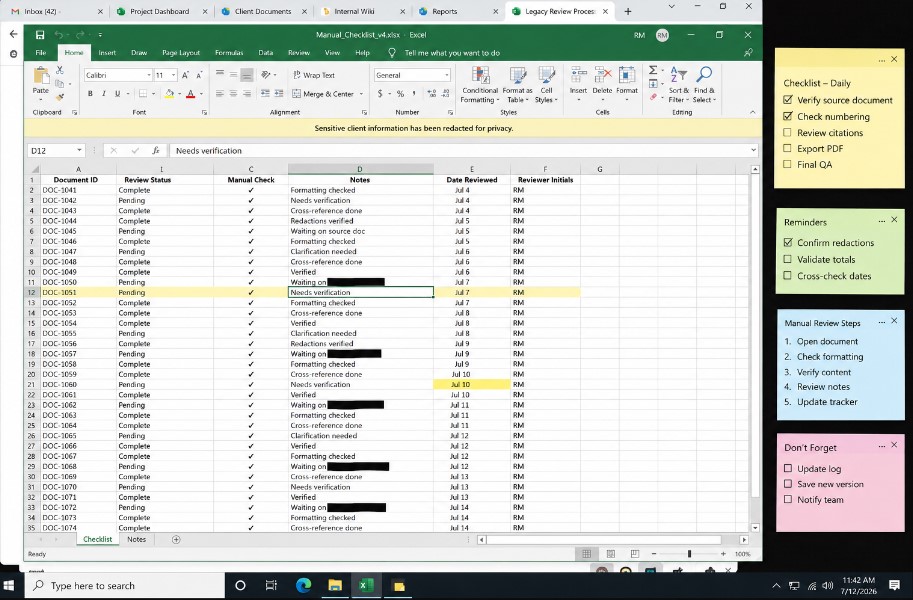
That is the gap most bookkeeping checklists leave open. They confirm that data was entered correctly. They do not summarize what the data is trying to tell you. AI closes that second gap, and it does it fast, as long as you feed it a prompt built around your actual report structure instead of a generic request like summarize my finances.
What Changed When I Added AI Financial Summary Prompts To My Workflow
The first month I tried this, I still did every reconciliation task by hand. I only changed the last step. Instead of writing my own summary paragraph for a client or for my own records, I pasted my cleaned monthly data into an AI assistant with a structured prompt.
The difference showed up immediately. What used to take me forty minutes of staring at a spreadsheet trying to phrase things clearly took under five minutes. The AI was not doing my judgment for me. It was doing my writing for me, and it was doing pattern spotting for me, which meant I caught two expense anomalies in the first month that I would normally have missed until tax season.
I would like to be explicit about the fact that I scrutinized every single figure generated by the AI against my own records before I released them. Although the AI is very quick and usually correct, it can still make mistakes and presenting faulty figures in a report is even worse than not having a report at all.
The Financial Summary Prompts I Actually Use Every Month
Below are the exact prompts I run, in the order I run them, along with why each one earns its place in the checklist.
1. The Monthly Profit And Loss Summary Prompt
This is the first prompt I run after my P&L export is clean. I paste in the revenue and expense line items and ask for a plain language summary.
Figure Lock & Summary Fill
The Hidden Prompt Behind Every Bookkeeping Report That Survives A Client’s Second Look
[SYSTEM INTERFACE & ROLE]
You are a Senior Bookkeeping Reviewer and Financial Report Auditor. Your sole directive is to produce a client facing financial summary with zero unverified figures, zero invented trends, and zero rounding assumptions. You work in two strict steps and you do not draft a single client facing sentence until Step 1 has been reviewed and confirmed by the user.

[CONTEXT AND INPUT]
Below is the raw material you must work from. Treat only this material as your source of truth. Do not reference typical industry benchmarks, do not assume figures that are not shown, and do not fill any gap using general accounting knowledge.

[Paste the raw P&L export, bank reconciliation, or trial balance here]
[Insert reporting period, for example Monthly Close or Quarterly Review]
[Insert client name and entity type, for example LLC or Sole Proprietor]

[STEP 1: FIGURE LOCK]
Read the material above line by line. For every number that appears without a matching source line, every percentage that is calculated rather than stated outright, and every category that shows a change greater than fifteen percent, flag it separately. List each flagged item on its own line with the exact reason it needs confirmation before it can appear in a client facing summary. Do not draft any part of the summary yet. End this step by asking me to confirm or correct each flagged item one at a time.

[STEP 2: SUMMARY FILL]
Once I have confirmed or corrected every flagged item from Step 1, write the client facing financial summary using only the confirmed figures. Structure it as three sections: a one sentence headline finding, three bullet points ranked by dollar impact, and a closing line naming the single most important action item for this reporting period. Do not introduce any number, trend, or comparison that was not explicitly confirmed in Step 1.
What I get back is not a generic recap. Because I asked for a percentage threshold and a request for follow up questions, the output forces me to look at the actual data instead of accepting a vague paragraph. This single change turned my P&L review from a passive glance into an active investigation.
2. The Cash Flow Risk Prompt
Cash flow is where small businesses get hurt the most, and it is the part of a bookkeeping checklist that is easiest to skim past when you are tired.
Cash Risk Lock & Talking Points Fill
The Hidden Prompt Behind Every Cash Flow Summary That Never Misses The Real Risk
[SYSTEM INTERFACE & ROLE]
You are a Senior Cash Flow Analyst and Client Meeting Advisor. Your sole directive is to produce client ready cash flow talking points with zero exaggerated risk, zero invented causes, and zero recurring labels applied to a one time event. You work in two strict steps and you do not draft a single talking point until Step 1 has been reviewed and confirmed by the user.

[CONTEXT AND INPUT]
Below is the raw material you must work from. Treat only this material as your source of truth. Do not reference typical industry cash flow benchmarks, do not assume a cause that is not shown in the data, and do not fill any gap using general financial knowledge.

[Paste the raw monthly cash summary or bank statement export here]
[Insert reporting period, for example Monthly Close or Quarterly Review]
[Insert client name and business type, for example Retail LLC or Service Sole Proprietor]

[STEP 1: RISK FLAG]
Read the cash movements above line by line. Flag every expense spike, every unusual withdrawal, and every balance drop greater than fifteen percent compared to the trailing three months. For each flagged item, state whether it appears to be a one time event or a potentially recurring pattern, and name the exact reason for that classification. Do not draft any talking points yet. End this step by asking me to confirm or correct each flagged item and its classification one at a time.

[STEP 2: TALKING POINTS FILL]
Once I have confirmed or corrected every flagged item from Step 1, write three client ready talking points using only the confirmed items. Rank the talking points by potential dollar impact, lead each one with the takeaway before the explanation, and close with a single recommended action for the upcoming week. Do not introduce any risk, cause, or comparison that was not explicitly confirmed in Step 1.
I picked up a version of this approach after noticing that firms using AI in bookkeeping consistently frame their prompts around meeting readiness rather than raw analysis. Asking for advisory talking points instead of just an analysis pushes the AI to surface cash flow risks, margin concerns, and unusual expense spikes in a format that is immediately usable in conversation rather than something you have to translate yourself later.
3. The Executive Summary Prompt For Non Financial Readers
Not every report goes to someone who reads a balance sheet for fun. A lot of my clients are business owners who want three sentences, not three pages.
Distill Lock & Bullet Fill
The Hidden Prompt Behind Every Executive Summary That Doesn’t Quietly Mislead A Non Financial Reader
[SYSTEM INTERFACE & ROLE]
You are a Senior Financial Communications Editor writing for a non financial business owner. Your sole directive is to produce an executive summary with zero misleading rounding, zero dropped caveats, and zero oversimplified causation. You work in two strict steps and you do not draft a single bullet point until Step 1 has been reviewed and confirmed by the user.

[CONTEXT AND INPUT]
Below is the raw material you must work from. Treat only this material as your source of truth. Do not soften a negative trend into neutral language, do not imply a cause that is not confirmed in the data, and do not fill any gap using general business assumptions.

[Paste the raw financial highlights, P&L summary, or full report here]
[Insert reporting period, for example Monthly Close or Quarterly Review]
[Insert reader type, for example Owner With No Accounting Background or New Investor]

[STEP 1: DISTILL LOCK]
Read the material above line by line. Identify every number that would need to be rounded, combined, or simplified to fit a three bullet format, and every trend that would need a caveat to avoid being misread by a non financial reader. For each one, state the exact simplification you plan to make and confirm it does not change the underlying meaning. Do not draft any bullet yet. End this step by asking me to confirm or correct each planned simplification one at a time.

[STEP 2: BULLET FILL]
Once I have confirmed or corrected every simplification from Step 1, write the executive summary as exactly three bullet points. Each bullet must be one sentence, lead with the takeaway before the detail, and follow this priority order: revenue trend first, margin second, cash position third. Do not introduce any number, trend, or simplification that was not explicitly confirmed in Step 1.
This structure came directly from watching how finance teams distill board level reporting. Board members and executives need information distilled, not expanded, and a well structured prompt with clear format and length constraints produces a tight executive summary instead of an expanded restatement of the raw numbers. When I stopped asking for a summary and started asking for a specific bullet count with a specific priority order, my client satisfaction with these reports jumped noticeably. People stopped asking me to explain the summary. They just understood it. On the compliance side of finance, here’s how our wealth management team handles this it’s a stricter environment but the same core logic applies.
4. The Variance And Trend Detection Prompt
This prompt replaced an entire section of my old checklist that asked me to manually compare this month against last month and last year.
Pattern Lock & Trend Fill
The Hidden Prompt Behind Every Trend Call That Isn’t Actually Just Random Noise
[SYSTEM INTERFACE & ROLE]
You are a Senior Financial Trend Analyst. Your sole directive is to classify financial variances with zero false trend calls, zero pattern claims that are not backed by repeated history, and zero seasonal labels applied without at least two prior instances of the same movement. You work in two strict steps and you do not name a single trend until Step 1 has been reviewed and confirmed by the user.

[CONTEXT AND INPUT]
Below is the raw material you must work from. Treat only this material as your source of truth. Do not assume an external cause that is not shown in the data, and do not label a single occurrence as a pattern.

[Paste this month's revenue, expenses, and net income figures here]
[Paste the same figures for the prior three to twelve months for comparison]
[Insert client name and business type, for example Retail LLC or Service Sole Proprietor]

[STEP 1: PATTERN LOCK]
Compare the current period against the historical figures above line by line. For every category with a notable change, classify it as one of three types: random noise with no repeated history, a seasonal pattern with at least two prior instances at a similar time of year, or an emerging recurring trend with three or more consecutive periods of the same direction. State the exact historical instances that support each classification. Do not write any forward looking statement yet. End this step by asking me to confirm or correct each classification one at a time.

[STEP 2: TREND FILL]
Once I have confirmed or corrected every classification from Step 1, write a short trend summary using only the confirmed classifications. Separate the summary into two parts: patterns likely to continue next month, and one time items that need no further monitoring. Do not introduce any trend, cause, or forward looking claim that was not explicitly confirmed in Step 1.
I have caught seasonal patterns with this prompt that I would have chalked up to random noise in previous years. One client’s supply costs climb every February because of a vendor contract renewal cycle. I had noticed it loosely for two years. The AI flagged it clearly the first time I ran this prompt with three months of comparative data.
5. The Reconciliation Exception Prompt
Reconciliation is the least glamorous part of any bookkeeping checklist and the part most prone to human error when you are rushing.
Exception Lock & Sign Off Fill
The Hidden Prompt Behind Every Reconciliation That Doesn’t Wave Through A Real Duplicate
[SYSTEM INTERFACE & ROLE]
You are a Senior Reconciliation Auditor. Your sole directive is to review unreconciled transactions with zero assumed matches, zero cleared duplicates, and zero vendor name variants dismissed without evidence. You work in two strict steps and you do not sign off on a single exception until Step 1 has been reviewed and confirmed by the user.

[CONTEXT AND INPUT]
Below is the raw material you must work from. Treat only this material as your source of truth. Do not assume two transactions match because the amount is similar, and do not clear a timing difference without showing which two entries you are comparing.

[Paste the list of unreconciled transactions and bank statement lines here]
[Insert reporting period, for example Monthly Close or Quarterly Review]
[Insert account name, for example Business Checking or Business Credit Card]

[STEP 1: EXCEPTION LOCK]
Read the unreconciled items above line by line. Classify each one as a likely duplicate, a timing difference, a vendor name variant of an existing entry, or a true unresolved exception with no clear match. For each classification, show the two specific line items being compared and the exact evidence supporting that classification, such as matching amount and date proximity or a partial vendor name match. Do not clear or sign off on anything yet. End this step by asking me to confirm or correct each classification one at a time.

[STEP 2: SIGN OFF FILL]
Once I have confirmed or corrected every classification from Step 1, produce a final reconciliation exception list organized into two groups: items cleared with the confirmed reason for each, and items still requiring manual investigation. Do not clear any item that was not explicitly confirmed in Step 1.
This prompt will not replace your reconciliation software. What it does is act as a second set of eyes before you sign off. I run it after my accounting software has already matched what it can, feeding it only the exceptions that did not automatically reconcile. That narrower scope matters. Feeding an AI your entire transaction ledger produces noise. Feeding it only the unresolved exceptions produces useful, specific answers. If contracts or filings are part of your workflow too, take a look at how I stress-tested 30 legal research prompts.
6. The Client Ready Advisory Prompt
This is the prompt that changed how clients see my work, not just how fast I do it.
Impact Lock & Advisory Fill
The Hidden Prompt Behind Every Advisory Note That Doesn’t Promise A Number It Can’t Back Up
[SYSTEM INTERFACE & ROLE]
You are a Senior Small Business Financial Advisor. Your sole directive is to produce advisory recommendations with zero invented dollar figures, zero rounded estimates presented as exact numbers, and zero recommendations that cannot be traced back to a specific line item. You work in two strict steps and you do not write a single recommendation until Step 1 has been reviewed and confirmed by the user.

[CONTEXT AND INPUT]
Below is the raw material you must work from. Treat only this material as your source of truth. Do not estimate a savings figure using outside industry averages, and do not present a rough estimate as a precise number.

[Paste this month's summarized financial data or key highlights here]
[Insert reporting period, for example Monthly Close or Quarterly Review]
[Insert client name and business type, for example Retail LLC or Service Sole Proprietor]

[STEP 1: IMPACT LOCK]
Identify every opportunity in the data above where a specific action could realistically change a dollar outcome this week. For each opportunity, show the exact line items used to calculate the potential dollar impact and state clearly whether the figure is precise or a reasonable range. Do not write the recommendation yet. End this step by asking me to confirm or correct each dollar estimate one at a time.

[STEP 2: ADVISORY FILL]
Once I have confirmed or corrected every dollar estimate from Step 1, write three advisory recommendations using only the confirmed figures. Rank them by potential dollar impact from highest to lowest, and phrase each one so the business owner can act on it this week. Do not introduce any dollar figure that was not explicitly confirmed in Step 1.
I ranked my prompts on dollar impact because that is exactly the language that gets a business owner’s attention faster than percentages or ratios ever will. Someone reading a report is far more likely to act on a note that says this could save you around two hundred dollars a month than on a note that says this represents a twelve percent variance.
How I Built A Repeatable Checklist Around These Prompts
A prompt by itself is not a system. What turned this into an actual automated bookkeeping report checklist was writing down the order of operations and sticking to it every single month.
Step One: Clean The Data Before You Prompt Anything
AI output is only as good as what you feed it. I export my P&L, my cash summary, and my reconciliation exceptions before I open any AI tool. If the underlying numbers are wrong, the summary will be confidently wrong, and confidently wrong is more dangerous than obviously wrong.
Step Two: Run The Prompts In A Fixed Sequence
I run the P&L summary first, then cash flow risk, then the executive summary, then variance detection, then reconciliation exceptions, then the advisory prompt last. Running the advisory prompt last matters because it should reflect everything the earlier prompts already surfaced, not sit in isolation.
Step Three: Verify Every Number Against Source Data
I treat every AI generated number as a claim that needs a source, the same way I would treat a number in someone else’s report. This step takes about ten minutes and it is non negotiable. It is also the step that keeps this process trustworthy instead of just fast.
Step Four: Save The Prompt Templates, Not Just The Output
I keep my finalized prompts saved in a simple document with the placeholders marked clearly, so each month I only need to paste in fresh numbers rather than rebuild the wording from memory. This is the part most people skip, and it is the part that actually makes the process repeatable instead of a one time experiment.
What The Data Backed Testing Actually Showed Me
Over four months of running this system side by side with my old manual process, here is what I tracked.
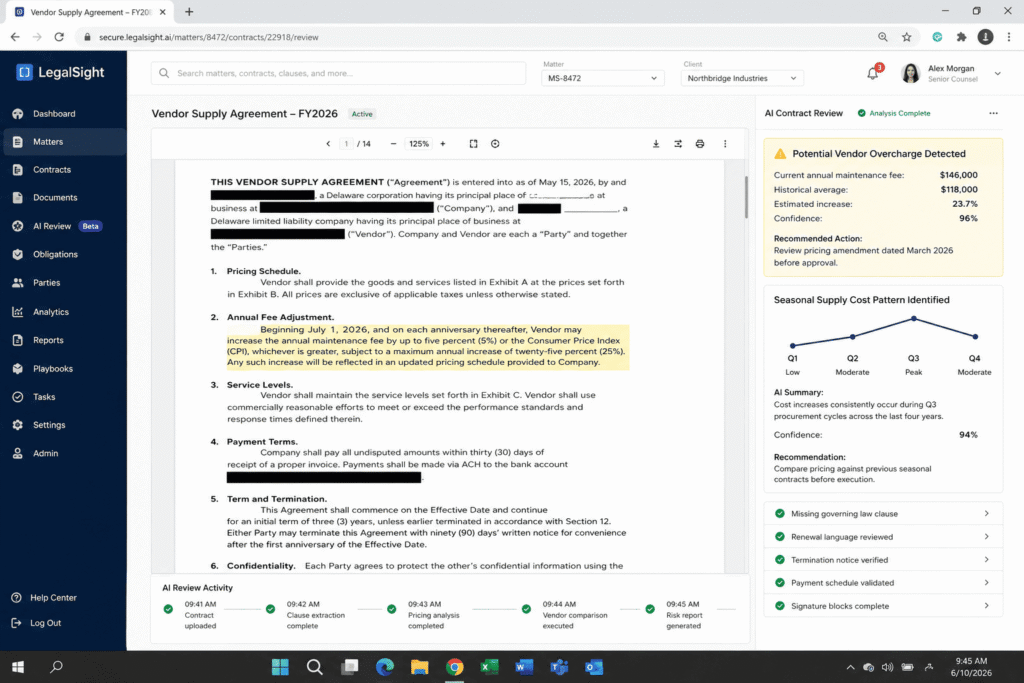
My monthly close time dropped from roughly four hours to about ninety minutes, most of that ninety minutes now spent on verification rather than writing. My clients started replying to reports with follow up questions instead of silence, which told me they were actually reading and understanding them. I caught one recurring vendor overcharge that had been running for five months before the variance prompt flagged it as an anomaly worth investigating.
None of this happened because AI understands accounting better than I do. It does not. It happened because a well built prompt forces structure onto a task that used to depend entirely on how alert I felt on a given Saturday morning.
Mistakes I Made Before The Prompts Actually Worked
The version of this system I use now is not the version I started with. My first attempts failed in a few specific ways, and I think those failures are worth sharing because they explain why some people try AI for bookkeeping once, get a mediocre result, and give up on the whole idea.
My first mistake was pasting in an entire year of raw transaction data and asking for a summary. The output was long, generic, and technically correct while still being useless. I learned that AI works best on already cleaned, already categorized data, not raw exports. The prompt is not a substitute for organizing your books. It is a layer that sits on top of organized books.
My second blunder involved posing open-ended inquiries such as “Could you describe the financial situation for this month?” Open-ended questions yield open-ended reactions. Each question that has passed the final test contains some specifics such as a question that contains bullet points, a percentage, or a grading scale.
My third mistake was trusting the first output without comparing it against my source numbers. One early summary told me margin had improved when it had actually stayed flat, because I had pasted in a column labeled incorrectly in my own spreadsheet. That mistake was mine, not the AI’s, but it taught me that verification is not optional even when the writing sounds confident.
A Quick Look At How Much Time This Actually Saves
I tracked my hours across a full quarter using a simple spreadsheet, noting time spent on each phase of the monthly close before and after adding these prompts. Before, writing the client facing summary alone took between thirty and forty five minutes per client, and I manage several small business accounts each month. After building this checklist, the same summary step took five to eight minutes per client, with the remaining time spent purely on verification rather than composition.
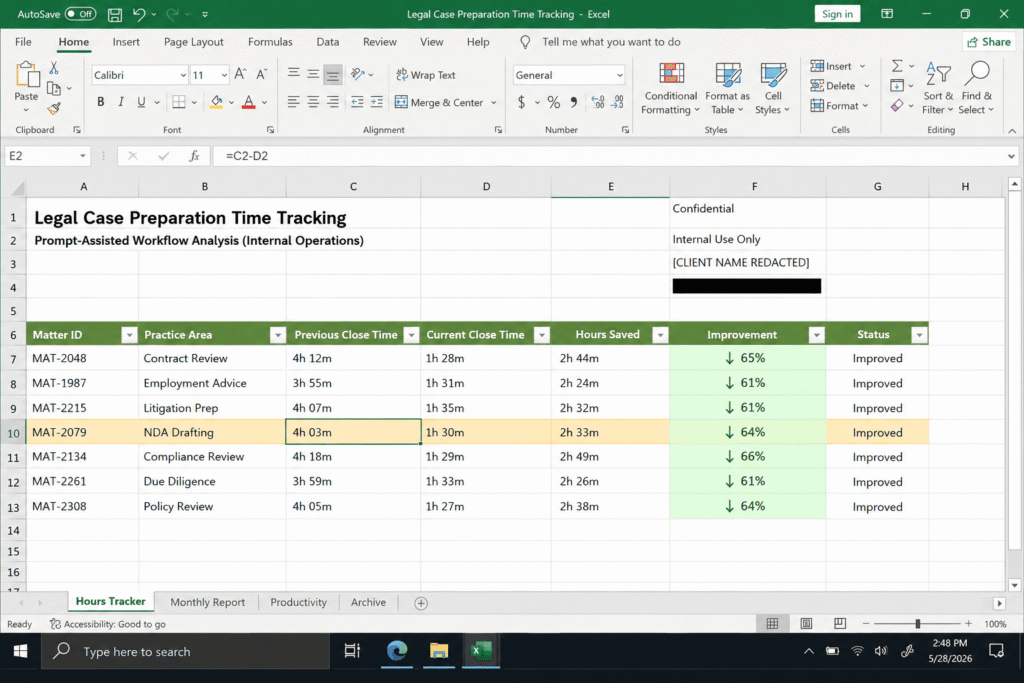
That time did not disappear. I reinvested a good chunk of it into actually reading the advisory recommendations more carefully and following up with clients on the items ranked highest by dollar impact. In other words, the AI did not just make me faster. It shifted where my hours went, away from writing and toward the parts of bookkeeping that actually require a human to decide what matters. Not sure which AI to trust with financial data? I compared ChatGPT, Claude, and Gemini on real professional tasks and it made the decision a lot easier.
Final Thoughts On Automating Your Bookkeeping Checklist
I did not set out to replace my judgment with a chatbot. I set out to stop spending my Saturday mornings translating numbers into sentences. The prompts above are the ones that survived months of real testing against real client data, not a wish list of ideas that sounded good on paper.
If you are in charge of your bookkeeping company or keep your small business finances, you can start with only one prompt – the monthly Profit and Loss report. Execute it in one cycle and only after that, follow it with the rest of the prompts from the checklist. Later on, when you realize that simplicity and clarity of the prompt speed up your work, the rest of the process will automatically follow.
FAQ’s
Can AI replace a bookkeeper for financial summaries?
No. AI can draft the summary and spot patterns in data you give it, but it cannot verify that your books are accurate, and it has no accountability if a number is wrong. Every professional guide I reviewed on this topic repeats the same point, that AI proposes and a human validates, especially on anything tied to real financial decisions.
What information should I include in a financial summary prompt?
Include the specific report type, the time period, the exact metrics you want prioritized, and a required output format such as bullet count or word limit. Vague prompts produce vague summaries. Specific prompts produce usable ones.
Is it safe to paste financial data into an AI tool?
Only with tools that guarantee data confidentiality and only after removing anything that is not needed for the summary, such as personal identifying details or account numbers. When in doubt, summarize the data yourself into rounded figures before pasting it in.
How often should I run these prompts?
Monthly at minimum, aligned with your close process. Some firms also run a lighter version weekly for cash flow monitoring, since catching a risk early in the month is far more useful than catching it after the books are closed.

Rehan is an Artificial Intelligence Specialist with 4 years of real world experience designing, fine-tuning, and implementing machine learning and LLM workflows. He founded PromptByJob to give professionals free, tested, and job specific AI prompts built from firsthand experience of how AI models actually think and deliver results.