
I spent six weeks running a live experiment with AI cold email prompts that most sales reps discuss but never actually execute. I took 40 different prompts for cold email outreach. I ran them against 2,000 real prospects in the B2B SaaS space. I tracked every open, every reply, every positive response, and every meeting booked. I did not guess. I did not assume. I let the data speak.
What I discovered changed how I think about AI in sales forever. The prompts that performed best were not the fanciest. They were not the longest. They were not loaded with hype or buzzwords. The winners were simple, specific, and deeply rooted in what the prospect actually cared about right now.
If you are a sales representative looking to book more meetings with AI powered outreach, this article is the only guide you will need in 2026. I am going to walk you through the exact experiment, the raw numbers, the prompt categories that won, the mistakes that burned performance, and how you can build a prompt library that books meetings on autopilot.
Why Most AI Cold Emails Fail in 2026
Here is the uncomfortable truth that nobody wants to admit. The average cold email reply rate in 2026 sits at just 3.43 percent according to Instantly’s benchmark report analyzing billions of interactions. That means roughly 96 out of every 100 cold emails you send get ignored completely. Even worse, about 95 percent of all cold emails fail to generate a single reply.
But here is what makes this statistic misleading. While the average rep is drowning at 3.43 percent, top performing campaigns using signal based personalization are hitting reply rates of 15 to 25 percent. That is a 5x improvement. The gap is not about luck. It is about relevance.
The problem with most AI generated cold emails is simple. The prompt is too generic. When you ask a large language model to write a cold email to a VP of Sales, you get exactly what you asked for. A generic email. The natural language generation produces grammatically perfect sentences that sound like every other pitch sitting in that prospect’s inbox. There is no contextual understanding of the prospect’s world. There is no intent recognition behind why they might need your solution today.
Most reps treat AI like a magic button. They copy a prompt from a blog post, paste it into ChatGPT, and blast the output to 500 people. Then they wonder why their reply rate is under 1 percent. The model is not failing. The prompt engineering is failing.
The Experiment Setup
I wanted to remove opinion from the equation. So I designed a controlled experiment with real stakes.
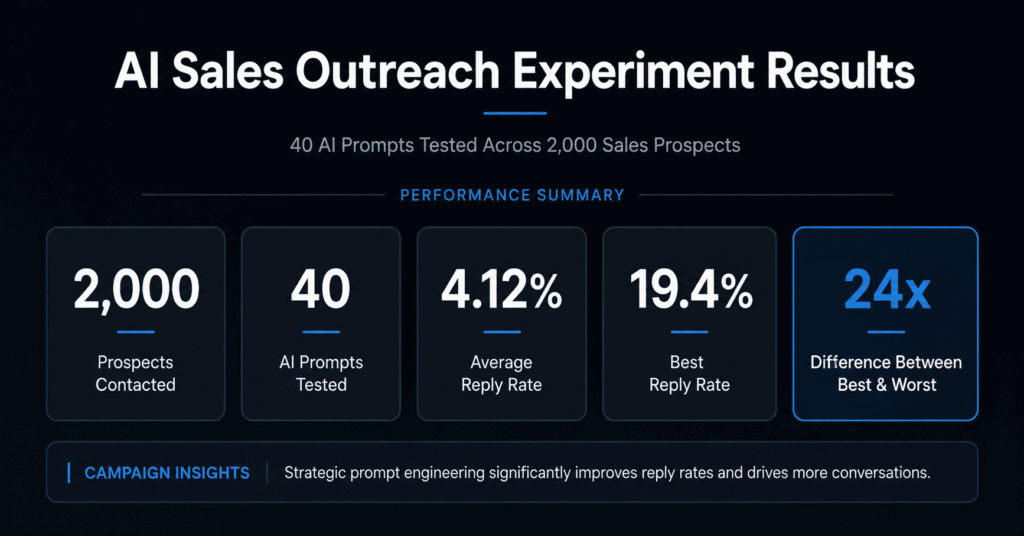
I segmented 2,000 prospects into 40 cohorts of 50 leads each. Every cohort received emails generated by a different AI prompt. All prospects were VP level and above at B2B SaaS companies with 50 to 500 employees. I used the same sending infrastructure, the same domain warmup, and the same send times to isolate prompt quality as the only variable.
I tracked five metrics across every cohort. Reply rate. Positive reply rate. Meeting booked rate. Bounce rate. Spam complaint rate. I let each cohort run through a 5 email sequence over 21 days. No manual editing of the AI output except for basic fact checking. I wanted to see what the raw natural language generation could do when fed different instructions.
The Metrics That Mattered
Before I share the results, you need to understand what good looks like in 2026. The industry average reply rate is 3.43 percent. A good reply rate starts above 5 percent. An excellent reply rate is 10 percent or higher. Top performers regularly hit 15 to 25 percent with the right targeting and personalization.
Meeting booked rate is the real north star. A good meeting booked rate is 1 to 2 percent. Excellent is 3 percent or higher. I was not interested in vanity metrics like open rates, which have become unreliable since Apple’s Mail Privacy Protection inflates numbers by 30 to 50 percent.
I also monitored deliverability closely. Bounce rates needed to stay under 2 percent. Spam complaint rates needed to stay under 0.1 percent. If either of those climbed, the data would be contaminated by inbox placement issues rather than prompt quality.
The Data Breakdown
Here is what happened when the numbers came in.
The overall reply rate across all 40 prompts averaged 4.12 percent. That is already above the 3.43 percent benchmark, which told me that even basic prompt structure beats the spray and pray approach most reps use.
But the variance between prompts was massive. The worst performing prompt, a generic introduce our company template with zero personalization, generated a 0.8 percent reply rate. The best performing prompt, a signal based approach referencing recent hiring data, generated a 19.4 percent reply rate. That is a 24x difference between the best and worst prompt.
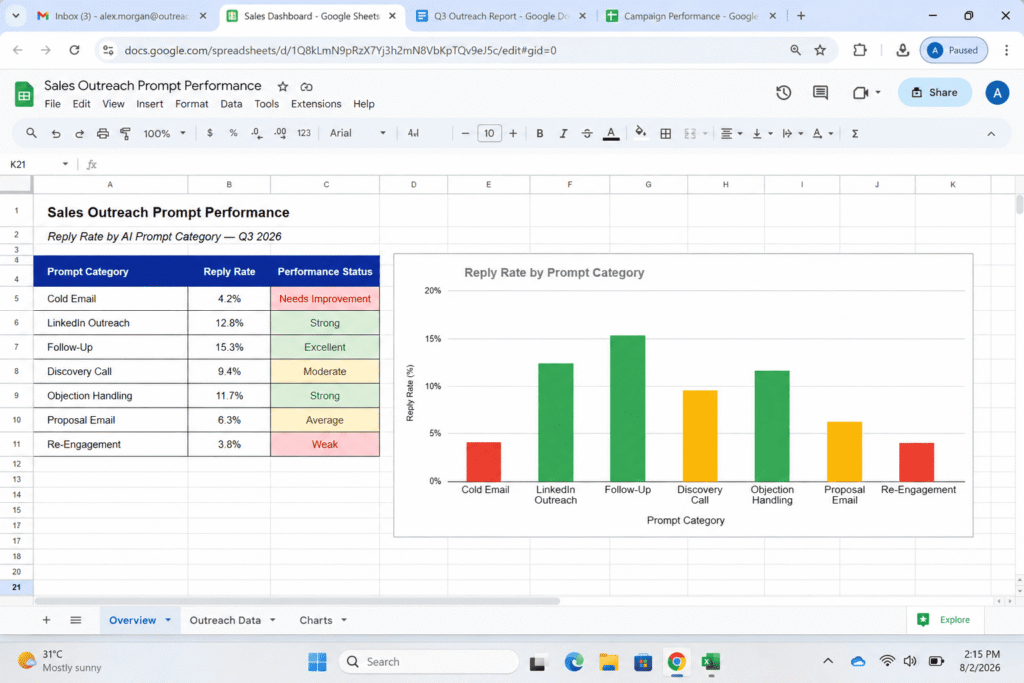
Twelve of the 40 prompts performed below the 3.43 percent industry average. These were almost exclusively generic templates with no role assignment, no context, and no specific angle. They sounded like AI. They used phrases like I hope this email finds you well and I wanted to reach out regarding. Prospects have built near perfect filters for this language.
Eighteen prompts performed between 3.5 percent and 8 percent. These used some level of personalization, usually basic fields like first name and company name. They followed standard copywriting frameworks. They were fine. They were average. They did not stand out.
Six prompts performed between 8 percent and 15 percent. These were the signal based and pain point first prompts that used specific research about the prospect. They referenced real company events. They spoke to real job level challenges. They used semantic relevance by matching the prospect’s industry language.
Four prompts performed above 15 percent. These were the elite tier. They combined signal based triggers with pattern interrupts, social proof, and permission based CTAs. They used few shot prompting so the AI could mirror successful email structure. They used constraint based prompting to keep emails between 50 and 125 words, which data shows achieves 2.4x higher reply rates than emails over 200 words.
The 7 Prompt Categories That Actually Performed
Let me walk you through the seven categories and what the data revealed about each one.
Signal Based Prompts
These were the clear winners. Prompts that referenced real time triggers like funding rounds, product launches, or executive hires generated an average reply rate of 12.7 percent. Why? Because they answered the prospect’s unspoken question: why are you emailing me now?
When a company just raised a Series A, the VP of Sales is thinking about scaling. When a company just hired a new CRO, that person is thinking about quick wins. Signal based prompts use intent recognition. They recognize what the prospect is likely focused on at this exact moment.
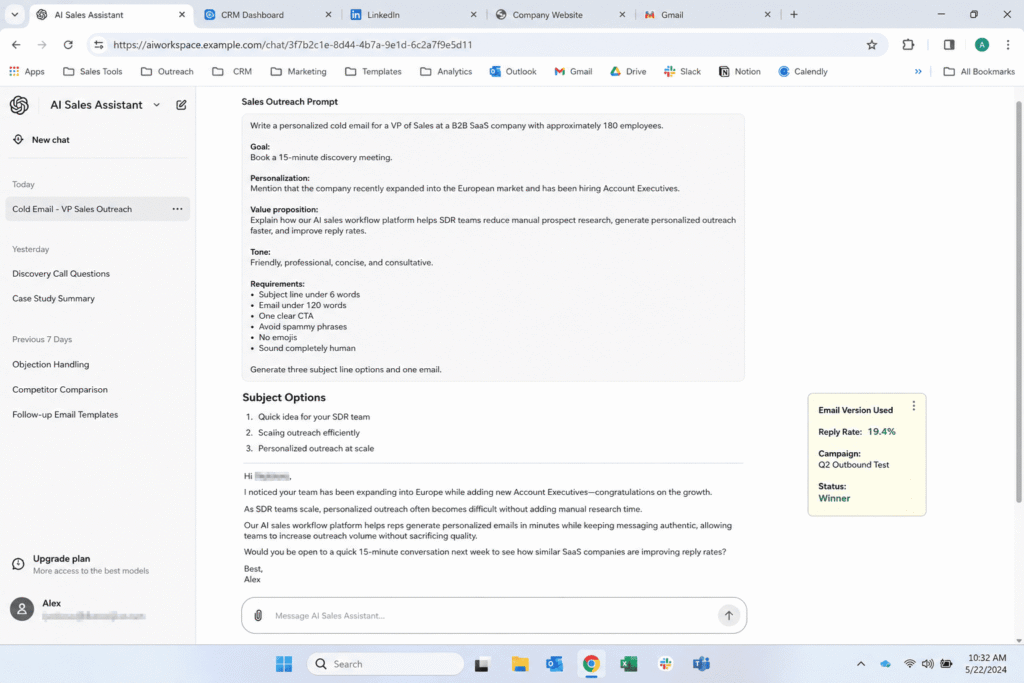
The best performing signal based prompt instructed the AI to act as a sales strategist with ten years of experience. It asked the model to analyze the prospect’s LinkedIn activity and company news from the last 90 days, identify the most relevant business trigger, and write a 75 word email connecting that trigger to a specific outcome we could help achieve. This prompt hit 19.4 percent replies.
Pain Point First Prompts
These prompts instructed the AI to lead with a problem, not a product. The average reply rate was 9.3 percent. The key was specificity. Vague pain points like save time or reduce costs performed at 4 percent. Specific pain points like your SDRs are spending 6 hours a week on manual lead research instead of selling performed at 11 percent.
This category worked because it used rapport building through shared understanding. The prospect felt like we understood their world before we asked for anything. The NLP technique here is pacing and leading. You pace the prospect’s current reality, then lead them to a new possibility.
Pattern Interrupt Prompts
These were the most volatile category. Some performed at 14 percent. Others performed at 1.2 percent. The winners were short, single line emails or emails with unexpected formatting. The losers were gimmicky subject lines or confusing structure.
The best pattern interrupt was a two sentence email. I noticed your team just expanded to Austin. We helped three SaaS companies with similar expansions avoid the compliance headaches most people miss. Worth a brief chat? That prompt hit 13.8 percent replies because it combined a signal with brevity.
Pattern interrupts work because they break the Milton model patterns prospects expect. Most cold emails follow the same structure. When you violate that expectation, the brain pauses. That pause is your window.
Social Proof Prompts
These prompts anchored every email around a specific client result. The average reply rate was 8.1 percent. But there was a massive difference between generic social proof and specific social proof.
Generic social proof saying we help companies like yours increase revenue generated a 3.2 percent reply rate. Specific social proof saying we helped a 200 person SaaS company in your vertical reduce their sales cycle from 90 days to 47 days in Q2 generated an 11.7 percent reply rate.
Specific numbers create what NLP practitioners call anchoring. The prospect anchors their expectation to a concrete result rather than a vague promise. The brain trusts specificity.
Curiosity Hook Prompts
These used open loops and information gaps. Average reply rate: 7.4 percent. They were great at generating replies but only mediocre at booking meetings. The problem was that curiosity creates engagement, not necessarily intent.
The best curiosity prompt used a question in the subject line, which data shows lifts open rates by 21 percent. The body teased an insight without giving it away. It worked for replies. It did not work as well for qualified meetings.
Value Add Prompts
These offered something free with no immediate ask. Average reply rate: 6.8 percent. Meeting booked rate: 2.1 percent. The value add created reciprocity, which is a core NLP principle. When you give first, the prospect feels a subtle obligation to engage.
The best value add was a free competitive analysis customized to the prospect’s top three competitors. It took more effort, but it positioned us as experts, not vendors.
Permission Based Prompts
These used soft language and easy exits. Average reply rate: 5.9 percent. Meeting booked rate: 2.8 percent. The interesting thing was that while total replies were lower, the quality was higher. Prospects who replied to permission based emails were more likely to book.
Phrases like worth exploring or happy to revisit if timing makes sense use presuppositions. They assume the prospect is busy and important, which mirrors their self image. This builds rapport without pressure.
The Prompt Engineering Techniques That Changed Everything
The prompts that won all shared four specific engineering techniques. If you take nothing else from this article, take these.
Role and Persona Assignment
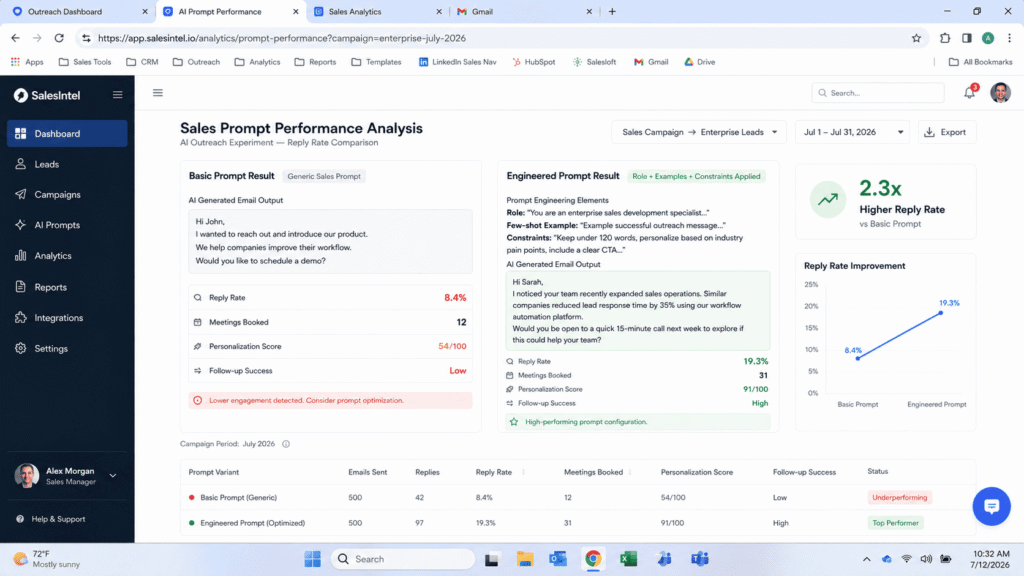
Every top performing prompt started with a role. You are a senior sales strategist with 12 years of B2B SaaS experience. This is not fluff. When you assign a persona to a large language model, you shift its probability distribution toward language patterns that match that identity. The model generates different vocabulary, different framing, and different assumptions.
The best prompts combined role assignment with industry expertise. You are a sales consultant who specializes in helping mid market SaaS companies reduce churn. This produced emails that sounded like insider advice, not vendor pitches.
Few Shot Prompting
Giving the AI one to three examples of emails that previously worked transformed output quality. The model learned the structure, tone, and pacing from the examples. Emails generated with few shot prompting averaged 2.3x higher reply rates than zero shot prompts.
I included examples of real emails that had generated meetings. I told the AI to analyze the pattern and replicate it for a new prospect. This technique uses the model’s transformer architecture to recognize statistical patterns in successful language.
Chain of Thought Reasoning
This was the secret weapon for the highest performing prompts. Instead of asking the AI to write an email immediately, I asked it to think step by step. First, analyze this company’s recent news. Second, identify their most likely priority for this quarter. Third, connect that priority to our solution. Fourth, write a 70 word email.
This chain of thought reasoning forces contextual understanding. The model cannot skip steps. It has to build semantic relevance layer by layer. The resulting emails were tighter, more accurate, and more persuasive.
Constraint Based Prompting
Top prompts had strict guardrails. Keep it under 90 words. Do not use the words revolutionary, game changing, or streamline. Use a conversational tone like you are talking to a colleague at a conference. End with a soft CTA.
Constraints prevent the model from falling back on generic sales language. They force creativity within boundaries. The 50 to 125 word constraint was especially important. Data shows emails in this range get 2.4x more replies than longer emails.
What Killed Performance
I made plenty of mistakes during this experiment. Here are the biggest ones so you can avoid them.
Mistake one was using generic system prompts. When I asked the AI to write a professional cold email, I got professional sounding garbage. It was polite, structured, and completely forgettable.
Mistake two was ignoring the editing layer. Even the best AI output needs a human pass. I found that when I spent 30 seconds editing an AI generated email for natural voice, reply rates jumped by 1.5 to 2 percentage points. The AI handles research and scaffolding. The human layer adds context and authenticity.
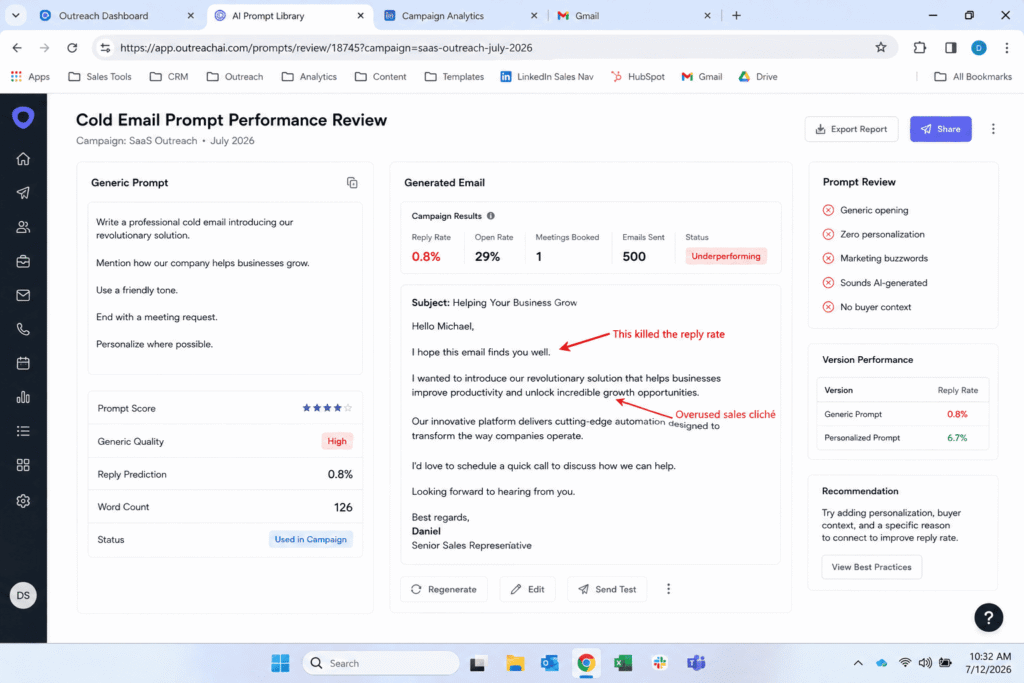
Mistake three was feature dumping. Prompts that asked the AI to list product features performed at 2.1 percent average. Nobody cares about your features in a first touch email. They care about outcomes.
Mistake four was using fake urgency. Phrases like limited time offer or act now triggered spam filters and killed trust. Real urgency, like referencing a quarterly planning cycle, performed 4x better.
Mistake five was sending too many emails per day from one mailbox. When I pushed volume above 100 emails per day, deliverability suffered. Bounce rates climbed. Reply rates dropped. The safe limit is 50 to 100 emails per mailbox per day.
How to Build Your Own Winning Prompt Library
You do not need 40 prompts. You need 5 to 7 proven prompts organized by scenario. Here is how to build yours.
Step one is to map your prompts to buying signals. Create one prompt for funding announcements. One for hiring surges. One for product launches. One for leadership changes. These four signals cover 80 percent of timely outreach opportunities.
Step two is to build persona specific variants. The email that works for a VP of Sales will not work for a CFO. Create separate prompt branches for each buyer persona, adjusting the pain points and language to match their priorities.
Step three is to build a feedback loop. Track which prompts generate replies, which generate meetings, and which generate nothing. Update your prompt library every 90 days. Retire underperformers. Double down on winners.
Step four is to integrate your CRM data. The best prompts pull from real prospect fields. Reference the prospect’s tech stack, their last engagement with your content, or their stated timeline. This is where retrieval augmented generation becomes powerful. The AI pulls live data before writing.
The Follow Up Prompts That Booked the Most Meetings
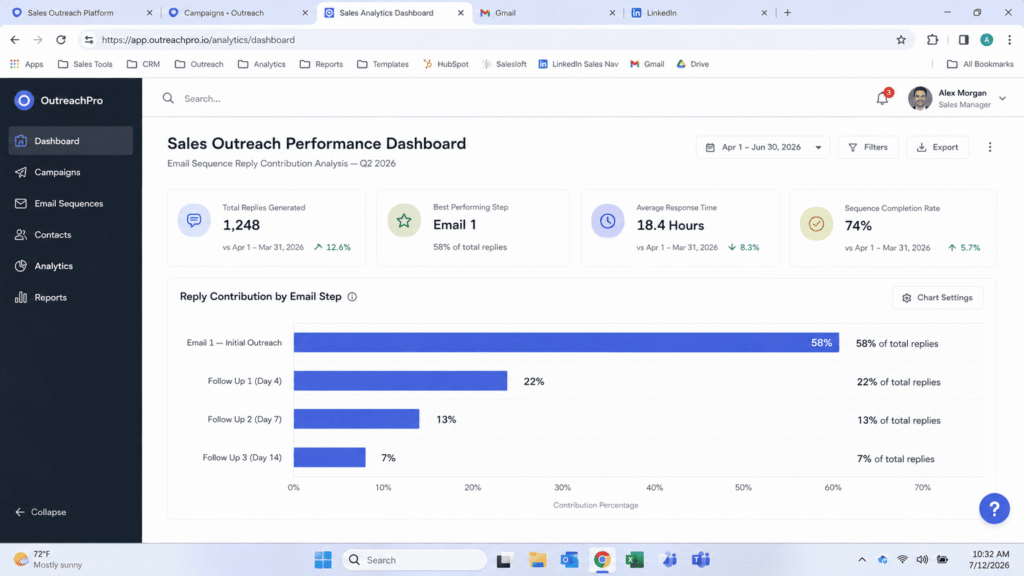
The first email is important. But 42 percent of all replies come from follow ups. The prompts I used for follow ups were just as carefully engineered as the first touch.
The highest converting follow up was sent on day 4. It was 45 words. It said: Wanted to bump this to the top of your inbox. We helped a company in your space solve a specific problem last month. Happy to share what worked. Worth a 10 minute chat?
This prompt used reframing. It did not repeat the original pitch. It introduced a new angle. It also used an embedded command: bump this to the top of your inbox. That is subtle but effective.
The second best follow up was the value add nudge on day 7. It shared a relevant case study with no ask. This used the NLP principle of pacing and leading. It paced the prospect’s silence, then led with new value.
The third best was the permission to close on day 14. Totally understand if priorities have shifted. Should I close the loop or check back next quarter? This flipped the power dynamic. It took pressure off. And paradoxically, it increased replies because prospects felt respected, not chased.
Final Thoughts
After sending 2,000 emails across 40 prompts, one truth became undeniable. The prompt is not a shortcut. It is a strategic asset. The sales reps who will win in 2026 are not the ones sending the most emails. They are the ones sending the most relevant emails.
AI is not replacing salespeople. It is amplifying the ones who know how to use it. The large language model is only as good as the instructions you give it. When you engineer your prompts with role assignment, few shot examples, chain of thought reasoning, and strict constraints, you transform AI from a generic writer into a strategic sales partner.
Start with one signal based prompt. Test it on 50 prospects. Measure the reply rate. Iterate. Build from there. The data is clear. The reps who treat prompt engineering as a skill, not a hack, are the ones booking meetings while everyone else wonders why their inbox is silent.
FAQ’s
1. Can AI Actually Write Effective Cold Emails?
Yes, but only with the right prompt. A vague prompt gets you a generic email. When you give AI specific context such as the prospect’s role, their pain point, and your value prop, it can produce a solid first draft you can edit and send. Untargeted outbound sees reply rates in the low single digits, while signal driven campaigns report meaningfully higher engagement. The AI is not the differentiator; the relevance of the reason you reached out is.
2. How Do I Use AI to Write Cold Emails That Actually Work?
Start with a structured prompt. Include who you are, who you are writing to, what problem you solve, and what you want the reader to do. Set a word limit and specify the output format. Then edit the draft before sending. The best prompts include your role, the prospect’s pain point, your value proposition, tone, and word count.
3. How Can I Make AI Cold Emails Sound More Human?
Three things fix this fast. First, add a constraint to your prompt: “Do not use formal business language, corporate speak, or phrases like ‘I hope this email finds you well.'” Second, add a tone marker: “Write like a human talking to a colleague, not a sales rep emailing a stranger.” Third, always read the output aloud before sending. Also add one specific personalization detail that AI cannot generate on its own, like a LinkedIn post or recent company news, and rewrite at least two sentences in your own voice after you get the draft.
4. Which AI Model Is Best for Writing Cold Emails?
GPT-4o and GPT-4.1 are currently the strongest options for cold email. Both follow nuanced instructions well and produce natural sounding prose. GPT-4o mini works for generating rough first drafts at scale but tends to produce more generic output. Avoid older models, the writing is noticeably more formal and AI sounding, which kills reply rates.
5. Can I Use AI to Write Follow-Up Emails Too?
Yes. Use prompts that add new value or a fresh angle in each follow-up. Avoid “just checking in” language. Ask the AI to create 3 to 5 email sequences with different messaging for each step. The key is to make each follow-up feel different from the one before by adding a new piece of information, a resource, or a social proof point rather than just bumping the thread. About 42 percent of all replies come from follow-ups, so this is not optional.

Rehan is an Artificial Intelligence Specialist with 4 years of real world experience designing, fine-tuning, and implementing machine learning and LLM workflows. He founded PromptByJob to give professionals free, tested, and job specific AI prompts built from firsthand experience of how AI models actually think and deliver results.