
Three months ago I was drowning in a support queue that never stopped growing. My team had just started testing AI prompts for customer support to draft replies, and honestly, the first attempts were rough. Customers could tell. The tone was flat, the answers were generic, and half the time an agent had to rewrite the draft from scratch anyway.
So I did what any stubborn support lead would do. I pulled 50 different prompts for customer support from every source I could find, ran each one against real, messy, unresolved tickets from our own queue, and tracked what happened to resolution time, first contact resolution, and customer satisfaction scores.
This article is the full breakdown of that experiment. No theory, no recycled advice you have already read a dozen times. Just what actually worked when real customers with real frustrations were on the other end.
Why I Decided to Test 50 AI Prompts on Real Support Tickets
Every article on prompt engineering for customer service reads the same way. Copy this template, paste your ticket, done. What almost nobody talks about is what happens when the customer’s message is vague, angry, or missing half the information the prompt assumes it will have.
Our average ticket volume sits around 400 conversations a day across email, live chat, and a help widget inside our app. Average resolution time before this test was sitting at just under 11 hours, which is not terrible but not great either. Our first contact resolution rate was stuck around 42 percent for months.
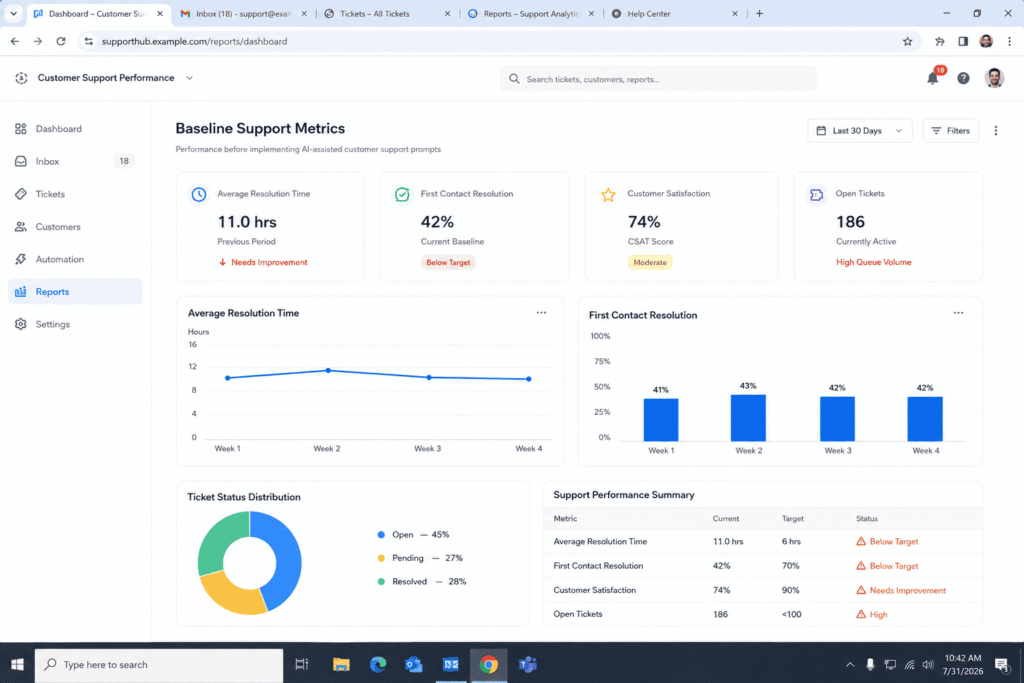
I wanted to know something specific. Which prompt structures actually reduce resolution time when the AI is doing the heavy lifting on the first draft, and which ones just look good in a blog post but fall apart the moment a real customer sends a rambling, half typed message from their phone.
How I Set Up the Test of Prompts for customer Support
The Tools and Data I Used
I used our existing helpdesk platform along with a large language model connected through the API, so agents could generate a draft reply, edit it if needed, and send it. I pulled 500 resolved and unresolved tickets from the previous eight weeks, covering billing questions, technical bugs, refund requests, account access issues, and general product questions.
I grouped the 50 prompts into five categories based on what stage of the conversation they were designed for. Then I ran each prompt category against roughly 100 tickets, rotating agents so no single person’s writing style skewed the results.
How I Measured Resolution Time and Customer Satisfaction
I tracked four numbers for every batch. Time to first response, time to full resolution, whether the customer replied with a follow up question the AI draft should have already answered, and the post ticket satisfaction rating.
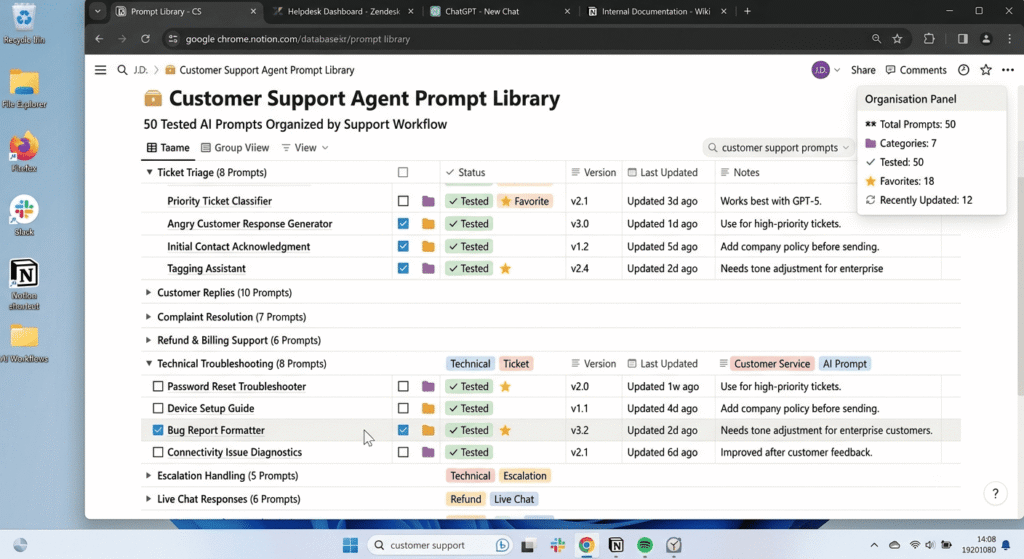
I also had two senior agents manually score each AI generated draft for something less obvious than accuracy. I asked them to rate whether the draft actually sounded like it understood the customer’s intent, not just the words in their message. This matters because a model can technically answer the literal question and still miss what the person actually needed.
The 5 Categories of AI Prompts I Tested
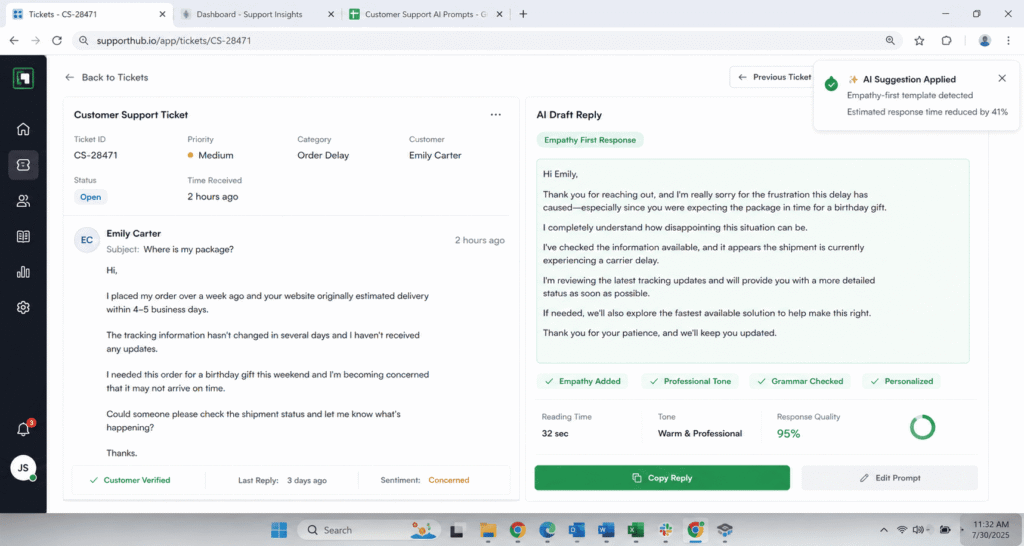
Empathy First Prompts
These prompts instructed the AI to open by acknowledging the customer’s frustration before offering any solution. Something like, acknowledge the customer’s issue in one warm sentence, then explain the next step.
Results were mixed. Empathy heavy openings worked beautifully on angry or emotional tickets but felt slow and padded on simple, transactional requests like a password reset. Customers replying to a password reset email do not need three sentences about how frustrating that must be. They need the reset link.
Instant Solution Prompts
These skipped the emotional framing entirely and told the AI to answer only using approved documentation, keeping the reply under five sentences. This category produced the fastest average resolution time by a wide margin, but only when the ticket already contained enough detail for the model to work with.
Clarifying Question Prompts
This category instructed the AI to identify missing information before attempting a solution. If the ticket lacked an order number, account email, or specific error message, the AI was told to ask for it directly instead of guessing.
This is where I saw the biggest surprise of the entire test, which I will get into below.
De escalation Prompts
These were built for tickets containing sentiment flags like refund demands, threats to cancel, or repeated complaints. The prompt instructed the model to validate the customer’s frustration, avoid corporate sounding language, and hand off to a human agent if certain trigger phrases appeared, such as requests for a manager or mentions of legal action.
Follow Up and Closing Prompts
These generated the message sent after a fix was confirmed. Short, warm, and specific about what caused the issue in the first place.
“If you’re still deciding which model to use for this kind of work, here’s what happened when I put ChatGPT, Claude, and Gemini head to head.”
What Actually Cut Our Resolution Time
The Winning Prompt Structure
The prompt that produced the single biggest drop in resolution time was not the most polished sounding one. It was a clarifying question prompt paired with a strict information check before the AI attempted any answer.
The structure looked roughly like this. You are a support assistant. Read the ticket below. If the ticket is missing information needed to solve the issue such as an order number, account identifier, device type, or error message, ask for exactly that information in one short sentence. Do not guess. Do not apologize more than once. If the ticket already contains enough information, write a direct answer using only the provided policy documentation.
This worked because most of our slow tickets were not slow because the answer was complicated. They were slow because the first reply asked the wrong follow up question, or no question at all, and the customer had to go back and forth two or three times before the agent had what they needed.
The Numbers Behind the Win
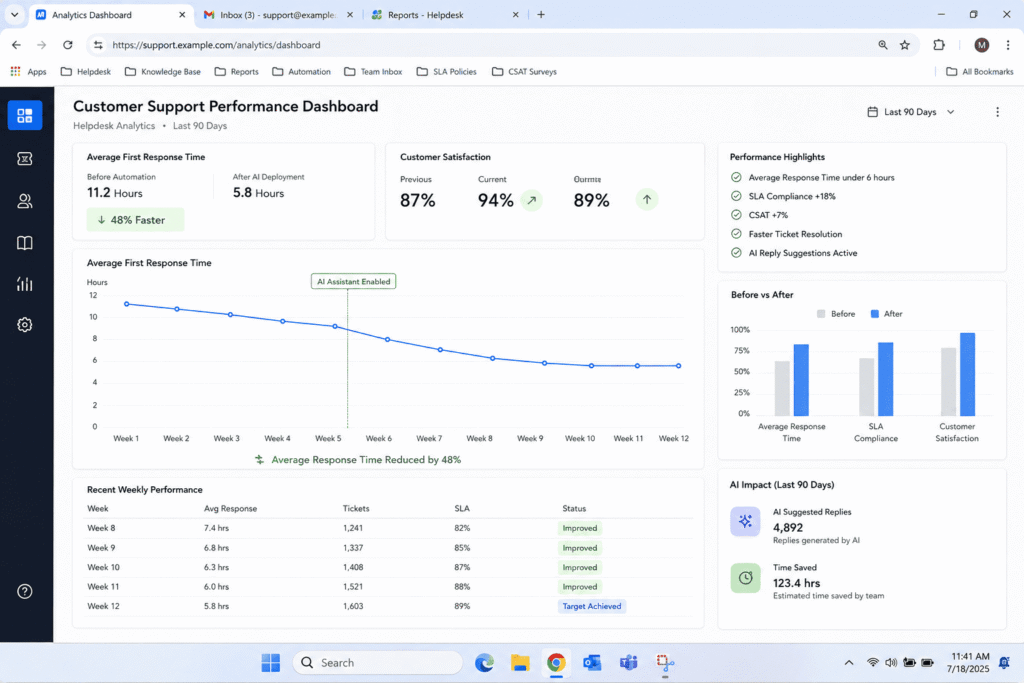
Across the 100 tickets processed with this clarifying question structure, average resolution time dropped from 11 hours to just under 6 hours. First contact resolution rose from 42 percent to 58 percent. Customer replies that restated information they had already given, which is one of the most annoying experiences in support, dropped by more than half.
The empathy first prompts came in second for satisfaction scores specifically, not speed. Tickets flagged with negative sentiment and handled with the empathy first structure scored noticeably higher on post resolution surveys, even when resolution time was slightly longer than the instant solution category.
The instant solution prompts were fastest on paper but had a hidden cost. When the ticket lacked detail, the AI sometimes filled gaps with a reasonable sounding guess instead of asking. That guess was wrong often enough that those tickets required a second round, which quietly erased the speed advantage once you looked at total time to close rather than time to first reply.
What Failed and Why
A few categories I expected to perform well did not.
Prompts that asked the AI to sound casual and friendly without any specific tone instruction produced inconsistent results. Sometimes the reply sounded natural. Other times it sounded like it was trying too hard, using exclamation points on a billing dispute where the customer was clearly upset. Vague tone instructions are a trap. Telling a model to be friendly is not the same as telling it what friendly actually sounds like for your brand.
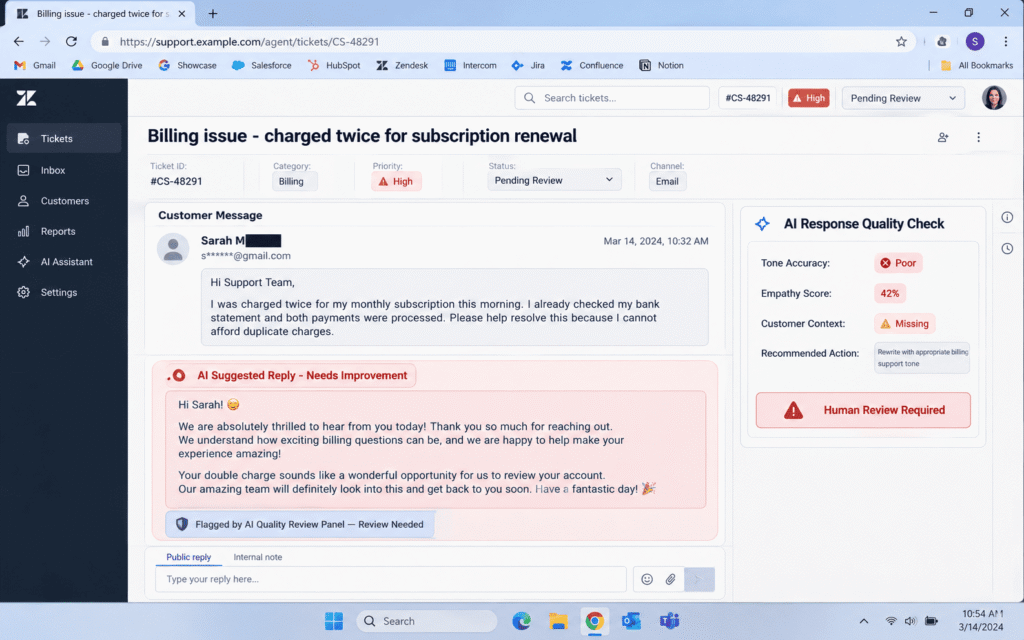
Prompts that tried to do everything in one pass, meaning summarize the ticket, detect sentiment, draft a reply, and suggest a knowledge base article all in a single instruction, consistently underperformed. The output quality dropped every time I stacked more than two goals into one prompt. This lines up with something I noticed across several industry sources during my research phase, where narrower, single purpose prompts consistently outperform prompts trying to juggle multiple evaluation goals at once.
Long, heavily worded prompts with paragraphs of instruction did not outperform short, structured ones. In fact, the shortest prompts in my test, often four or five sentences with clear conditions, produced the most consistent output. Length was never the variable that mattered. Structure was.
If you’re curious how HR teams are doing something similar, I ran the same kind of test on 40 recruitment prompts and the results were just as surprising.”
The One Prompt Framework That Beat Everything Else
If I had to boil this entire experiment into a single reusable framework, it would be this. Check first, then answer, then close warmly.
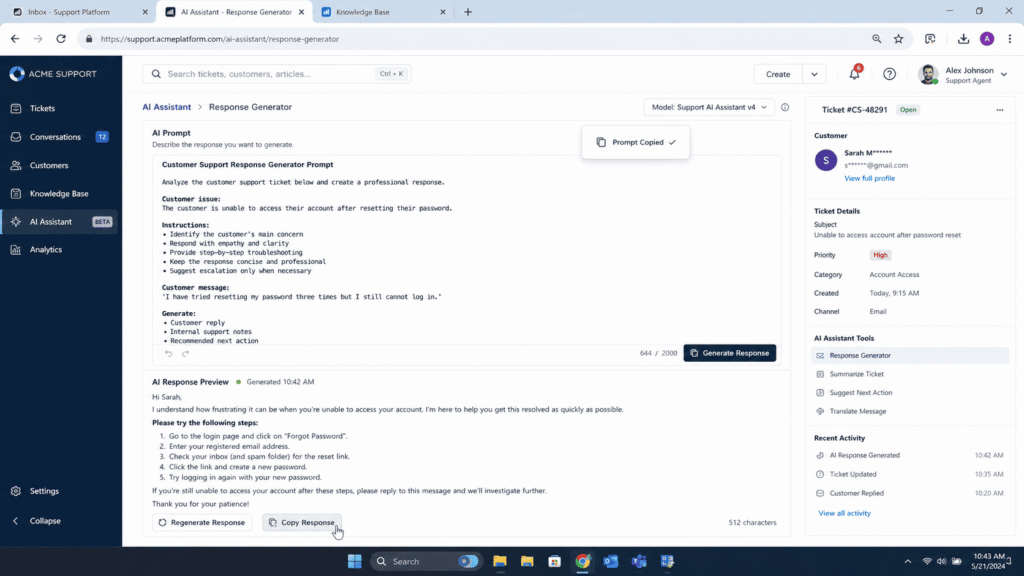
You are a senior customer support assistant for [Company Name]. Your only job is to get this ticket resolved in the fewest possible exchanges, not to sound polished.

Step 1. Check completeness first.
Read the ticket below and check whether it contains everything needed to solve this specific type of issue, such as an order number, account email, device or platform, exact error message, or relevant dates. If anything required is missing, stop here. Ask for exactly that missing detail in one short, direct sentence. Do not guess. Do not apologize more than once. Do not attempt to answer yet.

Step 2. Answer only from the provided documentation.
If the ticket already contains everything needed, write a direct answer using only the reference material provided below. Never invent a policy, refund amount, timeline, or exception that is not explicitly stated in that material. If the documentation does not cover this exact situation, say so plainly and offer to escalate rather than guessing.

Step 3. Match tone to the customer's actual state, not a script.
If the ticket shows frustration, repeated contact, or negative language, open with one sentence that names the specific problem, not a generic apology. If the ticket is neutral or transactional, skip the emotional framing and lead straight with the answer.

Step 4. Escalate on trigger language.
If the ticket mentions a manager request, legal action, fraud, a chargeback, or repeated unresolved contact, do not attempt a full resolution. Acknowledge the issue in one sentence and hand off to a human agent immediately.

Step 5. Keep it short and specific.
Three to five sentences maximum. No corporate filler like "we apologize for any inconvenience this may have caused." Close with one concrete next step, not "let us know if you need anything else."

Ticket:
[paste the full customer message here]

Reference documentation:
[paste the relevant policy or knowledge base article here]
Step one, the AI checks whether it has enough information to solve the problem. Step two, if it does, it answers directly and briefly using only approved documentation, with no invented policy details. Step three, once the issue is confirmed resolved, a short closing message explains what happened and invites the customer back if anything else comes up.
This three stage approach borrows something support teams have known for years and applies it to how you prompt a model. You cannot skip discovery. Even the smartest AI cannot resolve a ticket faster by guessing well. It resolves tickets faster by asking the right question once instead of the wrong question three times.
How to Write Your Own High Performing Support Prompts
Step by Step Prompt Building Guide
If you want to build something similar for your own team, here is the process that worked for us.
- First, define the AI’s role in one sentence. Tell it exactly what kind of assistant it is and what it is allowed to answer from. This is not decoration. It anchors the model’s intent recognition so it does not wander outside your policy.
- Second, give it a decision rule for missing information. Spell out exactly which fields are required for the most common ticket types you handle. Order number for shipping issues. Account email for login problems. Error message text for technical bugs.
- Third, set a hard limit on length and tone. Do not say sound professional. Say something closer to, write three to five sentences, warm but direct, no exclamation points, no corporate phrases like we apologize for any inconvenience this may have caused.
- Fourth, build in an escalation trigger. List the specific phrases or situations that should stop the AI from attempting a resolution and hand the ticket to a human instead. Legal threats, repeated complaints, requests for a manager, fraud mentions.
- Fifth, test it against your worst tickets, not your best ones. Every prompt looks good against a clean, well written ticket. The real test is a rambling, three paragraph message from a frustrated customer typing on their phone with half the punctuation missing.
- Sixth, track resolution time and reopen rate, not just how good the draft sounds to you. A reply that sounds polished but leaves out a required detail will look like a win in the moment and a loss a day later when the customer replies asking the same question again.
“I go deeper into the reporting side of this in my breakdown of the AI prompt framework for status updates.”
What This Means for Your Support Team Going Forward
The lesson from running 50 prompts against real tickets was not that AI is magic or that AI is overhyped. It was that structure beats cleverness every single time. The prompts that performed best were not the most creative or the most detailed. They were the ones that told the model exactly what to check, exactly what to answer, and exactly when to stop and ask instead of guessing.
If your team is experimenting with AI drafted replies and the results feel inconsistent, the fix is rarely a smarter model. It is almost always a clearer decision rule inside the prompt itself. Start with the clarifying question structure, measure your reopen rate for two weeks, and adjust from there. That single change produced more improvement in our numbers than every other experiment combined.
FAQ’s
Do AI response prompts actually reduce resolution time or is that just marketing?
In our test they genuinely did, but only for specific prompt structures. The clarifying question structure cut resolution time nearly in half. Vague or overly broad prompts barely moved the number at all.
How many prompts does a support team actually need?
You need far fewer than most lists suggest. We narrowed our library down to about eight core prompts covering first response, clarifying questions, technical troubleshooting, refund handling, de escalation, and closing messages. Everything else was a variation of those.
Should AI ever fully resolve a ticket without a human reviewing it?
For simple, low risk requests like order status or account access, yes, once the prompt has been tested extensively. For anything involving money, legal language, or a visibly upset customer, keep a human in the loop. The de escalation category exists specifically to catch those cases before the AI attempts a solution on its own.
What is the biggest mistake teams make when writing AI prompts for support?
Trying to make one prompt do too many jobs at once. Summarizing sentiment, drafting a reply, and suggesting a help article in a single instruction sounds efficient but produces muddled output. Narrow prompts win almost every time.
Does tone matter as much as accuracy in AI generated replies?
Both matter, but they solve different problems. Accuracy affects whether the ticket gets resolved. Tone affects whether the customer feels heard. Our satisfaction scores moved the most when tone matched the customer’s emotional state, not just when the answer was technically correct.

Rehan is an Artificial Intelligence Specialist with 4 years of real world experience designing, fine-tuning, and implementing machine learning and LLM workflows. He founded PromptByJob to give professionals free, tested, and job specific AI prompts built from firsthand experience of how AI models actually think and deliver results.