
AI can draft a support reply in seconds, but a fast draft is not the same as a useful one. A model left to its defaults can produce replies that sound generic, over-apologize, or guess at details the customer never gave. Customers notice, and agents end up rewriting the draft anyway.
This guide covers five types of AI response prompts for customer support, a check-first prompt template you can adapt, and a simple way to test any prompt on your own tickets before you trust it. The prompts and examples here are illustrative starting points. This article does not report test results, so treat every prompt as a draft to be evaluated against your own tickets, tone, and documentation.
Why Support Prompts Break on Real Tickets
Most prompt templates assume a clean ticket: one clear question with every detail attached. Real tickets are often vague, emotional, or missing exactly the information the prompt expects. A prompt that does not say what to do in that situation leaves the model to improvise, and improvising is where invented policy details and mismatched tone come from.
So the question to ask of any support prompt is simple: what does it do with a rambling, half-typed message from a frustrated customer on their phone?
The 5 Categories of AI Support Prompts
Support prompts can be grouped by the stage of the conversation they are built for. Each category has a use case and a risk worth knowing about.
Empathy-First Prompts
These tell the AI to acknowledge the customer’s frustration before offering a solution. An example instruction: acknowledge the customer’s issue in one warm sentence, then explain the next step.
Where it fits: angry or emotional tickets, where skipping the acknowledgment would feel cold.
Risk: on simple, transactional requests like a password reset, an empathy-heavy opening feels slow and padded. Someone asking for a reset link does not need three sentences about how frustrating that must be. They need the link.
Instant Solution Prompts
These skip the emotional framing and tell the AI to answer only from approved documentation in a few sentences. An example instruction: answer using only the reference material below, in under five sentences.
Where it fits: straightforward requests where the ticket already contains enough detail.
Risk: if the ticket is missing information, a model may fill the gap with a reasonable-sounding guess instead of asking. A wrong guess usually means a second round of messages, which can cancel out the speed advantage once you measure total time to close rather than time to first reply.
Clarifying Question Prompts
These tell the AI to identify missing information before attempting a solution. If the ticket lacks an order number, account email, or specific error message, the AI asks for it directly instead of guessing.
Where it fits: any ticket type where a specific detail is required to solve the problem.
Risk: if the prompt does not define which details are required, the AI may ask for things the customer already provided, which is one of the more irritating experiences in support. The prompt needs a clear list of required fields per ticket type.
De-escalation Prompts
These are built for tickets with signals like refund demands, threats to cancel, or repeated complaints. The prompt tells the model to validate the customer’s frustration, avoid corporate-sounding language, and hand the ticket to a human agent if certain trigger phrases appear, such as a request for a manager or a mention of legal action.
Where it fits: tickets where the relationship with the customer is at risk.
Risk: sentiment detection can be wrong in both directions. Keep the decision to hand off or concede something with a human agent.
Follow-Up and Closing Prompts
These generate the message sent after a fix is confirmed. A good closing message is short, warm, and specific about what the issue was.
Where it fits: the end of a resolved ticket.
Risk: do not let the AI state a cause the agent has not actually confirmed. Give it the confirmed cause as part of the input.
If you are still deciding which model to use for this kind of work, see ChatGPT vs Claude vs Gemini.
The Check-First Prompt Template
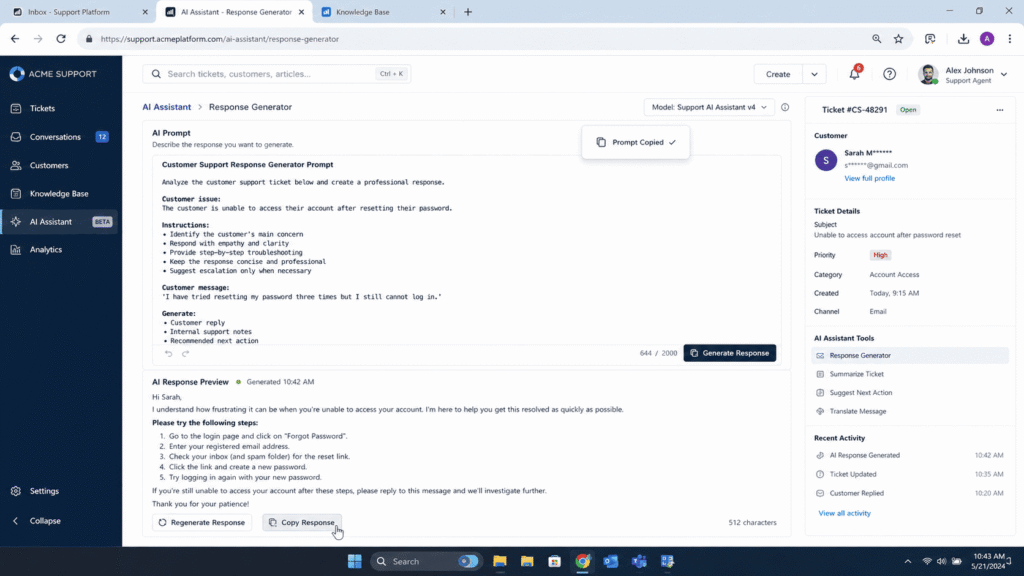
If the five categories had to be reduced to one reusable idea, it would be this: check first, answer from documentation, and keep it short. The template below combines the clarifying-question approach with escalation rules, tone matching, and a strict documentation limit. It is an illustrative template, not a tested or guaranteed one, so adapt it and evaluate it on your own tickets before using it.
You are a customer support drafting assistant for [Company Name]. A human agent will review your draft before it is sent. Your goal is to move this ticket toward resolution in as few exchanges as possible, not to sound polished.

Step 1. Check for escalation triggers.
If the ticket mentions a manager request, legal action, fraud, a chargeback, or repeated unresolved contact, do not attempt a full resolution. Write one sentence acknowledging the issue and flag the ticket for a human agent.

Step 2. Check completeness.
Read the ticket and check whether it contains everything needed to solve this specific type of issue, such as an order number, account email, device or platform, exact error message, or relevant dates. If anything required is missing, stop here. Ask for exactly that missing detail in one short, direct sentence. Do not guess. Do not apologize more than once. Do not attempt to answer yet.

Step 3. Answer only from the provided documentation.
If the ticket contains everything needed, write a direct answer using only the reference material below. Never invent a policy, refund amount, timeline, or exception that is not explicitly stated in that material. If the documentation does not cover this exact situation, say so plainly and offer to escalate rather than guessing.

Step 4. Match tone to the customer’s actual state.
If the ticket shows frustration, repeated contact, or negative language, open with one sentence that names the specific problem instead of a generic apology. If the ticket is neutral or transactional, skip the emotional framing and lead with the answer.

Step 5. Keep it short and specific.
Three to five sentences maximum. No corporate filler such as apologizing for any inconvenience this may have caused. Close with one concrete next step instead of a generic offer of further help.

Ticket:
[paste the full customer message here]
Reference documentation: [paste the relevant policy or knowledge base article here]
How the Template Works
Escalation comes first. Putting the trigger check ahead of everything else means a ticket that mentions legal action or fraud is not treated as a missing-information problem. You may also want to enforce escalation with helpdesk rules rather than relying only on the model to notice trigger phrases.
Completeness comes before the answer. A reply that misses a required detail can force the customer into several rounds of back and forth before the agent has what they need. Asking the right question once is usually better than answering the wrong one quickly.
Documentation limits the answer. Telling the model to use only the provided reference material, and to say so when the material does not cover the situation, reduces the chance of invented policies. It also means the quality of the draft depends on the quality of the documentation you paste in.
Tone follows the ticket, not a script. Frustrated customers get one specific acknowledgment. Transactional requests get the answer straight away.
A Hypothetical Example
The example below is invented for illustration. It is not a real ticket and not a recorded model output. It shows the kind of reply the template is designed to produce.
Hypothetical customer message: “Where is my stuff?? Ordered last week and nothing. This is ridiculous.”
The message is missing an order number and an account email, so Step 2 applies.
Reply the template is designed to produce: “I’m sorry your order hasn’t arrived. Could you send me the order number or the email address you used at checkout so I can look into it?”
The kind of reply it is designed to prevent: “Your order should arrive within 5 to 7 business days!” That reply states a delivery timeline the assistant has no basis for, uses an exclamation point on an upset customer’s message, and asks for nothing that would move the ticket forward.
Common Prompt Mistakes to Watch For
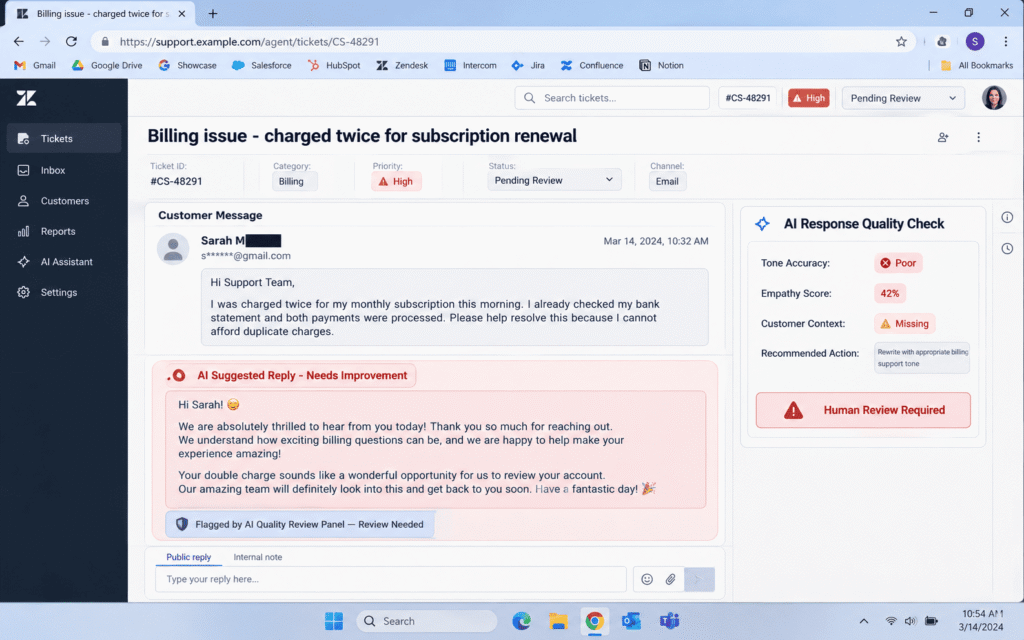
Vague tone instructions. Telling a model to be friendly is not the same as telling it what friendly sounds like for your brand. Without specifics, the result can swing between stiff and overeager, such as exclamation points on a billing dispute. Give concrete rules instead, for example the number of sentences, whether exclamation points are allowed, and which phrases to avoid.
Stacking too many goals in one prompt. A single instruction that summarizes the ticket, detects sentiment, drafts a reply, and suggests a knowledge base article asks the model to juggle several jobs at once, and it makes problems harder to diagnose. Splitting the work into narrower prompts is easier to evaluate and fix.
Long prompts with paragraphs of instruction. Length is not the same as clarity. A short prompt with clear conditions is easier to read, test, and maintain than a long one where the important rules are buried.
No rule for missing information. If the prompt never says what to do when the ticket is incomplete, the model will decide for itself, and it may decide to guess.
How to Write Your Own Support Prompts
- Define the AI’s role in one sentence. Say what kind of assistant it is and what it is allowed to answer from. This keeps the model inside your policy instead of wandering outside it.
- Give it a decision rule for missing information. Spell out which fields are required for your most common ticket types: order number for shipping issues, account email for login problems, error message text for technical bugs.
- Set hard limits on length and tone. Do not just say “sound professional.” Say something closer to: write three to five sentences, warm but direct, no exclamation points, no corporate phrases.
- Build in an escalation trigger. List the specific phrases or situations that should stop the AI from attempting a resolution and send the ticket to a human: legal threats, repeated complaints, requests for a manager, fraud mentions.
- Test it against your hardest tickets, not your easiest. Every prompt looks good on a clean, well-written ticket. The real test is a rambling, three-paragraph message with half the punctuation missing.
- Measure outcomes, not how polished the draft sounds. A reply that reads well but omits a required detail can look like a win in the moment and a loss a day later when the customer writes back with the same question.
How to Test a Prompt on Your Own Tickets
The approach below is a suggested method. It is not a description of a test run for this article.
- Build a sample set. Pull a set of past tickets that covers your main categories, such as billing, technical issues, refunds, and account access. Include some messy, incomplete, and emotional ones.
- Record a baseline. Note your current figures for time to first response, time to resolution, and reopen rate before changing anything.
- Run each prompt on the same tickets. Using the same set for every prompt variant makes the comparison fairer. If several agents are involved, rotate them so one person’s editing style does not skew the results.
- Score the drafts. Have agents rate each draft for factual accuracy against your documentation, whether it asked for the right missing detail, whether the tone fit the customer, and how much editing it needed.
- Check what happens after sending. Watch for follow-up questions the draft should have prevented and for reopened tickets.
- Change one thing at a time. If you edit the role, the tone rule, and the escalation list all at once, you will not know which change mattered.
Keep a Human in the Loop
An AI draft is a starting point for an agent, not a replacement for one. Review is especially important for anything involving money, legal language, fraud, account security, or a visibly upset customer. The prompt can tell the model to avoid inventing policy, but it cannot guarantee that it will comply every time, so a person should check the draft against your actual documentation before it is sent.
What This Means for Your Support Team
A good support prompt is mostly a set of decision rules: what to check, what to answer from, when to stop and ask, and when to hand off to a person. Clever wording matters less than a clear rule for what the model should do when the ticket is incomplete.
If your team is experimenting with AI-drafted replies and the results feel inconsistent, a good place to start is the check-first structure above. Run it against a sample of your own tickets, compare it with your baseline, watch your reopen rate for a couple of weeks, and adjust from there.
If you want to see how a similar approach applies to another profession, see recruitment prompts for HR managers. For a related framework on reporting, see the AI prompt framework for status updates.
FAQ’s
Do AI response prompts actually reduce resolution time or is that just marketing?
In our test they genuinely did, but only for specific prompt structures. The clarifying question structure cut resolution time nearly in half. Vague or overly broad prompts barely moved the number at all.
How many prompts does a support team actually need?
You need far fewer than most lists suggest. We narrowed our library down to about eight core prompts covering first response, clarifying questions, technical troubleshooting, refund handling, de escalation, and closing messages. Everything else was a variation of those.
Should AI ever fully resolve a ticket without a human reviewing it?
For simple, low risk requests like order status or account access, yes, once the prompt has been tested extensively. For anything involving money, legal language, or a visibly upset customer, keep a human in the loop. The de escalation category exists specifically to catch those cases before the AI attempts a solution on its own.
What is the biggest mistake teams make when writing AI prompts for support?
Trying to make one prompt do too many jobs at once. Summarizing sentiment, drafting a reply, and suggesting a help article in a single instruction sounds efficient but produces muddled output. Narrow prompts win almost every time.
Does tone matter as much as accuracy in AI generated replies?
Both matter, but they solve different problems. Accuracy affects whether the ticket gets resolved. Tone affects whether the customer feels heard. Our satisfaction scores moved the most when tone matched the customer’s emotional state, not just when the answer was technically correct.

Rehan Malik is a blogger and the creator of PromptByJob. He publishes articles and prompt examples about using AI tools for different tasks. He uses AI-assisted drafting in his writing process. He is not a healthcare professional, and his nursing-related content should not be treated as medical advice or evidence of clinical testing.